

TL;DR
Translation certificates are high-stakes documents — used in immigration, legal proceedings, university admissions, and medical licensing — and they’re being forged at scale. This guide explains what a translation certificate must include to be valid, how fraudsters replicate them, why traditional verification methods fail both issuers and verifiers, and how QR Mark’s certificate QR Code system makes verification instant and tamper-resistant without requiring any special app.
A translation agency in the EU recently discovered that a set of certificates it had never issued was circulating among immigration applicants.
The forgeries were convincing enough to pass desk reviews at multiple embassies before a consular officer noticed an inconsistency in the certification statement.
By that point, the agency’s name had been attached to dozens of fraudulent submissions it had no knowledge of.
That story is not unusual. In 2024, a popular document fraud detection software Resistant AI revealed that 15% of company registration certificates submitted for new corporate accounts were fraudulent
The problem is not that translation agencies are careless. It’s that the verification system they rely on was designed for a world where documents didn’t travel across borders in seconds.
If you’re running a translation agency, a certification body, or a compliance team that handles translated documents, this guide is for you.
We’re going to walk through how translation certificate verification works, how the fraud actually happens, why the standard prevention methods keep failing, and how a QR Code certificate verification system closes the gap for both the issuer and the person doing the checking.
What Is a Translation Certificate and Why Is It So High-Stakes?
| A translation certificate — also called a certificate of translation — is a signed statement attached to a translated document confirming that the translation is accurate and complete. |
It is issued by the translator or their agency and includes the translator’s name, signature, credentials or title, the date of translation, the language pair, and a certification statement attesting to the accuracy of the translation.
Many jurisdictions also require a contact address and, increasingly, a verification QR code or digital verification layer so the receiving party can confirm the certificate is genuine.
What a Valid Certificate of Translation Must Include
A legally recognised certificate of translation must include all of the following:
- A certification statement confirming the translation is accurate and complete to the best of the translator’s knowledge
- The translator’s full name and signature
- The translator’s title, credentials, or professional membership (e.g., ATA-certified, sworn translator, NAATI-accredited)
- The date the translation was completed
- The language pair (source and target language)
- The name or reference number of the source document
- Contact information for the translation agency or individual translator
What Is Translation Certificate Verification?
Translation certificate verification is the process of confirming that a translated document is genuine, issued by a legitimate provider, and accurately represents the original content.
Now, there are two intents behind this:
1. From the Issuer’s Perspective:
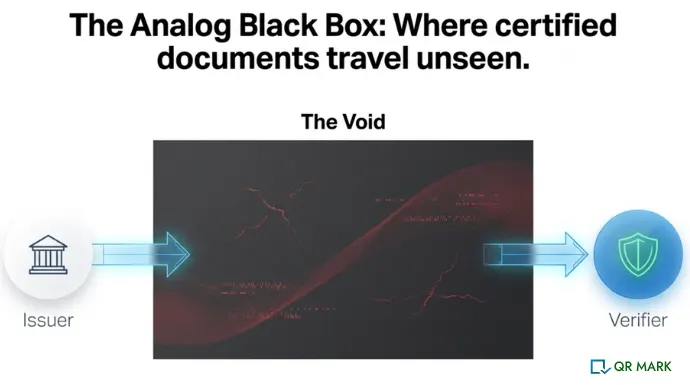
The issuer is the person who is issuing the translation certificate. They need to make the certificate verifiable at his end. This is the core problem.
Think of it like this – If a certificate is embedded with a verification layer that is tamper resistant, then it becomes difficult to forge and if the layer is easy to verify(for example – QR Codes) then you have the best of both worlds..
2. From the Verifier’s Perspective
It means checking the certificate against a trusted source, typically by scanning a QR Code, verifying it through digital signatures etc.
How Are Translation Certificates Being Forged?
The fraud patterns here are not especially sophisticated, which is part of the problem. The barrier to creating a convincing fake is low.
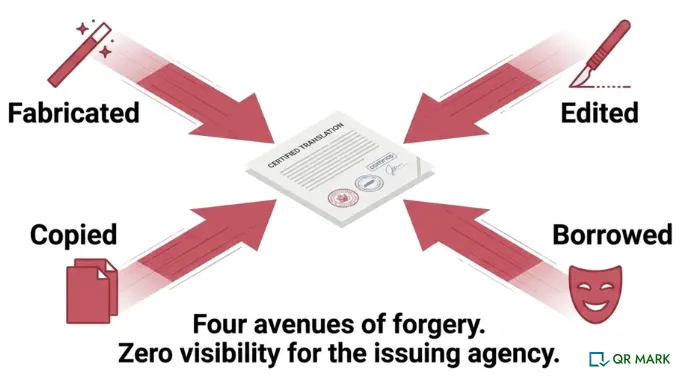
1. Fully fabricated certificates An online service generates a certificate template with a real-looking agency name, a plausible translator credential, and a stamp graphic. No actual agency is involved. The verifier receives what appears to be a complete, properly formatted certificate of translation because it looks like every other certificate of translation they’ve ever seen.
2. Edited genuine certificates: A legitimate certificate is issued for one document, then digitally altered, the source document name changed, dates adjusted, credentials inflated and reused for a different submission.
3. Borrowed agency identity: A fraudster uses the name and contact details of a real, reputable translation agency without that agency’s knowledge. The certificate looks credible because the agency is real. The document is not.
4. Copied certification statements: The exact wording of a legitimate certification statement is copied and reused across fabricated documents. Since most certification languages are fairly standard, this is easy to do.
The translation agency, in most of these cases, has no idea any of this is happening. There is no alert when a forged certificate uses their name. There is no notification when their credentials are borrowed. They find out when a client complaint surfaces, when a legal challenge is raised, or when a regulator comes calling by which point the reputational damage is already done.
How Effective Is Translation Certificate Verification?(Limits of Certificate Fraud Detection Methods)
If you ask most translation agencies what they do to protect their certificates, you’ll hear a version of the same answer: a stamp, a wet signature, company letterhead, and an email address the verifier can contact.
These measures were designed for a paper world. They create serious problems in a digital one.
| Method | What It Checks | Core Limitation |
| Physical Seal / Stamp | Visual impression on paper | Trivially replicated with cheap equipment |
| Back-and-forth email verification | Confirms issuer exists | Slow, inconsistently responded to, no audit trail |
| Notarisation | Notary confirms signature only | Does not verify translation accuracy or issuer credentials |
| Online registry checks | Whether the agency is listed | Does not verify the specific document |
| QR Mark Verification Image | Domain, issuer identity, key fields, validity status | None |
Why Traditional Translation Certificate Verification Fails at the Issuer and the Verifier Ends Simultaneously?
1. For the verifier: Email verification depends on the agency responding, having accessible records, and responding accurately. Turnaround times vary from hours to weeks. For embassies and courts handling large volumes of translated documents, this creates backlogs that serve no one.
2. For the issuer: Every verification request that comes in by email is a cost staff time, record retrieval, response drafting. A mid-sized translation agency issuing several hundred certificates a month can easily spend 20 or more hours a week on verification correspondence alone.
3. For both: Neither party has any visibility into how widely a document is being presented or whether it has been altered since issuance. The agency cannot know if someone is passing off a forged version of their certificate. The verifier cannot know whether the certificate in their hands matches the one the agency actually issued.
Notarisation helps but it only confirms the translator’s signature, not the accuracy or authenticity of the certificate itself. Online agency registries confirm an agency exists. They cannot confirm that a specific certificate was genuinely issued by that agency.
How Does QR Mark Solve the Translation Certificate Verification Problem?
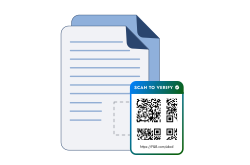
QR Mark adds a verification QR Code and verification URL to a translation certificate at the point of issuance.
When a verifier scans that code or visits the URL, they land on a verification page that the issuing agency controls, served from the agency’s own domain.
In seconds, they can confirm the certificate is genuine, check the key fields, and see whether it’s still valid.
The loop works in a very simple manner: Embed, Scan, Verify.
Here’s why it works where traditional methods don’t.
Ease of Issuance — Works With the Tools Translation Agencies Already Use
Translation agencies typically produce certificates in Microsoft Word, Google Docs, or through their own translation management systems. QR Mark meets you where you already are.
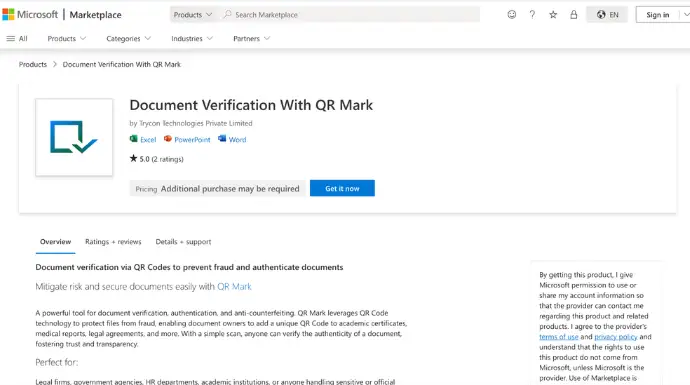
- The Microsoft Word Add-in lets you generate a Verification Image directly inside Word, in one click, without opening any other tool. You finish the certificate, embed the verification code, and the document is ready.
- The Google Workspace Add-on does the same for agencies working in Google Docs.
- If your agency uses a dedicated translation management platform or a custom-built document system, QR Mark’s API integration connects directly to that workflow certificates are issued and verified programmatically, with no manual step required.
- For agencies that need to issue certificates in volume end-of-month batches, large project completions. The Bulk Verification dashboard lets you upload multiple documents, place the verification image once, and generate unique codes for each certificate in the batch.
Custom Domain — Making Tampering Practically Impossible
This is the part that matters most from a security standpoint.
When a verifier scans the QR Code on your translation certificate, they land on a verification page at a URL like verify.youragency.com.
That domain is yours. It is registered to your organisation. No one else can host a page on it.
| “Translation agencies operate in a trust-critical space. Every certificate they issue is a professional claim about the accuracy of someone’s most important documents. What QR Mark does is give that claim a verifiable home. Instead of a verifier having to trust the paper and the stamp, they can scan a code, land on the agency’s own domain, and confirm in seconds that the certificate is genuine, who issued it, and whether it’s still valid. For the agency, it also means they have a complete record of every certificate issued and a way to know if their credentials are being misused. The combination of custom domain trust and real-time analytics is what makes this genuinely different from a stamp or a signature.”– Gautam Garg, CEO, QR Mark |
Analytics and Activity Tracking — Know When Your Certificates Are Being Used
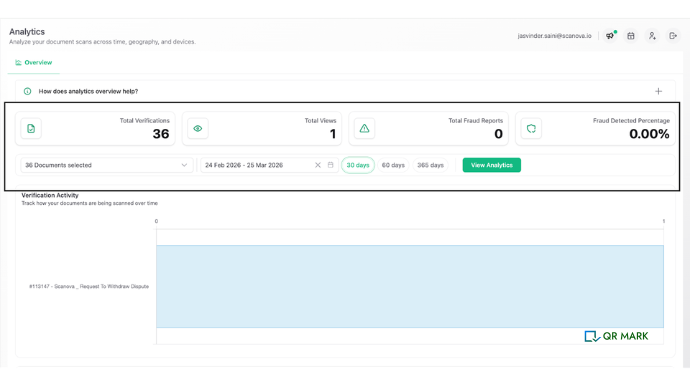
QR Mark gives the issuing agency analytics that no physical stamp or email process can provide. Every scan of a Verification Image is logged. You can see when a certificate was scanned, how many times, and from where.
If a certificate that should have been presented once is suddenly being scanned dozens of times across multiple countries, you know.
This is the kind of audit trail that traditional verification methods simply cannot produce and it’s the difference between finding out about misuse before the consequences arrive and finding out after.
Pricing That Scales With What You Actually Issue
QR Mark pricing is based on the number of documents secured per month: one certificate, one verification.
Scans are unlimited, so your costs don’t increase when more verifiers check a certificate. You’re not paying for verification activity; you’re paying for issuance capacity.
How Do You Use QR Mark to Verify Translation Certificate? (A Step-by-Step Walkthrough)
Here’s the end-to-end process, from the moment you issue a certificate to the moment a verifier confirms it’s genuine.
- Create a free QR Mark account at app.qrmark.com and set up your Custom Domain. You’ll configure a subdomain: typically verify.youragency.com and your IT team adds the required DNS records. This usually takes less than a day and is a one-time setup. Open your translation certificate in Microsoft Word or Google Docs. If you’re using the Word Add-in, click the QR Mark icon in your toolbar.
2. Fill in the key verification fields: translator name, credential/title, language pair, source document reference, issuance date, and validity period.
3. Click ‘Generate.’ QR Mark creates a Verification Image, a verificationQR Code and URL and embeds it in the certificate. Save and export the document as usual. The certificate is now verifiable.
4. The certificate is delivered to the client or submitted directly by them to the receiving party (the embassy, the university, the court, the employer).
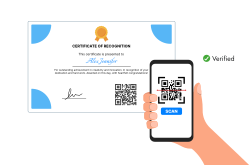
5. The verifier receives the certificate. They scan the QR Code with their phone camera — no app required. They land on your verification page at verify.youragency.com.
The page shows the translator’s name, credential, language pair, document reference, issuance date, and validity status. The verifier checks that these fields match the certificate in their hands. If they do, the certificate is confirmed genuine.
That’s it. For the verifier, the entire process takes about 30 seconds. For the translator or agency, the additional step at issuance is a single click. The fraud deterrence is significant. The operational overhead is minimal.
| What a verifier should check on every QR Mark-secured translation certificate: |
| 1. Domain: Does the verification URL belong to the issuing agency? (e.g., verify.agencyname.com) |
| 2. Fields: Does the translator name, credential, language pair, and document reference match the certificate in hand? |
| 3. Status: Is the certificate shown as currently valid, or has it expired/been revoked? |
| If all three match — the certificate is genuine. If anything is off — treat it as suspect. |
How to proceed with Translation Certificate Verification in 2026?
The problem is the same on both sides. Issuers have no visibility into how their certificates are being used or misused. Verifiers have no fast, reliable way to confirm what they are holding is genuine.
That is why translation certificate verification is not just a technical step, it is a trust decision. When verification depends on emails, stamps, or assumptions, it fails under volume and pressure. The only approach that holds up is one where proof is instant, consistent, and tied directly to the issuer.
Anything less leaves room for doubt. And in high-stakes documents like immigration applications, court proceedings, medical licensing – doubt is already a failure.
Frequently Asked Questions
What is a certificate of translation, and who can issue one?
A certificate of translation is a signed statement confirming that a translated document is accurate and complete. It is issued by the translator or their agency, and must include the translator’s credentials, signature, the date of translation, the language pair, and a reference to the source document. In many jurisdictions, a sworn translator, certified translator, or ATA-certified professional must issue it for it to be accepted by official bodies.
How do I get a translation certificate?
You commission a translation from a certified or sworn translator or a professional translation agency. Once the translation is complete, the translator or agency attaches a signed certification statement to the translated document. If you need the certificate to carry a verification QR Code — as some immigration authorities and legal bodies now request — ensure the agency uses a certificate verification system like QR Mark that generates a verifiable code at issuance.
Can fake translation certificates be detected?
Yes, when the certificate carries a verification QR Code linked to the issuing agency’s own domain. A verifier scans the code, lands on the agency’s verification page, and checks that the key fields match the document. A forged certificate either won’t have a code, will have a non-functional code, or will link to a domain the agency doesn’t own — all of which are immediate red flags.
Does the verifier need a special app to check the QR Code on a translation certificate?
No. QR Mark’s Verification Image works with any standard smartphone camera. The verifier points their camera at the QR Code, taps the link that appears, and lands directly on the verification page. No app download, no account creation, no extra steps required.
What is a certificate verification system using QR Code, and how does it work for translation agencies?
A certificate verification system using QR Code embeds a unique verification code into each certificate at issuance. When scanned, the code links to a verification page controlled by the issuing agency, showing the key details of that specific certificate. QR Mark is built for exactly this use case — it generates a Verification Image, hosts the verification page on the agency’s custom domain, and gives the agency analytics on how each certificate is being used. The result is instant, app-free verification that issuers and verifiers can both trust.
What happens if someone copies the QR Code from a genuine translation certificate and puts it on a fake one?
The verifier catches it by checking the fields on the verification page against the document in their hands. A copied QR Code links to the original certificate’s verification record — which will show different translator details, a different document reference, or different dates than the forged certificate. The mismatch is the red flag. This is why we always recommend verifiers check domain, fields, and validity status — not just that the QR Code opens.
