

TL;DR
Fake paperwork refers to documents created or altered to show false information in order to deceive a person or organisation. Fraudsters use five main methods: digital editing, AI generation, online templates, physical forgery, and insider access. Fake documents can be detected through visual checks, data verification, QR Code scanning, and digital signature validation. Organisations can reduce document fraud with verification databases, layered security features, staff training, and document verification tools. QR Mark helps organisations secure documents at issuance and lets anyone instantly confirm whether a document is genuine.
I usually don’t start an article with an image, but over the years of studying document fraud, I’ve noticed something. Across the web, there are more sources explaining how to create fake paperwork than there are explaining how to stop it.
It’s ironic!
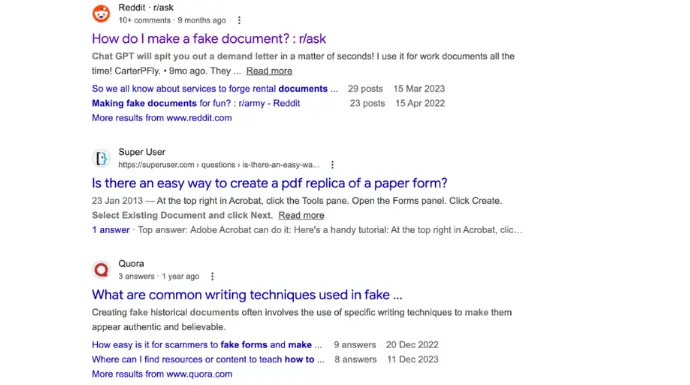
So in this guide, I would like to change that balance. At least for the organisations being targeted.
Today, I will explain what fake paperwork is, how fraudsters create fake documents, how organizations can detect suspicious documents, and the best ways to prevent document fraud before it causes damage.
Let’s get going!
What is fake paperwork?
Fake paperwork refers to documents that are created or changed to show false information in order to deceive a person or an organization.
Real World Example
Imagine someone applying for a loan at a bank. To increase their chances of approval, they edit a bank statement to show a higher balance than they actually have. The bank believes the applicant has more money and approves the loan.
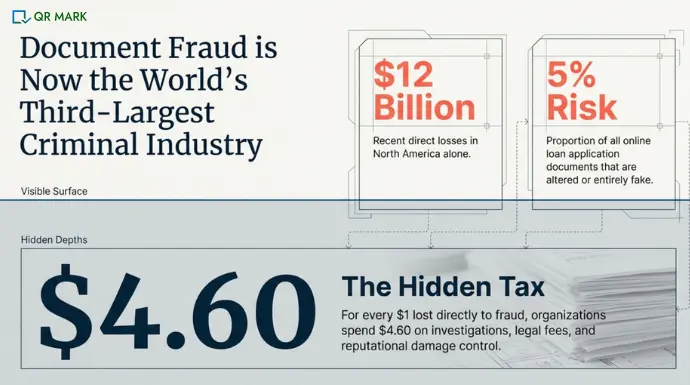
While this example may seem simple, fake paperwork has become a serious global problem. It is now considered the third-largest criminal industry in the world. In North America alone, document fraud has caused around $12 billion in losses in recent years.
The cost doesn’t stop here. For every $1 lost to fraud, organizations spend about $4.60 more on investigations, legal work, and recovery.
Organizations such as companies, universities, government agencies, and financial institutions are the most affected. These organizations rely on documents to confirm identity, qualifications, and financial records. Because of this, they are often targeted by people using fake or altered documents.
According to the Association of Certified Fraud Examiners (ACFE) in their 2024 Report to the Nations, organizations lose an estimated 5% of their annual revenue to fraud each year, and document manipulation is one of the common methods used in financial and identity fraud.
How do fraudsters create fake paperwork?
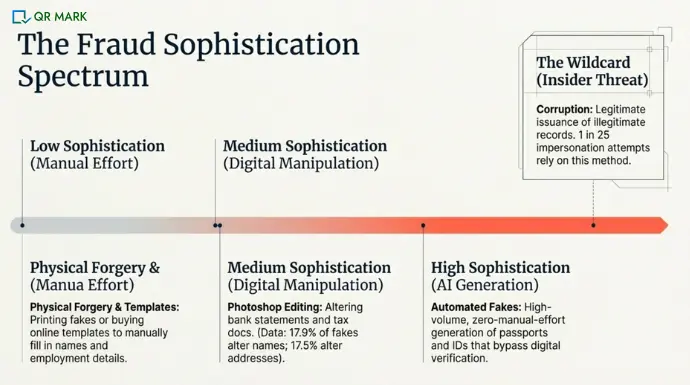
Fraudsters commonly create fake documents using the following methods:
1. How is digital manipulation used to create fake paperwork?
In this method, fraudsters use Photoshop tools to alter text, layout, change dates, remove seals, swap photos, etc.
For example, a person may download a bank statement using a document editing software online and change the balance, transaction details, or dates to show a better financial position.
According to Inscribe AI’s Document Fraud Report(2025), names are altered in about 17.9% of fake documents and addresses in 17.5%, while dates and financial values are also frequently modified.
Documents commonly altered using digital manipulation include:
- Bank statements
- Salary slips
- Utility bills
- Tax documents
2. How do fraudsters use AI generation to generate fake paperwork?
AI generation is one of the fastest-growing methods used to create fake documents. According to SigniCate in Q1 of 2025, deepfake fraud surged 3,400% in Canada, 1,900% in Hong Kong, and 700% in the U.S.
These tools study thousands of real documents to understand how they are designed, including their layout, fonts, and structure. Using this information, they can generate documents that look very similar to genuine ones.
Fraudsters use these tools to create realistic-looking text, fake photos for ID documents, and even AI-generated selfies that can trick digital verification systems.
Documents commonly created using AI include:
- Passports
- Driver’s licenses
- National ID cards
- Digital identity documents
3. How are document templates used for fraud?
In 2026, there are so many websites available online that give you document templates in order to reduce workload. But, people online have learned it to create fake documents. Fraudsters download or buy templates online and then fill in fake information such as names, qualifications, or employment details.
Documents commonly created using templates include:
- Degree certificates
- Experience letters
- Internship certificates
- Employment letters
- Business invoices
4. What is physical forgery and what documents are at risk?
Physical forgery involves printing fake documents or manually altering real ones. Fraudsters may use high-quality printers, stamps, seals, or special paper to make the document look official.
Even though many systems are now digital, physical forgery is still used for documents that are submitted in printed form.
According to Interpol’s Stolen and Lost Travel Documents (SLTD) database, millions of passports have been reported lost or stolen and may later be used to create forged identity documents.
Documents often forged physically include:
- Printed certificates
- Government forms
- Property documents
- Contracts
5. How does insider involvement create the risk of fake paperwork?
In some cases, fake paperwork is created with the help of insiders within an organization. Employees who have access to official systems or records may create or approve documents that should not exist.
Because these documents come from official systems, they can be very difficult to detect.
Sumsub’s 2025 Identity Fraud report shows that around one in every 25 identity verification attempts involves someone impersonating another person, often using manipulated or fraudulent documents.
“Document fraud can be a serious security risk for companies, as it may lead to financial losses as well as damage a company’ s credibility. Criminal actors, both individuals, and companies can perform work, and sell products and services which are not sufficiently qualified. This can lead to financial loss and expose organisations to both risk and injury, and do damage to its reputation and trust.” – Carl Heath, Senior Researcher and Focus Manager for Resilient Information Systems at RISE (Research Institutes of Sweden)
Documents that can be misused through insider access include:
- Government certificates
- Academic records
- Identity documents
How can you spot fake paperwork?
Detecting fake paperwork usually involves checking the document carefully and verifying the information it contains. Some fake documents can be identified with simple visual checks, while others require digital verification.
The methods below are ordered from quickest-to-apply to most rigorous.
1. What visual signs indicate a document is fake?
Many fake documents reveal small visual mistakes because they were edited or recreated.
Look for the following signs:
I. Font and text differences
Check whether the font style, size, or spacing changes in different parts of the document. Real documents usually use consistent formatting. If some text looks slightly different, it may have been edited.
II. Blurry logos or seals
Official logos, seals, and stamps are usually printed clearly. If a logo looks blurry, pixelated, or stretched, it may have been copied from another source.
III. Alignment problems
Look for uneven margins, inconsistent spacing, or text that is not properly aligned. These issues often appear when someone edits a document using software.
IV. Spelling and grammar mistakes
Official documents rarely contain spelling mistakes. Errors in names, dates, or wording can indicate that the document was created manually.
V. Signs of photo editing
For ID documents, check the photo carefully. If the edges of the face look unnatural or the lighting in the photo looks different from the background, the image may have been replaced.
2. How can you verify the data inside a suspicious document?
Even if a document looks real, the information inside it may reveal problems. Here’s what you should check:
I. Check calculations
For financial documents such as bank statements or invoices, recalculate the totals. Fake documents often contain math mistakes because the numbers were changed manually.
II. Check the order of pages
Page numbers should follow a logical sequence. Headers and footers should also remain consistent across pages. Sudden changes can indicate that pages were inserted or removed.
III. Look for color differences
Different color tones within the same document may suggest that certain sections were added later.
3. What Security features to look for when verifying a document?
Many official documents include security features to prevent forgery.
These may include:
- Watermarks
- Security fibers in paper
- Special ink or holograms
- Official stamps or embossed seals
If these features are missing or poorly reproduced, the document may be fake.
4. How can QR Codes help in Verification of documents?
Many modern documents now include QR Codes for document verification.
When you scan the QR Code using a smartphone or any other scanning device, it usually redirects you to an official verification page. This page may confirm details such as:
- The document number
- The issuing organization
- The name of the person who received the document
- The date of issue
If the QR Code does not work or redirects to an unrelated page, the document may be suspicious.
QR Codes are commonly used for verifying:
- Degree certificates
- Training certificates
- Government documents
5. How digital signatures contribute to the verification of a document?
Some digital documents include digital signatures. These signatures allow verification systems to detect whether the document has been modified after it was issued.
If the signature shows that the document has been modified or the signature cannot be verified, the document may not be authentic.
Digital signatures are commonly used in:
- Contracts
- Legal documents
- Government forms
- Official certificates
6. How to verify documents with the issuing organization?
One of the most reliable ways to confirm a document is to check it with the organization that issued it.
This can be done by:
- Checking the certificate number in the organization’s database
- Contacting the organization directly
- Using official document verification portals
For example, an employer may contact a university to verify whether a degree certificate actually exists in their records.
7. How to use document verification tools to verify a document?
Many organizations now use specialized software to detect fake documents. These tools can analyze documents and identify:
- Edited text or images
- Manipulated file properties
- Inconsistencies in document structure
Some systems also use artificial intelligence to detect subtle changes that may not be visible to the human eye.
| Detection Method | What You Check | Difficulty | Reliability | Best Used For |
| Visual inspection | Fonts, spacing, logos, seals, spelling errors | Easy | Low–Moderate | Quick manual checks |
| Data verification | Calculations, page order, data consistency | Easy | Moderate | Financial documents |
| Security feature inspection | Watermarks, holograms, special inks | Easy | Moderate | Physical documents |
| QR Code verification | Scan code to verify record on issuer’s page | Very easy | High | Certificates and official records |
| Digital signatures | Cryptographic signature validation | Moderate | Very high | Contracts and digital documents |
| Issuer verification | Check with issuing organization or database | Moderate | Very high | Academic or government documents |
| Document verification software | AI detection of edits and manipulation | Easy–Moderate | Very high | High-volume document checks |
How can organizations reduce the risk of fake paperwork?
Here are some of the best practices that you can adopt:
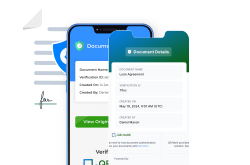
1. Add QR Codes for instant verification
One of the most effective ways to protect documents is by adding QR Codes.
A QR Code links the document to a verification record in the issuer’s system, allowing anyone to confirm its authenticity instantly. If the code does not work, leads to an unrelated website, or shows details that do not match the document, the document may be fake.
QR Codes make document verification fast and reliable. Anyone who receives the document can scan the code and confirm its authenticity without contacting the issuing organization. This reduces manual verification work while improving trust in the document.
This method is increasingly used for:
- Degree certificates
- Training certificates
- Contract
- Compliance documents
- Legal Documents
- Property and Land Documents
2. Use digital signatures
Digital signatures help confirm that a document was issued by the correct authority and has not been modified after it was created.
When a document is digitally signed, the system creates a unique fingerprint of the document, called a hash. This fingerprint represents the exact content of the document at the time it was signed.
The hash is then encrypted using the sender’s private key to create the digital signature, which is attached to the document.
When someone receives the document, the system uses the sender’s public key to verify the signature and recover the original hash. At the same time, it generates a new hash from the received document.
If both hashes match, the document is confirmed as genuine and unchanged. But if even a small part of the document has been altered, the hashes will not match and the signature will immediately show as invalid, indicating the document has been modified.
3. Maintain a verification database
Organizations can also maintain a central database of issued documents..
Each document is assigned a unique ID or certificate number. Anyone who wants to verify the document can enter this number into the organization’s verification portal.
The system then checks whether:
- The document exists in the database
- The details match the official record
This approach is widely used by:
- Universities verifying degrees
- Licensing boards verifying professional credentials
- Manufacturers verifying product certifications
4. Include visual and layered security features
Businesses can also add physical or visual and layered security features to make documents harder to copy.
Common examples include:
- Watermarks
- Holograms
- Security paper
- Microtext
- Embossed seals
- Microprinted text,
- Special inks
- Layered images
For example, driver’s licenses are among the most commonly forged documents in the United States because they are widely used for identity verification. To prevent forgery, modern licenses include several security features such as holograms, microprinted text, special inks, and layered images that are difficult to replicate using normal printing methods.
These features make it more difficult for fraudsters to replicate documents accurately.
5. Train staff to identify suspicious documents
Employees who review documents must also know what warning signs to look for.
Fraudsters often rely on the assumption that documents will be reviewed quickly without careful inspection. Proper training helps employees detect suspicious details early.
Organizations can train employees in teams that frequently handle documents, such as HR, compliance, finance, and customer onboarding teams.
Training can include:
- Learning how genuine documents normally look
- Identifying common signs of edited documents
- Checking formatting inconsistencies
- Verifying documents using official databases or QR Codes
- Following verification procedures before approving documents
Companies may also provide reference examples of genuine documents so employees know what authentic documents in their organization look like.
Example
An HR team reviewing job applications may be trained to check whether a degree certificate includes proper seals, verification codes, consistent formatting, or by scanning the QR Code present and then verifying with the data stored on the issuer’s domain.
6. Use document verification software
Many large organizations also use document verification software to strengthen their security process. These software can analyze documents, detect signs of manipulation, and compare document data with official records before the document is accepted.
By automating these checks, organizations can review thousands of documents quickly while reducing the risk of accepting fake paperwork.
By combining technology with manual checks, businesses can significantly reduce the risk of accepting fake documents.
As more processes, such as hiring, loan applications, licensing, and onboarding, move online, organizations are increasingly adopting digital verification software to reduce document fraud.
| Method | Fraud Resistance | Infrastructure Required | Popularly Used For |
| QR Codes | High | Verification database | Any Type of Document |
| Digital signatures | Very high | PKI infrastructure | Legal contracts |
| Security features (holograms/seals) | Low | None | Physical documents |
| Database verification | High | Institutional portal | Government IDs |
| AI-based verification | Very high | AI verification systems | KYC and onboarding |
How does QR Mark help businesses secure their documents?
QR Mark solves the fake paperwork problem by adding instant verification to every document by embedding a QR Code linked to a verification database at the time of issuance.
Once the document is issued, the QR Code connects it to a secure record stored in the organization’s system on a custom domain. Anyone who receives the document can scan the code to instantly verify its authenticity.
When scanned, the QR Code opens a verification page where the user can compare the details shown on the page with the information printed on the document. If the details match, the document is confirmed as authentic and unchanged.
Because verification happens instantly through the QR Code, there is no need for manual checks or contacting the issuing organization. This makes the verification process faster and more reliable.
In a conversation with the HR head of a leading automobile company, we uncovered another issue. Candidates would accept offer letters, then disappear and use those same letters to negotiate better offers elsewhere. This left roles blocked and created operational overload.
QR Mark understood this pain point and built the expiry control feature. Now, the user can set the validity period of the document they are issuing. Once the validity period ends, the document is automatically marked invalid during verification.
By enabling instant verification, QR Mark helps organizations:
- Detect altered documents quickly
- Reduce manual verification work
- Build trust with partners and customers
- Secure documents from fraud before it causes damage
QR Mark is also compliant with AICPA SOC, ISO, and GDPR standards, ensuring that document data is securely stored and protected.
Sign up for a free pilot trial to see QR Mark in action.
Conclusion
I believe that the problem of fake paperwork creation is not going to go away. But it should not mean that you should not take steps to prevent it.
In this blog, I have tried to provide you with an idea of fake paperwork creation and the best methods that, as an organization, you can take to stop them from hurting your organization’s reputation.
Simple steps like checking document details, verifying information with issuing authorities, using QR Code-based verification, digital signatures, and maintaining secure document records can significantly reduce the risk of accepting fake paperwork.
In the end, the goal is not just to spot fake documents after they appear, but to make documents easy to verify and difficult to manipulate in the first place.
FAQs
1. Is creating fake paperwork illegal?
Yes. Creating or using fake paperwork is illegal in most countries. In the United States it falls under 18 U.S.C. §1028 (identity document fraud). In the UK it is prosecuted under the Fraud Act 2006. In India, document forgery is covered under Sections 463–471 of the Indian Penal Code.
2. Which industries are most affected by fake paperwork?
Industries that rely heavily on documents for verification are the most affected. These include banking and finance, education, government services, healthcare, real estate, and employment verification. In these sectors, documents such as identity records, certificates, licenses, and financial statements are frequently submitted and verified.
3. Why is fake paperwork becoming more common?
Fake paperwork is increasing because modern tools make document editing easier than ever. Graphic editing software, online templates, and AI-powered generators allow fraudsters to replicate official documents quickly. At the same time, many organizations still rely on manual verification processes, which makes it easier for fake documents to slip through.
4. What are the most commonly forged documents?
Some of the most commonly forged documents include identity documents, bank statements, degree certificates, employment letters, and tax documents. These documents are often targeted because they are frequently used to verify identity, qualifications, or financial status.
5. Can AI detect fake paperwork?
Yes. Many modern document verification systems use artificial intelligence to detect signs of manipulation. AI tools can analyze document layouts, identify edited text or images, and detect inconsistencies that may not be visible to the human eye. These systems are often used by banks, financial institutions, and online verification platforms.
6. What are the risks of accepting fake paperwork?
Accepting fake paperwork can lead to financial losses, regulatory penalties, reputational damage, and security risks. For example, a company may hire an unqualified employee, a bank may approve a fraudulent loan, or a government agency may issue services based on incorrect identity information.
7. How long does it typically take to verify a document manually?
Manual document verification can take anywhere from a few minutes to several days depending on the document type. For example, verifying academic certificates may require contacting universities, while verifying financial documents may require cross-checking with banks or financial records.
8. What should someone do if they suspect a document is fake?
If a document appears suspicious, it should not be accepted immediately. The best approach is to verify the document with the issuing organization or through an official verification system. Organizations may also use document verification tools or request additional supporting documents before making a decision.Author Bio:
