

TL;DR
Digital document verification confirms whether a document is genuine, unaltered, and issued by a legitimate authority using QR Codes, digital signatures, database checks, and AI-based tools. Organisations in HR, education, banking, healthcare, and government rely on it to cut fraud, speed up decisions, and reduce manual checks. The right method depends on document type, verification audience, and how much automation your organisation needs.
At QR Mark, we work with a lot of organizations that are already issuing documents digitally. But very few of them know how document verification actually works on the receiving end or they are also not aware about the right way to issue secure digital documents.
Digital document verification is the process of confirming whether a digital document is legit, valid, and unaltered using technologies like QR Codes, digital signatures, and secure databases instead of manual checks. It’s the difference between a document that looks official and one that can actually be trusted.
And in 2026, that difference matters more than ever. The Entrust 2024 Identity Fraud Report found that around 34.8% of digital documents show signs of manipulation. This means, more than 1 in 3 documents being shared today could be fake, altered, or misused and most of them won’t look suspicious at first glance.
The problem isn’t just receiving fraudulent digital documents. It’s issuing ones that are easy to forge in the first place.
In this guide, I will explain:
- What digital document verification is?
- What types of documents are considered digital documents?
- How can documents be verified digitally?
- Which organizations rely on digital document verification the most
- The advantages and challenges of digital document verification
What is digital document verification?
Digital document verification is a process of confirming if a document is authentic, valid, and unaltered using digital technologies instead of manual or physical checks.
These technologies make it possible to verify a digital document in seconds using tools like QR codes, biometric checks, blockchain records, and AI algorithms without any manual back-and-forth.
For example, in manufacturing, product certificates or quality inspection reports often include a QR Code or digital verification ID. When scanned, the code directs the user to the manufacturer’s verification page where they can confirm that the certificate was issued by the company and has not been altered.
What types of documents are considered digital documents?
A digital document is any official record stored or shared electronically rather than on paper — including identity credentials, academic certificates, financial statements, and legal contracts.
In the US, several states now accept “mobile driver’s licenses” stored in Apple or Google Wallet as equivalent to a plastic ID.
In Europe, the upcoming EU Digital Identity Wallet will let all citizens store things like driving licenses, diplomas, banking info, and medical records on their phones.
Many governments now issue official documents as digital credentials. For example, India’s DigiLocker platform allows citizens to access their driver’s licenses, vehicle registration, mark sheets and other government certificates online.
“The shift to digital credentials is inevitable, but trust in those credentials depends entirely on the infrastructure behind them, not just the technology itself.”
— Andrew Bud, Founder and CEO of iProov, speaking at Identity Week 2024
What are the best ways to make your digital documents easy to verify?
Issuing a document is the easy part. Making sure anyone who receives it can instantly trust it without emails, phone calls, or manual back-and-forth is where most organizations fall short.
To solve this, organizations are increasingly embedding verification mechanisms directly into their documents. These include methods such as using Digital Signatures, Embedding QR Codes, or using secure databases and allowing verification via portals.
Here are these approaches discussed in detail so you can choose the one that benefits you most.
1. Digital Signatures
A digital signature is a cryptographic signature attached to a document that confirms the document was issued by a specific authority and has not been modified after signing.
When someone opens the document, the system verifies the signature against the issuer’s digital certificate.
How to implement it
Organizations typically implement digital signatures using:
- Public Key Infrastructure (PKI)
- Trusted certificate authorities
- Document signing tools (such as Adobe Sign or DocuSign)
- Government-approved digital signature certificates
The issuer signs the document digitally before sharing it. When the document is opened, the signature can be validated automatically by the PDF reader or a verification software.
Pros
- Ensures document integrity
- Legally recognized in many jurisdictions
- Prevents tampering after issuance
- Suitable for contracts and legal documents
Cons
- Verification can be confusing for non-technical users
- Requires digital certificate management
- Recipients may not know how to check the signature properly
- Does not provide an easy public verification mechanism
2. QR Codes for Verification
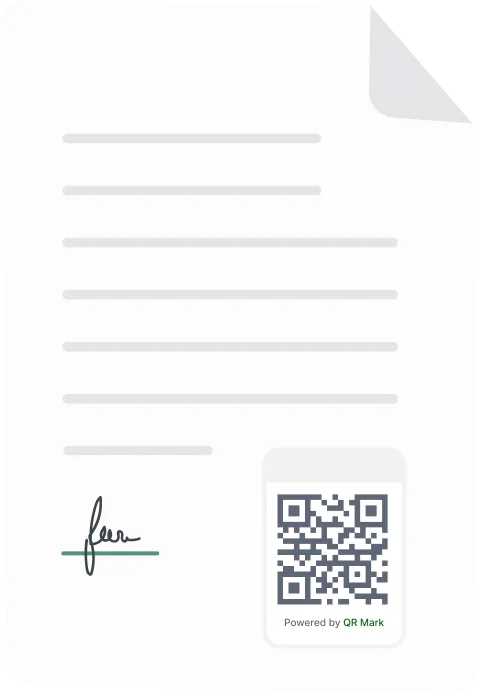
A QR Code on the document can allow instant verification by linking the document to an online verification page.
When someone scans the QR Code using a smartphone, it redirects them to a page hosted by the issuing organization that confirms the document’s authenticity.
How to secure documents using QR Mark?
Go to qrmark.com and create an account.
1. Set custom domain
Set up a custom domain like verify.yourcompany.com.
This is important. Your verification link will now carry your official domain.
If someone tries to tamper with the document or recreate it, they won’t be able to replicate this domain.
It acts as an extra layer of security and makes fake versions easier to spot.
2. Upload document or use add-on
Upload your document to QR Mark or use the add-on inside your workflow.
You can secure PDFs, certificates, contracts, reports—anything you issue.
If you’re already creating documents in tools like Docs or Word, you can do it there directly.
3. Generate verification image
QR Mark generates a verification image with:
- QR Code
- Verification URL
Place it anywhere on the document. This links your document to a secure record that can be checked anytime.
You also get two important controls here:
- Set expiry dates → We saw that this feature is useful for HR documents like offer letters or contracts. After a certain date, the document becomes invalid.
- Store original document version → Helpful for legal, product, or medical documents. You can always compare the shared version with the original.
4. Export and share
Export your document as PDF, PNG, or JPEG. Now when someone scans the QR Code, they can instantly verify:
- If the document is real
- Whether the document’s key details match the issuer’s original verification record. A mismatch signals the document may have been tampered with or is not the version that was issued.
Stop relying on manual checks and email back-and-forth.
Pros
- Very easy to verify using a smartphone
- Fast verification (usually within seconds)
- Does not require technical knowledge
- Works for both digital and printed documents
Cons
- Requires a verification infrastructure behind the QR Code
- If the QR Code simply links to a static page, it can be copied
- Needs proper database management for secure verification
3. Secure Document Databases
A secure database of issued documents allows organizations to confirm whether a document actually exists in their records.
When a document needs to be verified, you can log in to the verification portal, enter the details and check the information from the database.
Pros
- Enables reliable record verification
- Helps track issued documents
- Supports audit trails and compliance
Cons
- Requires proper database management
- Verification may still require manual checks without automation
- External users may not have access to the database
| Method | Ease of use | Reliability | Speed | Best for |
| Digital signatures | Medium | Very high | Fast | Contracts, legal and compliance documents |
| QR Codes (QR Mark) | Very easy | High | Instant | Certificates, HR docs, reports |
| Document databases | Medium | Very high | Medium | Government, banking, institutional records |
How can digital documents be verified? (5 Methods that actually work)
Organizations run a document authenticity check using a combination of visible security features and technology-driven validation systems, some focus on elements embedded in the document itself like QR Codes, others relying on databases, cryptographic signatures, or automated document verification softwares.
In practice, most verification workflows combine several of these methods to confirm whether a document is genuine.
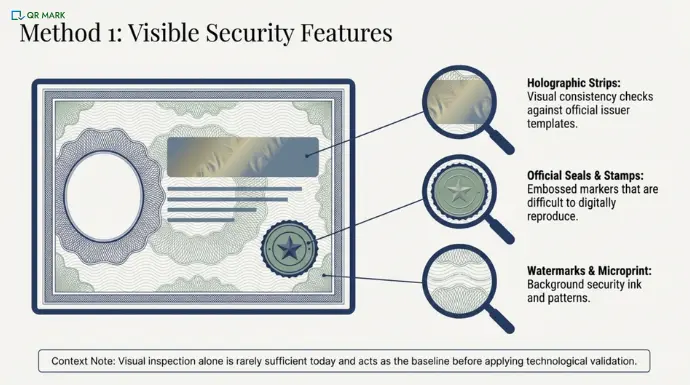
1. Security features such as Seals, Stamps, and Holograms
Many documents include visible security features designed to prevent forgery. These features help reviewers confirm whether the document matches the format issued by the original authority.
Common examples include:
- Official seals or embossed stamps
- Holographic security strips
- Watermark patterns
- Microprinted text or security ink
For example, many government IDs, professional licenses, and university certificates contain holograms or embossed seals that are difficult to reproduce. When reviewing a digital copy of these documents, organizations often check whether these security elements appear consistent with the original format issued by the authority.
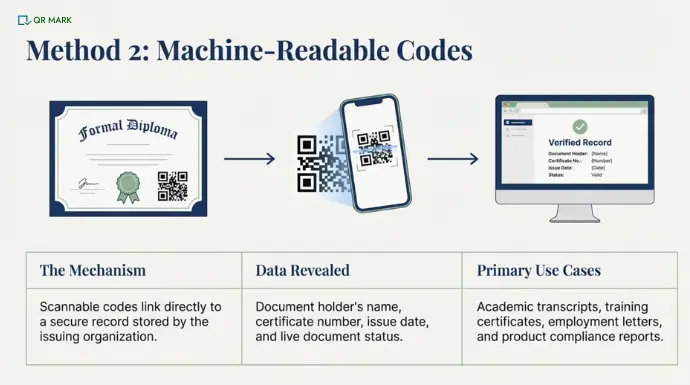
2. QR Codes and Machine-Readable Verification Codes
Many modern documents now include machine-readable verification elements, such as QR Codes.
When scanned, these codes connect the document to a record stored by the issuing organization. The verification page typically shows details like the document holder’s name, certificate number, issue date, or document status.
This approach is increasingly common for documents such as:
- Academic diplomas and transcripts
- Training and professional certificates
- Employment certificates and experience letters
- Product inspection and compliance reports
For example, some universities issue digital degree certificates with QR Codes that link to an official verification portal where employers can confirm whether the credential was actually issued.
Create verifiable documents with QR Mark and let anyone confirm authenticity in seconds.
Because the code links directly to the issuer’s record, it allows organizations to verify documents quickly without contacting the issuing institution manually.
3. Database Verification through Government or Institutional Records
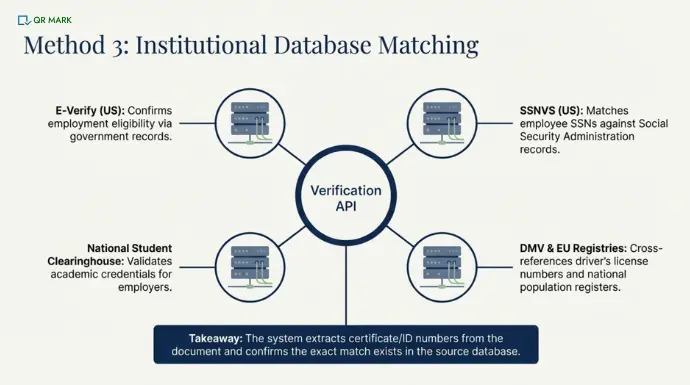
Another common method is to compare the document details with official databases maintained by governments or institutions.
Verification systems extract important fields from the document such as certificate numbers, ID numbers, or license numbers and check whether they match official records.
Examples of government or institutional verification databases include:
- E-Verify (United States) – used by employers to confirm employment eligibility based on government records
- Social Security Number Verification Service (SSNVS) – allows employers to confirm whether an employee’s SSN matches Social Security Administration records
- National Student Clearinghouse (United States) – widely used by employers to verify academic credentials
- Driver License verification systems used by state DMVs
European digital identity registries and national population registers used across EU countries
For example, when verifying a professional license or academic credential, the verification system may check whether the certificate number exists in the issuing authority’s database.
If the record exists and the information matches, the document can be confirmed as legitimate.
4. Digital Signature Validation
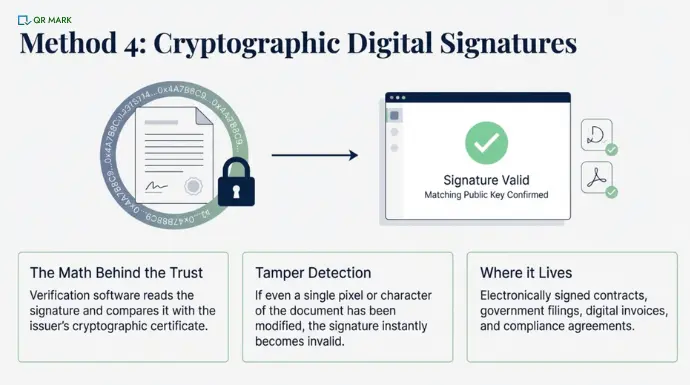
Some digital documents include cryptographic digital signatures that confirm the document’s authenticity.
Verification software reads the digital signature and compares it with the issuer’s cryptographic certificate. If any part of the document has been modified, the signature becomes invalid.
Digital signatures are commonly used in:
- Electronically signed contracts
- Government documents and filings
- Digital invoices
- Legal agreements and compliance documents
5. Automated Verification using AI and Biometric Technologies
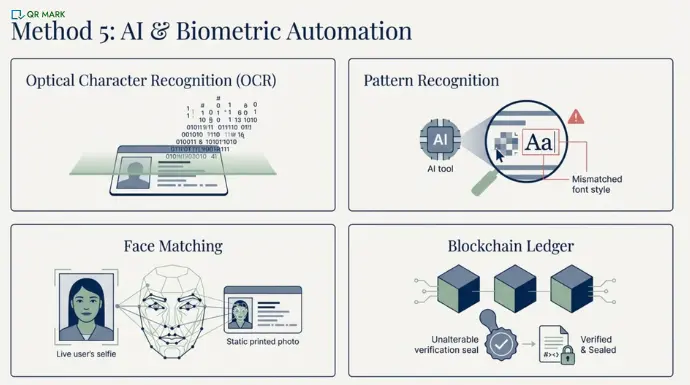
Many organizations now use automated verification systems that use the latest technologies to verify documents.
These systems may use:
- OCR (Optical Character Recognition) to extract text from documents
- AI-based pattern recognition to detect inconsistencies or signs of tampering
- Biometric face matching to compare a user’s selfie with the photo on an ID
- Blockchain verification to confirm whether credentials were issued and recorded on an immutable ledger
Which organizations benefit from issuing secure digital documents?
Organizations that onboard customers, employees, vendors, or partners remotely rely heavily on digital document verification. This is especially true in industries where decisions depend on the authenticity of documents.
One of the most common examples is employers and HR teams. During hiring, companies verify documents such as academic degrees, certifications, experience letters, and salary slips to confirm a candidate’s background. At the same time, the documents they issue, like offer letters or employment certificates, also need to be structured in a way that makes them easy to verify and harder to misuse.
Universities and educational institutions also deal with large volumes of documents. Admissions teams verify incoming records like transcripts and diplomas, while the certificates they issue are expected to be trusted instantly by employers without repeated manual checks.
Financial institutions follow a similar pattern. Banks and lending platforms verify IDs, income proofs, and tax records before approvals, while also issuing statements and documents that should be reliable enough to stand on their own without constant re-validation.
In insurance and healthcare, documents such as medical reports, claims, and licenses are regularly reviewed. Since these directly impact financial and legal outcomes, even small inconsistencies can cause issues, making both accuracy and integrity important.
In manufacturing, compliance, and supply chains, organizations work with certificates, inspection reports, and regulatory approvals. These documents often move across multiple stakeholders, so they need to remain consistent and trustworthy throughout their lifecycle.
Government agencies also handle large-scale document verification for IDs, permits, and licenses submitted online, where the expectation is that documents can be checked quickly and relied upon without additional back-and-forth.
“One of the most common patterns we’re seeing across industries is not poor document design, but the lack of verifiability at the point of issuance. In one recent case, a real estate company discovered that property documents they had legitimately issued were being altered and resubmitted to banks and legal bodies as authentic records. That’s precisely why we built QR Mark. When every document is backed by a secure, tamper-evident verification record from the moment it’s issued, any modification becomes immediately detectable. A bank, regulator, or buyer can independently verify its authenticity in seconds.” – Gautam Garg, CEO, QR Mark
Document security shouldn’t rely on how a document looks. It should rely on whether it can be cryptographically verified.
For that real estate company, the fix wasn’t redesigning their documents. It was making them verifiable from the moment they were issued.
Why does the real shift in document security start at the moment of issuance?
The conversation around document fraud usually focuses on detecting how to spot a fake after it arrives. But the more useful question is earlier than that: when you issued that document, did you give anyone a way to verify it?
Most organisations haven’t. A PDF with a logo and a digital signature looks official. But without a live, issuer-controlled record behind it, anyone can edit it and reshare it and the recipient has no way to know.
That is the gap digital document verification closes. Not by making verification harder to bypass on the receiving end, but by making it impossible to fake on the issuing end.
The organisations that get ahead of this aren’t waiting for a fraud incident to prompt the change. They are building verification at the moment of issuance, so every document they send carries its own proof.
FAQs
1. How long does digital document verification usually take?
In most modern systems, digital document verification takes a few seconds to a few minutes. Automated systems can instantly check document data, verify digital signatures, or match records with databases. However, if a document is flagged for review, manual verification may take longer.
2. Can digital document verification detect edited PDFs?
Yes. Many verification systems can detect signs of document editing. They analyze elements such as file metadata, font inconsistencies, image layers, and structural changes in the document. These signals can reveal whether a PDF or scanned document has been modified after it was originally created.
3. Is a scanned copy of a document considered valid for verification?
In many cases, scanned copies or photos of documents can be verified digitally. Verification systems use text extraction, pattern analysis, and database checks to analyze the document. However, poor image quality or missing details may require manual verification.
4. Can digital document verification work for international documents?
Yes. Many verification platforms support multi-country document verification. They maintain libraries of document formats from different countries and can verify passports, IDs, licenses, and certificates issued internationally.
5. What happens if a document fails digital verification?
If a document fails verification, the system typically flags it for manual review. The organization may request additional documents, ask the user to resubmit a clearer copy, or contact the issuing authority to confirm the document’s authenticity.
6. Are digitally verified documents legally valid?
In many countries, documents verified through digital signatures, electronic records, or trusted verification platforms are legally recognized. Laws such as electronic signature regulations and digital identity frameworks allow organizations to accept digitally verified documents in place of physical copies.
7. Can small businesses use digital document verification tools?
Yes. Many modern verification tools are designed for businesses of all sizes. Small companies can use cloud-based verification platforms to check documents without building their own systems. These tools help reduce fraud risk while simplifying customer onboarding and compliance processes.
