

TL;DR
Legal document authentication is the process of proving a document is genuine, unaltered, and issued by who it claims to be. It runs through three routes: physical (notarization, stamping, witnesses), digital (digital signatures, Aadhaar eSign, audit trails, QR Codes), and cross-border (apostille or consular legalization). Each one proves origin and identity well. None of them, on its own, lets a recipient instantly confirm the content in front of them matches the issuer’s record. That last gap is where a verification layer helps.
One of QR Mark’s customer from a reputed legal firm describes his encounter with document fraud, “A document we had drafted came back to me later with the wording changed. The signatures and the stamp paper were exactly as they should be, so nothing looked wrong at a glance, and the party holding it insisted it was the copy we had given them. I had no clean way to prove which version was the one we actually drafted. That was the moment I decided every document leaving my firm needed something a third party could scan and check on their own.“
The problem is getting worse, not better. According to Entrust’s 2025 Identity Fraud Report, digital document forgery overtook physical counterfeits for the first time in 2024 and now accounts for 57% of all document fraud, a 244% jump from the year before. Cheap generative tools made it easy to alter a PDF and keep the signature looking untouched.
So when someone asks how authenticating a legal document actually works, the honest answer is that it depends on what you are trying to prove and where the document is going. Let me walk through it.
What is legal document authentication?
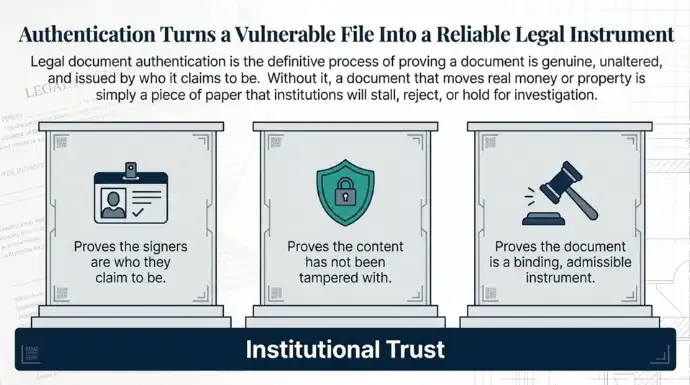
It is the set of steps that helps legal entities like firms etc. to make their document genuine, and let the verifier know that the people who signed it are who they say they are, and that it can be relied on as evidence or as a binding instrument. It confirms a document is trustworthy enough for the other side to act on.
The exact steps change with the document and the jurisdiction. The goal never changes: give the person receiving the document a reason to believe it is real.
Why do legal documents need to be authenticated?
Because a legal document is only worth acting on if the recipient can trust it. A document that cannot be checked is one a court, a bank, a registrar, or a counterparty will either reject or hold while they investigate. Here are the main reasons authentication matters:
- A forged or altered document moves real money and property. When someone forges a deed or quietly rewrites a clause, the loss is not theoretical. The FBI’s Internet Crime Complaint Center recorded 58,141 real estate fraud victims and $1.3 billion in reported losses between 2019 and 2023, much of it from forged property documents used to transfer ownership. Authentication is what lets the receiving party catch the fake before the transfer goes through.
- Institutions will not act on a document they cannot verify. Banks, registrars, courts, and foreign authorities will not release funds or record a transfer against a document whose origin is in doubt. Authentication turns a piece of paper into something an institution will rely on, which keeps the deal moving instead of stalling for manual checks.
- Many documents are not admissible until they are authenticated. In India, most agreements carry no legal weight until the right stamp duty is paid and the document is notarized or registered. Skip that step and a signed contract can be worth nothing in a dispute, whatever the text says.
- Digital tampering is now cheap and hard to spot. A signature can be lifted from one file and dropped onto an altered one in minutes, and the result survives a quick glance. That is why digital forgery passed physical counterfeits in 2024, as the Entrust figures above show, and why eyeballing a document is no longer enough on its own.
- The issuer carries the fallout when a forgery uses its name. When a fake contract or certificate circulates under your organisation’s name, the reputational and legal damage lands on you, not the forger. Being able to prove which version you actually issued is what protects the name on the document.
What types of legal documents get authenticated?
Almost any document that creates rights, transfers assets, or settles a dispute gets authenticated at some point. The common ones fall into a few groups:
- Corporate and commercial contracts: NDAs, shareholder and partnership agreements, employment contracts, and service level agreements.
- Litigation and court documents: petitions and plaints, affidavits, legal notices, and subpoenas or summons.
- Property and real estate: sale, gift, and mortgage deeds, plus lease and licence agreements.
- Estate planning and family law: wills, trusts, powers of attorney, and divorce or settlement petitions.
- Intellectual property: trademark, copyright, and patent applications, and cease and desist letters.
- Corporate governance: Memorandum and Articles of Association, and board resolutions.
What are the different methods of authenticating legal documents?
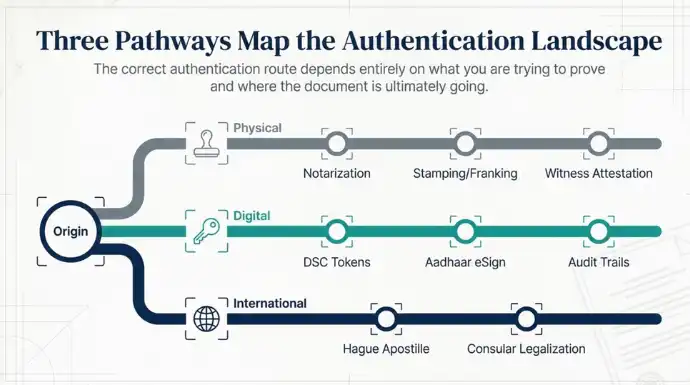
There are three broad methods: physical authentication, digital authentication, and international authentication. Which one you use depends on whether the document stays internal, gets filed with a court or registrar, or travels to another country.
Physical and conventional authentication
- Notarization: a notary public verifies the signers’ identities, witnesses the signing, then adds a signature, stamp, and seal.
- Stamping and franking: many jurisdictions require stamp duty to be paid on stamp paper or through a franking machine before an agreement is admissible as evidence.
- Witness attestation: independent witnesses sign alongside the main parties. This matters most for wills and property deeds.
Digital and electronic authentication
- Digital Signature Certificate (DSC): a token-based signature that uses public-private key cryptography. Any change to the file after signing breaks the cryptographic seal and invalidates it.
- Aadhaar-based eSign: an online signature tied to identity through an OTP sent to the Aadhaar-linked mobile number, governed in India by the Information Technology Act, 2000.
- Audit trails: platforms log IP addresses, timestamps, and email verifications to serve as evidence of intent.
- QR Codes: increasingly used as the bridge between a printed document and its digital source record. A QR Code when linked to a secure url can be used a tamper-proof method to authenticate legal documents.
“A QR Code is only as trustworthy as the page it opens. Anyone can generate a code. What they cannot do is make it resolve on your verified domain, and that domain is the part a verifier should actually be checking.”
Gautam Garg, Founder, QR Mark
| Authentication level | Common method used | What it actually proves |
|---|---|---|
| Basic local contracts | Witness signatures + notary stamp | Identity of the signers and intent to sign |
| Domestic corporate / e-gov | DSC token or Aadhaar eSign | Data integrity and anti-tampering of the signed file |
| Cross-border (Hague members) | Apostille certificate (MEA / Secretary of State) | Legitimacy of the local notary or official abroad |
| Cross-border (non-Hague) | Consular / embassy legalization | Manual embassy-chain verification of officials |
How do you authenticate legal documents in your own country?
For domestic use you usually only need local notarization or registration, with no international step. The exact route splits by country, so here are the two most common.
If you are in the United States
A document for a local court, a real estate transaction, or a business contract only needs state-level notarization.
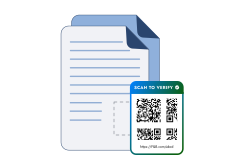
- Physical notarization: find a licensed notary at a bank, UPS store, or library, show a government-issued photo ID, sign in person, and receive the notary’s signature, commission date, and seal. To make your documents instantly verifiable and trustworthy, you can use dynamic QR Codes in the documents.
Tools like QR Mark, link the QR Code to a verification page, which when scanned can help to instantly verify if the document is tampered with or not.
- Remote Online Notarization (RON): where your state allows it, use an approved platform, pass an identity check and a live facial scan, then sign over a recorded video call with a notary who applies a digital seal.
If you are in India
Domestic documents usually need stamp duty paid, plus notarization or registration.
- Stamp duty: most agreements are invalid until the state-mandated stamp duty is paid, via an e-Stamp certificate from an authorized SHCIL centre or a franking machine at a bank.
- Notarization: a government-appointed notary verifies ID such as Aadhaar, PAN, or passport, enters the document in their register, and adds a stamp, signature, and registration number.
- Sub-registrar registration: transfers of immovable property, like sale deeds, gift deeds, and long leases, must be registered under the Registration Act, 1908, in person with two witnesses and biometrics.
- Digital: Aadhaar eSign for electronic contracts, and a DSC token for corporate filings and government tenders.
The same small step fits here too. Once the document is stamped and notarized, add a secure QR Code and confirm the stamped copy they received is the one you actually issued, without a phone call back to your office.
How do you authenticate legal documents for use in other countries?
For international use you need either an apostille or a consular authentication certificate, and the two are not interchangeable. The destination country decides which one applies.
- Use an apostille when the destination is a member of the 1961 Hague Convention. As of late 2025 the Convention has 129 contracting parties, according to the HCCH status table. A single apostille from your country’s designated authority is then accepted in every other member state, with no embassy step.
- Use a consular authentication certificate when the destination is not a Hague member. The document is notarized, reviewed and certified by state officials, then legalized by the destination country’s embassy.
An apostille certifies less than most people assume. It confirms the signature, the capacity of the person who signed, and the seal. It does not certify the content of the document. The HCCH even recommends that authorities print that disclaimer on the apostille itself. So an apostilled contract can have its body altered afterwards and the apostille will still look perfectly valid.
The same workflow change helps here too: issue the document, add a Verification Image, then send it for apostille. The apostille satisfies the legal chain. The Verification Image lets the foreign authority or counterparty confirm the content matches your record without a single email back to you.
How does QR Mark authenticate the legal documents you issue?
QR Mark adds a scannable Verification Image to each document and hosts a verification page on your own domain, so anyone can confirm in seconds that the document is genuine and matches your records. The loop is Embed, Scan, Verify.
- Embed: add the Verification Image to the document. You can do it through the Microsoft Word Add-in or Google Workspace Add-on while you draft, upload a finished PDF, generate in Bulk for a batch of documents, or call the API from your own document system.
- Scan: the recipient scans the QR Code or opens the verification URL on any phone. No app, no login.
- Verify: they land on your verification page and match the details (document name, parties, date, reference number) against what is shown.
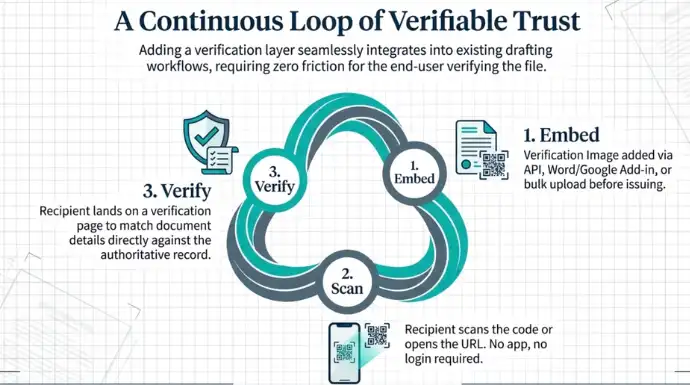
Here is how you can do it step-by-step:
Step 1: Create Your QR Mark Account
Visit qrmark.com and create your account.
With the Free Trial, you can authenticate up to 3 documents per month, making it easy to explore the platform before upgrading.
To learn more about available plans and features, visit the Pricing page.
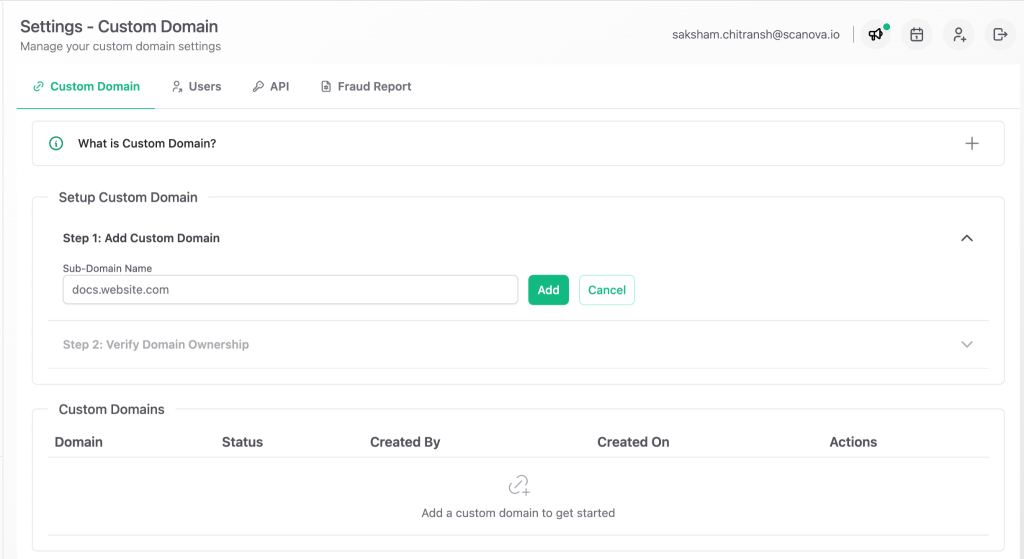
Step 2: Set Up Your Custom Domain
Configure your custom domain to host your verification pages.
During the free trial, you can use the demo domain provided by QR Mark. For production use, a custom domain is strongly recommended because it allows verification pages to be hosted on your organization’s own domain, making them more trustworthy and resistant to spoofing attempts.
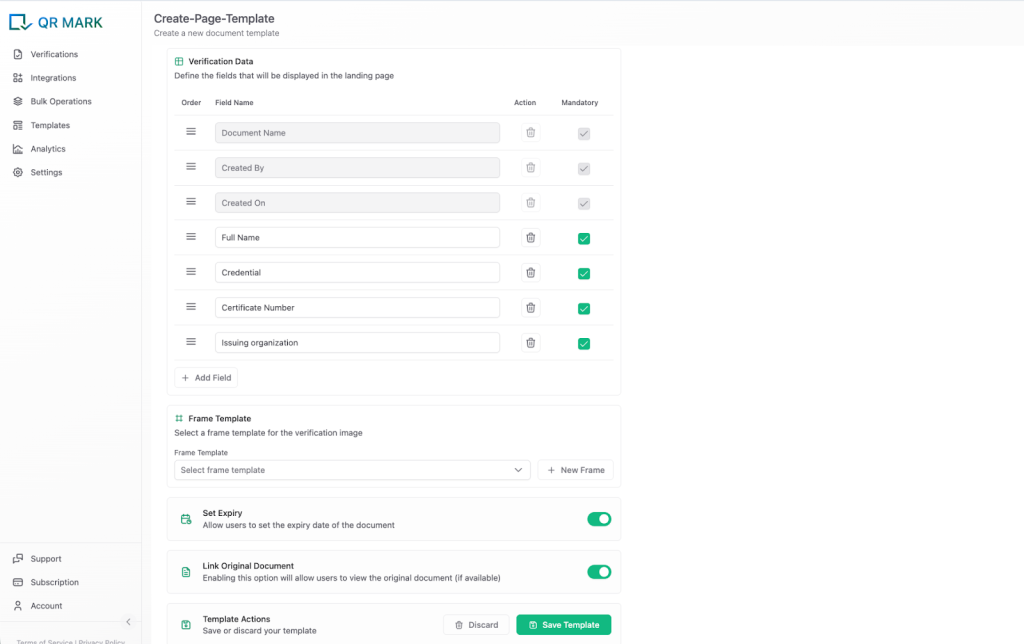
Step 3: Create a Verification Template
From the left sidebar, click Templates to create a verification template.
This is an important step because the information you add to the template will be displayed to anyone verifying the document. Include only the details you want recipients to see.
If you’re issuing confidential or time-sensitive documents, you can also set an expiry date to control the document’s validity.
Step 4: Upload Your Document
Upload your document in PDF format.
Then:
- Select your custom (or demo) domain.
- Choose the verification template you created.
- Enter the verification details you want to display.
Once completed, generate the verification record.
Step 5: Generate and Place the Verification Image
Generate the verification image and place it in the bottom-right corner of your PDF.
Download the updated document. Your document is now ready to be shared or notarized with instant QR-based verification.
The takeaway
Authenticating a legal document has always come down to one question: can the person holding this trust it? Notarization, stamping, registration, and apostille handle the identity and origin side well. They were never built to answer whether the content in your hand matches what was issued, and that is the gap forgers now exploit with a few minutes and an editing tool.
Closing it does not mean replacing anything you already do. It means adding one verification step the recipient can run themselves, on your domain, in seconds.
Frequently asked questions
Is an apostille enough to prove a legal document is authentic?
An apostille proves the signature, the signer’s authority, and the seal are genuine. It does not prove the content of the document is unaltered, and the HCCH recommends that exact disclaimer be printed on the apostille. To confirm the content, you need a separate check, such as a verification page tied to the issuer’s records.
Can a QR Code be trusted on its own for legal document authentication?
No. A QR Code is only a link. It becomes trustworthy when it resolves to a page the verifier can trust, which is why the page should sit on the issuer’s verified domain. A code that opens a generic or unrelated URL proves nothing.
What is the difference between an apostille and an authentication certificate?
Use an apostille when the destination country is a Hague Convention member; it is a single certificate accepted across all 129 member states. Use a consular authentication certificate when the destination is not a member; it requires notarization, state certification, and embassy legalization.
Do recipients need an app to verify a document secured with QR Mark?
No. They scan the Verification Image with any phone camera or open the verification URL in a browser. There is no app to download and no account to create.
Does QR Mark replace notarization or digital signatures?
No. QR Mark is a verification layer, not a signature or encryption tool. You still notarize, register, or apostille as the law requires. The Verification Image adds a fast way for recipients to confirm the document matches your records.
