


TL;DR
Issuing a machine operator certificate shouldn’t stop at creating a PDF. A modern certificate generator should let you issue certificates in bulk, maintain accurate records, and enable instant verification through QR codes. This guide explains the common challenges training providers face, the features to look for in certificate software, and how QR Mark helps you create, issue, and verify machine operator certificates in a streamlined workflow.
Creating a machine operator certificate is easy. Issuing one that anyone can verify instantly is the real challenge.
As training cohorts grow, so do administrative tasks: generating certificates, managing records, responding to verification requests, and dealing with the risk of forged documents. A certificate generator should solve these problems, not add to them.
This guide covers everything you need to know about issuing machine operator certificates from the challenges training providers commonly face and the features to look for in a certificate generator to the step-by-step process of creating and issuing verifiable certificates with QR Mark.
Why issuing operator certificates is harder than it looks?
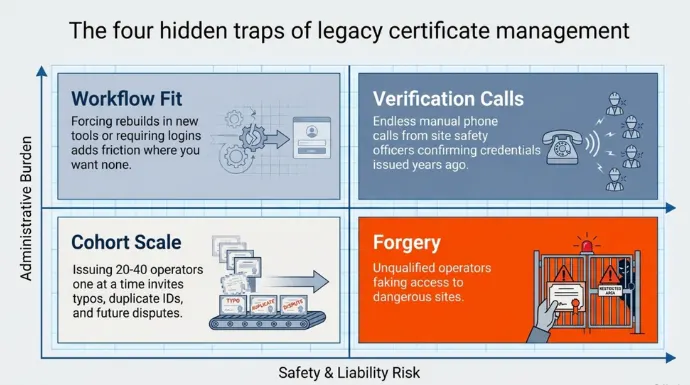
Four critical problems sit around every certificate you send out. None of them are about the design.
- Verification calls
Employers and site safety officers ring to confirm a certificate before letting someone onto a machine. It is manual, and it never stops. Someone calls about a certificate you issued three years ago.
- Forgery
The certificate unlocks paid work on a dangerous site, so there is direct incentive to fake it. On a plain PDF, changing a name, a date, or the equipment class takes minutes and leaves no trace. This can have a direct impact on the revenue you generate.
According to the Association of Certified Fraud Examiners (ACFE) Report to the Nations, organizations lose an average of 5% of annual revenues to internal and occupational fraud, creating high incentives for applicants to fabricate credentials.
- Cohort scale
A class graduates 20 to 40 operators at once. Issuing one at a time invites typos and duplicate IDs, and every error becomes a future dispute.
- Workflow fit
You already build certificates in Word, Google Docs, an LMS, or Canva. A tool that forces a rebuild, or makes the person checking create a login, adds friction exactly where you want none.
How to issue a machine operator certificate with QR Mark?
Here is the full loop, from template to a verifiable certificate in a recipient’s hands.
- Build your certificate once in the template designer, or upload your existing design as the background. Map the fields you want to include in your certificate.
2. Download the sample CSV, fill it with your roster, and upload it as CSV, XLS, or XLSX. You can also type rows straight into the in-app grid. You can choose bulk or single upload based on your requirements.
Note: Make sure the fields you have in your CSC/XLS/XLSX file are mapped according to your attributes mentioned while designing your certificate. For reference see the image before we started the steps.
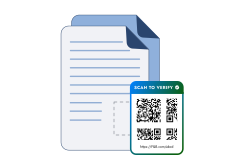
3. QR Mark creates one individual PDF per participant. When you use a tool like QR Mark to generate a certificate, a QR Code is automatically generated on the certificate that anyone can scan and verify the authenticity of the cme certificate.
4. Download the batch as a ZIP or a merged PDF, or send it out by email.
Why choose QR Mark over other certificate generators?
A good machine operator certificate generator should make your job easier. Features like customizable templates, bulk certificate generation, automated recipient data import, digital signatures, and easy certificate management can save hours of manual work and help you scale your certification process.
But once those essentials are covered, one factor matters more than anything else: verification.
A machine operator certificate is not a document you can afford to get wrong. If a forged certificate allows an unqualified operator onto heavy machinery, the consequences go far beyond administrative errors. It puts projects, equipment, and most importantly, people’s safety at risk.
That’s why the best certificate generators don’t just create certificates—they make them instantly verifiable. A QR code embedded directly on the certificate allows employers, inspectors, and clients to confirm its authenticity in seconds without contacting your team or checking paper records.
QR Mark combines both. You get the features you’d expect from a modern certificate generator such as custom certificate templates, bulk issuance, and streamlined certificate management while making verification the core of every certificate you issue.
Every certificate includes a unique QR code that links to a live verification page, making authenticity simple to prove whenever and wherever it’s needed.
With QR Mark, you get all the freedom to design, issue in bulk, and a verification that proves authenticity.
But sometimes, just for your convenience you should look at other options too. Here is how each compares to QR Mark.
|
Solution |
Verify by scanning | On your own domain | Keeps your design | Best for |
|---|---|---|---|---|
| Word / PDF template | No | No | Yes | Cheapest option, no verification |
| Canva | No | No | Yes | Best-looking certificate, no verification |
| Credly | Yes | No, on Credly | No | Enterprise badge networks trainees share |
| Certifier | Yes | Limited (Additional Charge) | No | Automated certificate and badge issuing |
| Accredible / Sertifier | Yes | Limited (Additional Charge) | No | Digital credentials and badges at scale |
| QR Mark | Yes | Yes | Yes | Making your own certificate verifiable and tamper-evident |
Conclusion
Issuing a machine operator certificate shouldn’t end when you click Generate. The real value comes from making every certificate easy to trust, easy to verify, and easy to manage years after it has been issued.
A modern certificate generator should let you design certificates your way, issue them individually or in bulk, maintain a complete issuance record, and allow employers to verify authenticity without contacting your team.
QR Mark’s Certificate Generator combines all of these capabilities into one workflow. Whether you’re issuing certificates for a single trainee or an entire graduating cohort, every certificate receives its own verification record, helping reduce administrative work while giving employers confidence that the credential they’re reviewing is authentic.
If your organization wants to move beyond static PDFs and manual verification requests, QR Mark provides a simple way to issue machine operator certificates that are verifiable from the moment they’re created.
FAQs
1. What information should a machine operator certificate include?
A certificate typically includes:
- Recipient’s name
- Certificate ID
- Training program or equipment type
- Date of issue
- Issuing organization
- Authorized signatures
- QR code or verification method
2. Can I email certificates directly after generating them?
Yes, many tools offer this service. After certificates are generated, you can download them as individual PDFs, a ZIP archive, or a merged PDF, and distribute them by email according to your workflow.
3. What happens if someone tries to edit a certificate PDF?
Changing information on a PDF does not change the verification record if you are using a tool like QR Mark. When the QR code is scanned, the verification page shows the original issued details, making unauthorized alterations easier to detect.
4. Why is QR code verification better than manual verification?
QR code verification is available instantly, works around the clock, reduces administrative workload, and allows employers to verify credentials without waiting for emails or phone confirmations from the issuing organization.
5. Can I issue certificates for different types of machine operators?
Yes. A certificate generator should support certificates for different equipment types, such as forklifts, cranes, excavators, loaders, bulldozers, backhoes, and other heavy machinery, using separate templates or dynamic fields.
6. Should every machine operator certificate have a unique certificate ID?
Yes. A unique certificate ID helps distinguish every issued certificate and makes it easier to retrieve, verify, and audit records later. If you issue a machine operator certificate using QR Mark, it will automatically add a QR Code that functions as a unique certificate ID.
