

TL;DR
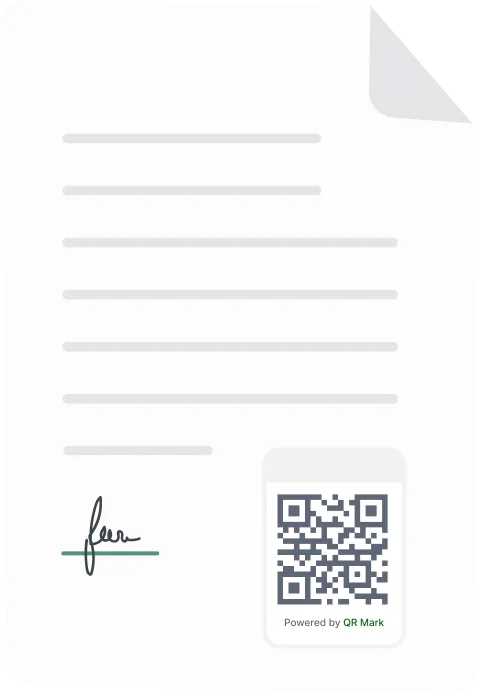
The right legal document verification service depends on what you need to catch. Identity tools confirm who signed. E-signature trails secure files inside their own platform. QR Mark adds a verification layer to the document itself, so anyone can confirm a contract, filing, or deed is genuine by scanning it, on screen or on paper, without special software.
As legal documents are increasingly created, shared, and stored digitally, proving their authenticity requires more than traditional paper-based security measures. This guide focuses on digital methods of verifying the authenticity of legal documents after they have been issued and shared.
A legal document is only as trustworthy as its ability to prove it is genuine. While signatures, stamps, electronic signatures, and other document security measures all play an important role, they don’t solve the same problem. Some verify who signed a document, others restrict access, while a few help detect whether a document has been altered after it was issued.
A legal document verification service helps law firms prove that contracts, legal opinions, deeds, affidavits, and other legal documents are authentic even after they have been distributed.
However, not every digital verification solution works the same way. In this guide, we’ll compare the most common legal document verification services, explain how they work, and help you choose the right solution for your firm’s needs.
What Problem Should a Legal Document Verification Service Solve for Your Firm?
Before taking a step towards legal document authentication, you should be aware of the biggest risk your firm faces after a document is issued.
Some of the most common problems include:
- No reliable way to secure issued documents
Once contracts, legal opinions, affidavits, or deeds are sent to clients or third parties, many firms have no mechanism to prove that the document remains authentic.
- Traditional security measures are easy to bypass
Physical signatures, stamps, embossed seals, or watermarks may help identify the issuing firm, but they cannot reliably detect whether a digital or printed document has been altered after issuance.
- Documents leave the firm’s control permanently
After a document is emailed, downloaded, or printed, it can be copied, edited, or redistributed. Without a verification mechanism, the firm has no practical way to help recipients distinguish the genuine version from a modified one.
- No way to offer verifiable trust to clients
Many firms rely solely on visual security features, providing no simple method for clients, courts, banks, or regulators to independently confirm that a document is genuine.
- Previous incidents of forgery or document misuse
Firms that have experienced altered contracts, forged legal documents, or disputes over authenticity often require a stronger document verification process to reduce legal, financial, and reputational risk.
A legal document verification service should directly address these challenges by giving recipients a reliable way to confirm that a document was genuinely issued by your firm and has not been misrepresented.
How Do Current Solutions Solve The Problem of Legal Document Verification?
Over the years, organizations have adopted different approaches to secure legal documents and reduce the risk of forgery. Understanding how these solutions work can help law firms choose the right level of protection.
QR Code Document Verification
QR Code for verification connects every document to an official verification record maintained by the issuing organization.
Instead of relying solely on visual security features, recipients scan a QR code to access a verification page where they can confirm key document details against the copy in hand.
This approach is particularly useful for legal documents because verification can be performed quickly by clients, courts, banks, regulators, or business partners without requiring specialized software.
It also allows firms to decide how much information is displayed during verification, helping balance transparency with confidentiality.
Password Protection and Document Access Controls
Many firms protect legal documents by encrypting PDF files or restricting who can open them through document management systems. These solutions reduce the risk of unauthorized access while the document is being shared.
The limitation is that they secure access, not authenticity. After a document has been opened, downloaded, or printed, recipients still have no simple way to verify that the version they possess is the official one issued by the firm.
Electronic Signatures and Digital Certificates
Electronic signature platforms verify the identity of the people signing a document and maintain an audit trail of the signing process.
They are widely used for executing agreements and demonstrating that a document was signed by authorized parties.
While they strengthen the signing process, they are not primarily designed for third-party document verification.
Clients, banks, courts, or regulators receiving the document later may still require an independent method to confirm that the copy they received matches the firm’s official version.
Cryptographic Hashing and Document Anchoring
Document anchoring solutions create a cryptographic hash, a unique digital fingerprint for every document. That fingerprint is stored on a secure ledger or blockchain.
If even a single character changes, the hash changes, making alterations immediately detectable.
This provides strong evidence that a document has remained unchanged since it was issued.
However, verification often requires technical tools or access to the anchoring platform, making it less intuitive for everyday recipients who simply want to confirm a document’s authenticity.
The table below will help you in choosing the best legal document verification service for you.
| Solution | How It Solves the Problem | Best For | Key Limitation |
| Physical stamps & seals | Makes documents visually identifiable | Paper documents | Can be copied and manually forged |
| Password protection | Prevents unauthorized access | Secure document sharing | Doesn’t prove authenticity after distribution |
| Electronic signatures | Verifies signer identity and records execution | Signing agreements | Doesn’t provide simple post-issuance verification |
| Cryptographic hashing | Detects whether a document has been altered | High-integrity document validation | Verification can be technical |
| QR-based verification | Lets third parties instantly verify authenticity against the issuer’s official record | Contracts, legal opinions, deeds, affidavits | Requires maintaining a verification record |
How to Digitally Verify Legal Documents Using QR Mark: Step-by-Step
I will tell you how to do this with QR Mark. Follow these steps to make your document verification instant with QR Mark.
Step 1: Create Your QR Mark Account
Start by creating an account on QR Mark. Once you’re signed in, you’ll have access to the dashboard where you can manage document verifications, templates, and issued documents.
Step 2: Set Up Your Custom Domain
Before issuing documents, configure your firm’s custom domain.
This is one of the most important steps in the process. Instead of directing recipients to a generic verification website, every QR code points to a verification page hosted on your firm’s own domain. This strengthens trust by allowing recipients to verify that the document is genuinely associated with your organization.
Step 3: Create a Verification Template
A verification template defines the information that will appear when someone scans the QR code.
For example, you can choose to display:
- Document or agreement ID
- Client or party names
- Execution date
- Document status
- Validity or expiry date
You decide exactly which fields are visible, allowing recipients to verify authenticity without exposing the full document.
Step 4: Create a New Verification
From the dashboard, click Create Verification and upload the legal document you want to protect.
QR Mark supports both individual document verification and bulk verification for organizations issuing large volumes of documents.
Step 5: Enter the Verification Details
Fill in the information that should appear on the verification page. This information becomes the official record that recipients will compare against the document they receive.
Review the details carefully before generating the verification image.
Step 6: Generate and Place the Verification Image
Click Generate Verification Image.
QR Mark generates a verification image containing a secure QR code and verification URL. Place this image anywhere on your legal document, such as the footer, signature page, or alongside the firm’s seal.
Once the document is issued, anyone can scan the QR code using a smartphone camera to access the verification page and confirm that the document matches the official record maintained by your firm.
What makes QR Mark different?
QR Mark adds a verification layer to the document itself instead of guarding a file inside one platform. It places a Verification Image (a QR code plus a verification URL) on the document.
The document becomes self-verifying: anyone can confirm it is genuine without installing enterprise software or logging in.
The loop is simple: Embed the Verification Image, the recipient scans it, and they land on a verification page that shows the key fields the issuer chose.
If the details on the page match the document in hand, it checks out. If they do not, the document is flagged.
This is the point most tools miss. If a lawyer prints a contract, court filing, or deed onto paper, the printed Verification Image still works.
Scanning it opens the same verification page, served from the issuer’s own domain, that links back to the original record.
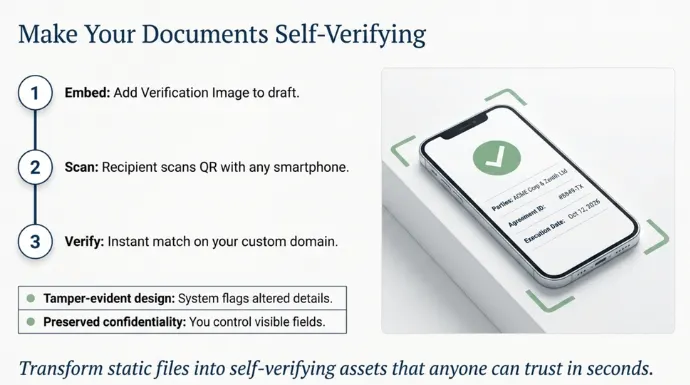
Verification survives the jump from screen to paper, which is exactly where e-signature trails and identity checks stop being useful.
Law firms like Arthashastra Legal are already making the switch by choosing QR Code for document verification and staying ahead of their competitors.
“A signature proves who signed. It does not travel with the document once it is printed or forwarded. QR Mark verifies the document itself, on your own domain, so a counterparty can trust it in seconds.” Gautam Garg, Founder & CEO, QR Mark.
Conclusion
As we’ve seen, different solutions address different parts of this problem.
Physical security features help deter casual forgery, password protection controls access, electronic signatures verify who signed a document, and cryptographic hashing detects unauthorized changes.
Each plays an important role, but they don’t all make it easy for clients, courts, banks, or regulators to verify a document after it has been shared.
That’s where QR-based document verification offers a different approach. By linking every document to an official verification record, it gives recipients a fast and reliable way to confirm authenticity without requiring specialized software or technical knowledge.
If your firm regularly issues contracts, legal opinions, affidavits, deeds, or other high-value legal documents, implementing a verification layer at the point of issuance can significantly reduce disputes over authenticity while giving every recipient a simple way to verify the document in seconds.
FAQs
Can legal documents be verified after they are printed?
Yes. Some document verification solutions, such as QR Mark, allow printed documents to be verified by scanning a QR code. This enables recipients to compare the document with the issuer’s official verification record without requiring specialized software.
Is QR-based document verification legally valid?
A QR code itself is not a legal signature. Instead, it acts as a verification mechanism by linking the document to an official record maintained by the issuing organization. It helps recipients confirm authenticity but does not replace legal execution requirements such as signatures or notarization.
Which legal documents should be verified?
Organizations commonly verify contracts, legal opinions, affidavits, deeds, powers of attorney, compliance certificates, corporate resolutions, court filings, and other official legal documents.
Is document verification different from document encryption?
Yes. Encryption controls who can access a document, while document verification confirms whether the document is genuine and has remained unchanged after issuance.
Do legal document verification services replace notarization?
No. Notarization and document verification serve different purposes. A verification service helps confirm authenticity, while notarization confirms the identity of signatories and witnessing procedures.
Can legal documents be verified without contacting the issuing firm?
Yes. Modern document verification platforms allow recipients to verify documents independently. With QR Mark, recipients simply scan the QR Code to access a verification page hosted on the issuer’s custom domain, eliminating the need to call or email the firm.
