



TL;DR
A document authentication QR code is a scannable code that links a document to a verification page confirming who issued it and whether the details are genuine. Scan it with any phone camera and you see the issuer’s record, no app or login needed. This guide covers how these codes work, the main types, how to add one to a PDF, where they are used across industries, and the mistakes to avoid.
A document authentication QR Code is a unique, scannable code placed on an official document that links directly to a secure online verification record maintained by the issuing organisation.
Instead of inspecting physical security features, anyone can scan the QR Code with their smartphone to instantly confirm whether the document is authentic.
What makes an authentication QR Code effective is that it connects the physical or digital document to its original, verified record. Even if someone edits, copies, or tampers with the document, the QR Code reveals the authentic information issued by the organisation, making it far easier to detect fraud while simplifying the verification process for everyone involved.
In this guide, you’ll learn how document authentication QR Codes work, why organisations are increasingly adopting them, and how you can use them to protect your documents from fraud while making verification almost effortless.
Why QR codes for document authentication are becoming a trend in 2026?
Because QR code authentication turns a slow, manual chase into an instant self-serve check, and because scanning is now an everyday habit. When verification is one scan away, the people who receive your documents stop emailing you to ask if they are real.
Forgery deterrence
QR codes help detect forgery through custom domain, server-side scan tracking, and cryptographic validation. When combined with secure databases or advanced printing techniques, they make fake products and documents easy to spot.
Sector rules
Some regulators now expect it.
In pharma industry, the CDSCO mandate of 2022 makes it compulsory to include QR Code on 300 different types of medicine.
Similarly, The University Grants Commission directed universities across India to add QR codes to degree certificates for verification and to curb duplication (UGC, 2019).
Instant verification
QR Codes enable instant verification through a simple scan. With most of tools, any smartphone camera works. Anyone with the access to QR Code can scan and easily verify the details and confirm the authenticity of the document.
Brand trust
When the verification page loads on your own domain, the verifier sees your brand, not a generic link. That is the difference between a real check and a random QR Code link.
Lower cost than manual checks
Every verification your recipients self-serve is one your team does not spend time answering. Manual verification costs time, and time costs money. Teams often waste hours cross-referencing databases, sending follow-up emails, or validating signatures by hand.
Built-in authentication, like QR Codes, cuts that overhead drastically. Scanning a code, confirming identity, and logging the event can all happen instantly, without involving multiple people or platforms.
What are the main types of authentication QR codes, and how do they work?
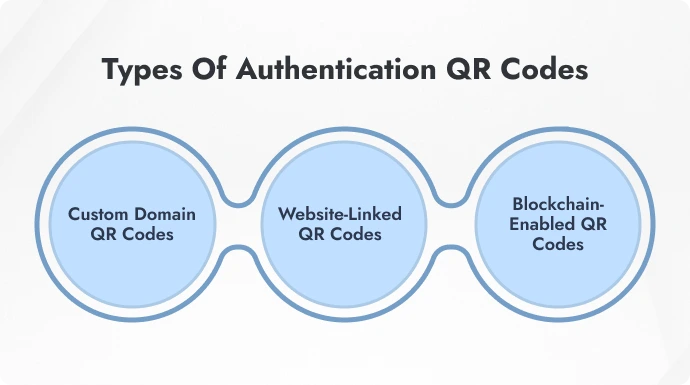
Not all authentication QR Codes work the same way. Some offer basic verification. Others provide deeper trust signals through domain control or blockchain.
Here are three of the most effective types being used today:
1. Custom domain QR Codes
These QR Codes open a secure verification page hosted on the issuer’s own domain. The page typically shows details like the document holder’s name, unique ID, creation date, and issuing authority.
Only domain owners can generate these codes. That’s because creating and linking them requires dashboard-level access through a verified platform. It ensures no third party can issue or spoof documents under your domain.
This setup builds trust instantly. When users scan the code and see your domain in the URL, they know the source is genuine. It also lowers phishing risk and reinforces brand authority.
It keeps full control with the issuing organization and makes validation feel secure and official.
Pro Tip: Use HTTPS with SSL certificates and custom subdomains for stronger security and trust signals.
How do you add an authentication QR code to a document using QR Mark?
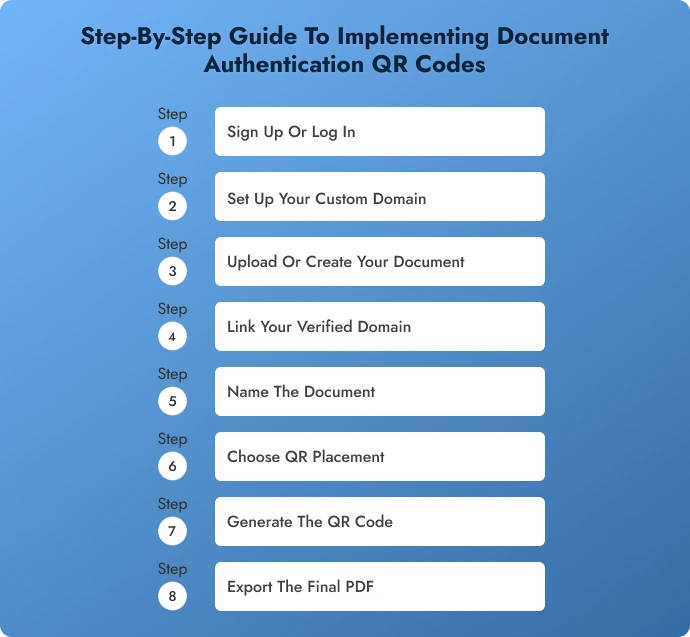
You sign up, set up your domain, add the document, generate a verification image, and export the file. Using QR Mark it takes a few minutes and no developer. I have used the PDF upload path below, but any secure provider follows similar steps.
-
Sign up or log in
Go to qrmark.com and create an account, or log in if you already have one. -
Set up your Custom Domain
In settings, add a subdomain like verification.yourcompany.com and follow the one-time verification. This is what makes your codes resolve on your brand, not a generic link. -
Add your document
Open Verifications, click Create Verification, and upload the PDF. Prefer to work inside your document tool? Use the Microsoft Word Add-in or the Google Workspace Add-on to add verification as you write. -
Select your verified domain
Ignore the QR Mark demo domain and choose the domain you set up in step 2. -
Name the document
Give it a clear, unique name. This shows on the verification page and makes records easy to track. -
Choose placement and generate
Pick where the code sits, then click Generate Verification Image. QR Mark embeds a scannable Verification Image into the file. -
Export the final PDF
Click Export and you are done. The document now carries a built-in verification code.
2. Website-linked QR Codes
This type uses a regular URL QR Code that links to an existing website, database, or online record.
It’s commonly used for documents where verification can be done by checking a hosted list, an open record, or a public profile. For example, linking a certificate to a page that lists graduates or verified participants.
It’s easy to implement and works across many platforms.
But here’s the catch: Anyone can create a URL QR Code, and unless the site itself is secured or access-controlled, the verification lacks deeper protection. There’s no issuer-side gatekeeping.
3. Blockchain-enabled QR Codes
These QR Codes point to a record that’s stored on a blockchain network.
Why does that matter? Once a document is recorded on the blockchain, it can’t be changed or deleted. Every verification action is logged, timestamped, and public. That makes forgery nearly impossible.
It’s especially useful for industries where long-term proof of authenticity is required, like education, licensing, and compliance.
That said, the user experience can be a bit complex. Verifiers may need guidance or a user-friendly interface to interpret blockchain records, especially if the platform exposes raw data or hashes.
Where are authentication QR Codes used across industries?
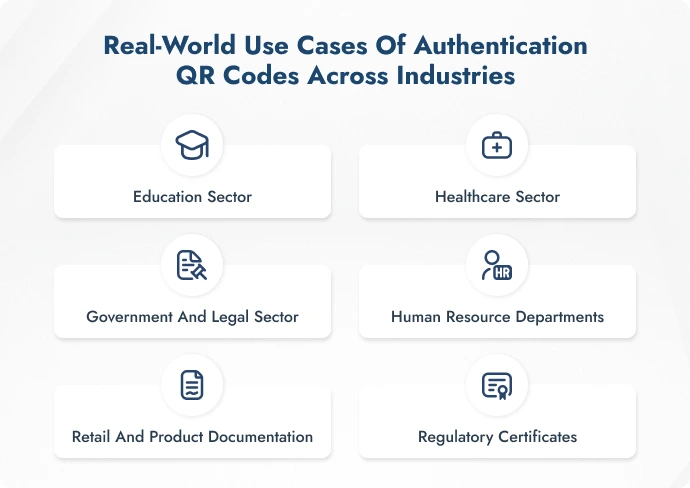
Authentication QR Codes aren’t just for tech companies or startups. They’re being used every day across sectors where document integrity matters.
1. Education sector
QR Code authentication is becoming a standard in education, where forged documents can lead to false admissions, job placements, or immigration approvals.
By embedding verifiable QR Codes, institutions ensure that only legitimate academic records are recognized.
Common documents:
-
Diplomas and Degrees
Help prevent fake qualifications. The QR Code confirms the issuing institution and degree awarded, reducing credential fraud. -
Letters of Recommendation (LORs)
Prevent unauthorized edits or forged endorsements. QR Codes verify both authorship and authenticity. -
Course Completion Certificates
Especially in online learning, QR Codes help verify that the course was actually completed under the stated provider. -
Transcripts and Grade Sheets
Ensure grades haven’t been manipulated. Recruiters or universities can instantly validate academic performance from the source.
The University Grants Commission (UGC) in India has mandated the use of QR Codes on degree certificates to prevent forgery and ease verification. This initiative helps institutions ensure that only legitimate qualifications are accepted for jobs, further education, or immigration.
2. Healthcare sector
In healthcare, inaccurate or forged documents don’t just cost money; they can risk lives. Whether it’s a fake prescription, altered report, or forged qualification, the damage can be irreversible.
That’s why QR Code authentication online is quickly becoming a compliance and safety essential.
Common documents:
-
Electronic prescriptions
Prevents the misuse of forged or duplicated prescriptions. Scanning the QR Code lets pharmacies verify that the prescription was issued by a licensed provider, on a specific date, and hasn’t been altered since. -
Diagnostic reports
Ensures reports (like blood tests, X-rays, MRIs) haven’t been edited or falsified, whether for insurance claims or misdiagnosis cover-ups. QR Codes link back to tamper-proof digital records from verified labs. -
Doctor certifications
Helps hospitals, clinics, and patients verify a physician’s credentials in seconds. Prevents incidents involving impersonators or unqualified practitioners. -
Patient discharge summaries
Protects against fake discharge documents used in insurance fraud or to avoid follow-up care. QR authentication confirms document origin, patient details, and treating facility.
In Turkey, a QR Code Identity Tag system has been introduced to improve patient identification and access to medical records. Patients receive a unique QR Code that can be scanned by medical personnel to retrieve vital information, including medical history and treatment status.
3. Government and legal sector
Governments and legal institutions issue documents that carry significant authority, making them prime targets for forgery.
QR Code verification ensures that these documents remain verifiable and tamper-proof, even when shared digitally or across borders.
Common documents:
-
National IDs and e-passports
Protects against identity fraud by allowing instant verification of the issuing authority, document validity, and holder details. QR Codes ensure that the ID hasn’t been counterfeited or altered for malicious use. -
Voter registration cards
Helps prevent duplicate or fake voter identities during elections. Scanning the QR Code can verify the cardholder’s eligibility and registration status in real-time. -
Marriage licenses and legal contracts
Confirms that the document was issued or notarized by a recognized authority. Prevents manipulation of dates, names, or clauses in legally binding agreements. -
Court-issued summons or notices
Ensures recipients are responding to legitimate court communications, not fake notices meant to intimidate, extort, or mislead. The QR Code links back to the court’s secure case database.
Did you know? Bhutan’s National Digital Identity (NDI) program provides citizens with a foundational ID that includes a QR Code linking to their biometric and personal information.
4. Human resource departments
HR teams handle documents that directly impact employment, compensation, and compliance.
These records are often shared with third parties such as banks, auditors, and background verifiers. This makes authenticity critical.
Common documents:
-
NDAs and confidentiality agreements
Verifies that the agreement was signed with proper authority and hasn’t been altered post-signing. Prevents fake NDAs from being used to falsely implicate or pressure individuals. -
Salary slips and tax forms
Helps prevent forged payslips being used to inflate income for loans or visas. Verifiers can scan and confirm exact salary details and issue HR department credentials. -
Offer letters and appointment orders
Confirms whether an employment offer is legitimate. Especially useful in preventing fake job scams where fraudsters send false offer letters using a company’s name. -
Experience certificates
Protects against falsified work history. Verifying a QR Code can reveal if the document actually came from the issuing company and matches their employment records.
5. Retail and product documentation
In product-heavy industries, especially luxury, electronics, and automotive, documentation plays a key role in authenticity.
It also supports customer service and after-sales processes. But these documents are frequently forged to resell counterfeit items or make false warranty claims.
Common documents:
-
Invoices
Confirms the purchase details and source of sale. Prevents fraudulent claims related to return, exchange, or warranty by verifying that the invoice came from an authorized seller. -
Warranty cards
Verifies warranty duration and legitimacy. Helps prevent fake warranty claims using photocopied or doctored documents. -
Authenticity certificates for luxury goods
Confirms the origin and genuineness of high-value items like designer apparel, watches, jewelry, or collectibles. Useful in curbing the resale of counterfeits with forged certificates.
Louis Vuitton uses QR Codes on authenticity cards and warranty documents. Scanning these codes links customers to secure verification pages that confirm the product’s origin and warranty status.
6. Regulatory certificates
Regulatory documents prove compliance with important safety, quality, and environmental standards.
However, these certificates are often altered, counterfeited, or reused by unauthorized parties, undermining their value and trust.
Adding a document authentication QR Code lets regulatory bodies issue tamper-proof certificates that anyone including enforcement officers, buyers, or the public can instantly verify.
For example, food safety certificates such as FSSAI (India), FDA (USA), or EFSA (EU) approvals ensure food producers meet strict hygiene and safety rules.
By embedding an authentication QR Code, these certificates become easy to confirm on the spot, preventing misuse or forgery.
What are the common mistakes to avoid when using document authentication QR codes?
1. Failing to maintain updated verification data
The QR Code may be secure, but if the backend it points to is outdated or no longer functional, it undermines the whole authentication system.
This often happens when links break, databases aren’t synced, or documents are revised but not re-linked.
Fix: If your QR Code is linked to a live website or database, ensure it reflects real-time changes like updated status, revocation, or replacement.
If you’re using an advanced solution like custom domain verification, make sure verification is not accidentally disabled from the backend.,And, also ensure that your tool subscription is active and maintained.
2. Skipping user education
Even the most secure document can go unchecked if users don’t know how or why to verify it. This is especially common when issuing documents to the public, students, or patients who aren’t familiar with QR-based verification.
Fix: Include a short instruction next to the QR Code or in the covering message. Train internal stakeholders like HR teams, admin staff, or enforcement officers on the importance checking authenticity.
3. Poor QR Code placement on documents
Incorrect placement can affect usability, such as positioning the QR Code near folds, on the edge, or over images or colored backgrounds.
Additionally, setting the code size too small can make it unreadable, while making it too large may interfere with important content.
Fix: Place the QR Code in a clean and flat area, ideally in a document corner or at the center-bottom.
Use a plain background with sufficient white space around the code for better visibility. Maintain a moderate size: large enough to scan easily but not so big that it clutters the layout.
4. Not testing across devices and environments
QR Codes can behave differently across smartphones, lighting conditions, and surfaces. A code that works fine on screen may fail when printed or scanned under glare or shadows.
Fix: Test across multiple smartphones, screen sizes, and lighting environments. If the document will be printed, verify that the printed QR Code scans properly in normal and low-light conditions and on different paper types.
5. Using untrusted or free QR Code tools
Free generators may store data on unsecured servers, introduce branding you can’t control, or lack compliance with data protection laws.
Fix: Choose enterprise-grade QR Code tools with built-in encryption, access control, and GDPR/ISO compliance. Ensure that data linked to the code stays secure and private.
The Bottom Line
In a world where trust is fragile and document fraud is becoming more sophisticated, authentication QR Codes offer a smarter defense. They don’t just claim a document is real, they prove it, instantly and securely.
Whether you’re a university, hospital, government body, or business, adding authentication QR Codes is no longer just a best practice. It’s quickly becoming the standard.
Because in 2026 and beyond, verification shouldn’t be complicated. It should be clear, instant, and impossible to fake.
Got questions or unsure how this fits into your workflow? Drop a comment below, we’re here to help.
FAQs: Document authentication QR Code
1. Can QR Code be used for authentication?
Yes, QR Codes can absolutely be used for authentication. In fact, they’re now widely used to verify documents, certificates, ID cards, and even products.
When a QR Code is linked to a secure backend, like a database or a verification portal, it becomes a quick way for someone to check whether the document or item is genuine.
The QR Code itself isn’t the authentication, but it gives you access to real-time data that proves authenticity.
2. Is a QR Code proof of authenticity?
Not by itself. A QR Code is just a gateway that points to information. What makes it proof of authenticity is where it leads.
If it takes you to a secure verification page hosted by the original issuer (like a university, government body, or company), and that page confirms the document’s details, then yes. It becomes a valid proof of authenticity.
But a random QR Code without a trusted verification system behind it doesn’t mean much.
3. How do I create a QR Code for authentication?
Go to qrmark.com > Sign up or log in > Go to Settings > Add your custom domain name and verify it > Go to Verifications > Click on Create Verification > Upload your document as a PDF > Click Generate Verification Image > Export the verified PDF with the QR Code.
4. How to check the authenticity of a QR Code?
Start by scanning the QR Code using your phone’s camera or any QR scanner app.
Then look at where it takes you. Is the link from a trusted organization or domain? Does the page show matching details of the document or product you’re verifying?
Authentic QR Codes typically lead to a secure, verifiable webpage. These often have official branding, digital signatures, or a validation message.
If it just opens a random site with no verification info, or looks suspicious, then it may not be trustworthy.
5. How do I scan a QR Code for authentication?
It’s simple. Just open your phone’s camera and point it at the QR Code. Most smartphones will automatically detect it and show a clickable link.
Tap the link to open the verification page. If your camera doesn’t support QR scanning, you can use any free QR Code scanner app.
Once scanned, make sure the link leads to a legitimate verification source, look for correct domain names, matching document details, or a status like “Valid” or “Verified.”
