

If a document can’t be verified instantly, it can’t be trusted. This guide explains both sides of the process—how issuers (universities, companies, hospitals) embed verification into documents, and how verifiers (HR teams, admissions offices, inspectors) confirm authenticity. It also covers the four main verification methods, key challenges, and where tools like
QR Mark fit in.
A university issues degree certificates of their latest batch. The logo is correct and they have also used a seal that looks official. Nothing seems wrong.
Months later, similar certificates start showing up fabricated and reused. The university is left wondering where the process failed and why can’t they be detected.
This problem needs to be addressed from two sides.
If you are an issuer (a university, a hospital, a company), you need a process that makes every document you produce verifiable.
If you receive documents (for hiring, applications, medical reports, or inspections), you need a reliable way to confirm that what you are holding is genuine.
This guide covers exactly that.
What Is a Document Verification Process?
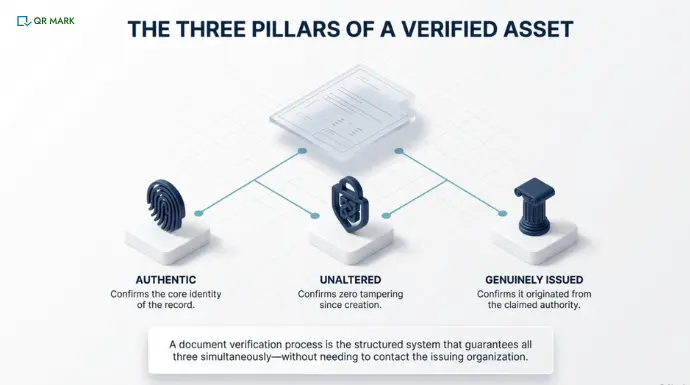
A document verification process is a structured way to confirm whether a document is authentic, unaltered, and issued by the organization it claims to represent.
The process depends on both sides. When an issuer builds in verifiability and a verifier knows how to use it, document fraud becomes extremely difficult to execute without detection.
Why is understanding the document verification process necessary?
Understanding the document verification process helps you detect forged documents and verify the identity or credentials of the person submitting them.
Research from AuthBridge shows that about 28% of education discrepancies found during verification involve fake or manipulated degrees or certificates.
Some common examples include:
- Edited salary slips
- Fake experience certificates
- Altered academic transcripts
- Forged internship or training certificates
“We can’t have single solutions. We need a multilayered approach to stay a step ahead of these issues.”
— Simon Horswell, Senior Fraud Expert
Horswell’s point is backed by data. According to Entrust’s 2025 Identity Fraud Report, digital document forgeries surpassed physical counterfeits for the first time in 2024. They now account for 57% of all document fraud and are growing at 244% annually. The tools needed to create convincing fakes are now accessible to anyone with a laptop.
At QR Mark, we have seen this play out not just with academic documents but across employment, medical, and compliance contexts.
How Do You Set Up a Document Verification Process if You Are an Issuer?
If your organization issues official documents, you build a verification system so that anyone who receives one of your documents can confirm instantly and independently that it came from you and has not been altered.
Here is how to build that system from the ground up.
Step 1: Define what documents need verification
Start by listing every document your organization officially issues that leaves your premises and is presented as proof of something.
A university issues degrees, transcripts, and enrollment letters. A company issues offer letters, experience certificates, and salary slips. A hospital issues discharge summaries, bills, and diagnostic reports.
Rank them by risk. A forged degree certificate carries far more consequence than a routine internal memo.
Step 2: Design a standard document issuance procedure
Your official documents need to be so standardized that any changes are immediately visible.
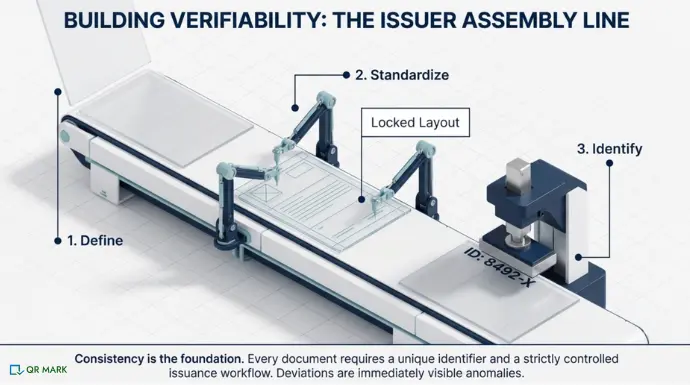
A standard issuance procedure needs three elements:
- A unique document ID. Every document should carry a unique identifier. For a university, this could be the student’s roll number combined with the year of issue.
- A fixed layout and design. Define and lock the layout: margins, fonts, logo placement, signature blocks, seal positions.
- A controlled issuance workflow. Define who can issue documents, who signs off, and how each document is logged before it goes out.
For example, Create a structure like: ORG-YEAR-DEPT-UNIQUE NUMBER.
In reality, it looks like this, A student from Yale University from batch 2026-2029, of the Computer Science Department with a student enrolled at 30th place will have its unique ID like, Yale2026CS30.
Step 3: Build a centralized database of issued documents
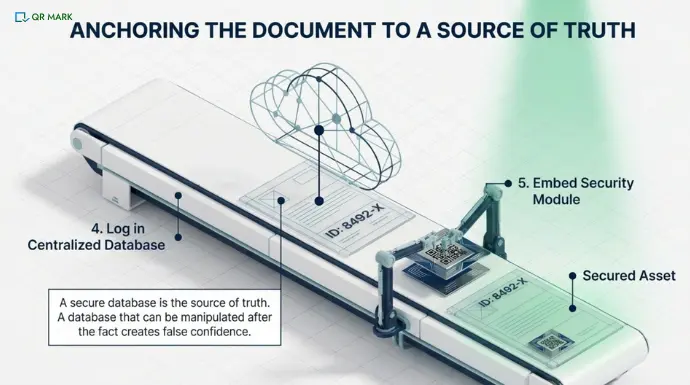
Every document you issue should be logged in a centralized, secure database before it is sent.
This database is the source of truth that all verification relies on. Each record should include at minimum: the document’s unique ID, the recipient’s name and key details, the date of issue, the issuing authority’s name, and the document’s current validity status.
The database needs to be both secure and accessible. Secure so no one can alter records after the fact, and accessible so a verifier can pull up document details in seconds.
Step 4: Add a verification method
A verification method is a feature embedded in the document that allows any external party to confirm its authenticity without needing to call, email, or wait. It must be unique to each document and difficult to replicate.
Here are the four verification methods currently in use, with an honest assessment of each:
1. Blockchain
Blockchain stores a cryptographic hash of each document on a distributed basis. Any alteration to the document produces a different hash, making tampering immediately detectable.
2. QR Codes (with a linked secure database)
A QR Code embedded in a document links directly to a secure verification page hosted by the issuing organization. When scanned, the page displays the original document details: name, date, issuing authority, validity.
QR Mark is built precisely for this. Organizations embed a unique, dynamic QR Code into any document — whether in Microsoft Word, Google Docs, or uploaded as a PDF.
The key to QR Mark’s effectiveness is the separation between the QR Code on the document and the database it points to. Even if someone tampers with the code on the document, the database record cannot be altered.
QR Mark supports custom branded verification URLs, multi-user access, and is compliant with ISO 27001:2022, SOC 2, and GDPR.
From QR Mark: A real problem we did not expect to find
In a conversation with the HR head of a leading automobile company, we uncovered a fraud pattern that most organizations do not talk about. Candidates were accepting offer letters, then disappearing and using those same letters to negotiate better offers at other companies. We understood the pain point and built the expiry control feature.
Now, when an organization issues a document through QR Mark, they can set a validity period. Once that period ends, the document is automatically marked invalid during any verification scan.
3. Digital Signatures
A digital signature uses public-key cryptography to create a unique signature tied to both the document and the signer’s private key. Any alteration after signing invalidates the signature.
4. Watermarks, seals, and holograms
Physical security features like embossed seals, holographic stickers, and watermarks have been used for decades to signal document authenticity.
What Are The Real Challenges Faced by Issuers?
Getting those steps right is the goal. In practice, issuers consistently run into the same four obstacles.
1. Maintaining a secure and reliable verification database
A verification system is only as trustworthy as the database behind it. At QR Mark, this is why we built on ISO 27001:2022 and SOC 2-compliant guidelines.
2. Balancing security with ease of verification
A verification process that requires recipients to download an app or create an account will simply not be used. The best systems maximize security while keeping verification as frictionless as a camera scan.
3. Long-term accessibility of verification records
Documents issued today may need to be verified 10 or 20 years from now. Does your database retain records indefinitely? What happens when staff changes or the organization rebrands?
Long-term archiving is often an afterthought and a costly one when it becomes a problem.
4. Cost of implementing secure verification systems
Enterprise-grade verification infrastructure carries real costs: software licenses, database hosting, security audits, staff training, and ongoing maintenance.
Platforms like QR Mark provide enterprise-level capabilities without requiring organizations to build or maintain that infrastructure themselves.
| Method | Ease of Use | Cost Effectiveness | Verification Speed | Implementation Time | Security Level | Scalability | User Accessibility |
| Blockchain | Low | Low (high cost) | Moderate | High | Very High | High | Low (technical required) |
| QR Codes + Secure Database | Very High | Very High | Instant | Low | High | Very High | Very High |
| Digital Signatures | Moderate | Moderate | Fast | Moderate | Very High | High | Moderate |
| Watermarks / Seals / Holograms | Very High | High | Instant (visual check) | Low | Low to Moderate | Low | Very High |
How Do You Verify Documents That You Receive?
Your job is to confirm that what you have been given is genuine. Here are some ways you can verify the document.
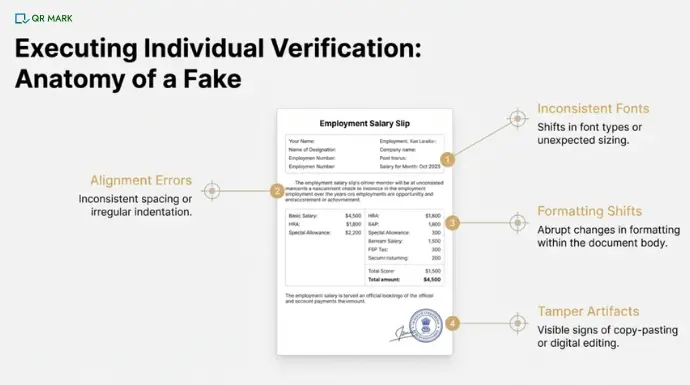
1. How do you spot visual signs of a tampered document?
Start by examining the document carefully.
Look for things such as:
- Different fonts or font sizes
- Inconsistent spacing or indentation
- Formatting changes within the document
- Signs of editing or copied text
These visual inconsistencies can sometimes indicate document tampering.
2. When should you contact the issuing organisation directly?
Certain details cannot be confirmed through visual checks. For example: Job designation in a relieving letter, last drawn salary in a salary slip or employment duration
To confirm these details, you may need to:
- Contact the previous employer directly
- Use a background verification company
3. How does QR Code or digital signature verification work for recipients?
Some modern documents include QR Codes or digital signatures for verification.
I. QR Code verification
If a document contains a QR Code, scanning it usually opens a verification page hosted by the issuing organization.
You can then verify the information shown on the verification page with the details printed on the document. This helps to verify the document instantly without requiring any extra effort.
This method is fast and does not require contacting the issuer directly. You can try free pilot of QR Mark to implement the process in your organization and see for yourself.
II. Digital signature verification
Digital signatures contain cryptographic hash values that confirm whether the document has been altered.
Once you have verified the Hash Code with the issuing organization then only you can be sure that the document you have received is legitimate.
In most cases, QR Code-based document verification is faster and easier, because it allows you to confirm the document instantly without involving third-party verification services.
What Are the Challenges Faced when Verifying Documents You Recieve?
1. Expired or incorrect documents
A document may be genuine but no longer valid. An expired professional license, a degree from a delisted institution, or a medical certificate past its stated validity date.
2. Poor submission quality
Documents submitted as low-resolution scans or photos taken at an angle lose the visual detail needed for thorough manual checks. Setting clear submission standards: file type, minimum resolution, accepted formats.
3. Damaged security features on physical documents
Physical holograms peel. Seals fade. QR Codes can be obscured or torn. When a physical security feature is damaged, you need an independent verification path, which is why layered verification matters.
4. Large volumes of documents
An HR team processing 500 applications cannot afford the same manual attention on every document. Batch verification tools and centralized dashboards make high-volume verification operationally feasible.
Conclusion
Whether you are a university that wants every degree to be instantly verifiable, a company that needs tamper-proof employment letters, or an HR team that cannot afford to onboard based on falsified credentials.
If a document cannot be verified instantly, it cannot be trusted. A strong document verification process ensures that every document you issue can prove its authenticity in seconds.
Instead of relying on manual checks, you create a system where verification is simple, fast, and reliable for both you and the person receiving the document.
Frequently Asked Questions
Which industries need a document verification process the most?
Educational institutions, companies, and healthcare providers are among the most affected by document fraud. Universities face forged degree certificates; companies encounter fake experience and salary documents during hiring; hospitals deal with falsified medical bills and insurance claims. Legal firms, financial institutions, and government agencies also rely heavily on verified documentation for compliance and licensing purposes.
Can a QR Code on a document be faked?
A QR Code by itself can be copied or altered but a QR Code linked to a secure, issuer-controlled database is significantly harder to fake effectively.
Even if someone replaces the QR Code with a modified version, the link will either not work or redirect to a page that does not match the claimed document details.
Platforms like QR Mark use custom branded domains and tamper-proof verification pages specifically to make spoofing attempts detectable.
What is the difference between document verification and document authentication?
Document verification checks whether a document is genuine, while document authentication confirms the source and legitimacy of the issuer. In practice, both processes work together to ensure a document is real and issued by a trusted authority.
What are the risks of not verifying documents?
Not verifying documents can lead to hiring fraud, financial losses, compliance issues, and reputational damage. Organizations may unknowingly accept fake credentials, incorrect data, or manipulated records, which can have long-term consequences.
