

TL;DR
A legal document verification service lets anyone holding a document issued by a law firm (the client, a court, opposing counsel, a bank, a regulator) confirm in seconds that it is authentic, unaltered, and still valid. In 2026, with AI-generated forgeries and free PDF editors everywhere, notary stamps and signatures are not enough. This guide covers what verification services do, which documents need them, and how QR Mark makes any legal document instantly verifiable.
Recently at QR Mark, we onboarded a legal firm that didn’t need convincing about document forgery.
They had already experienced it.
A finalized agreement left their firm, passed through clients and third parties, and later came back into question.
There was no way to prove whether the version in circulation was the original.
That’s when the gap became clear.
Every document they issued, engagement letters, NDAs, agreements, was going out with nothing more than a signature, a seal, and a letterhead.
No verification layer.
This isn’t a rare problem. The ACFE’s 2024 Report to the Nations estimates organizations lose around 5% of annual revenue to fraud, with a median loss of over $145,000 per case.
Legal documents are a prime target because they carry real weight. They move money, assign rights, settle disputes, and define obligations. If you’re running legal ops, managing a paralegal team, or handling compliance at a law firm, this matters.
If you run legal ops, manage a paralegal team, or own compliance at a law firm, this guide is written for you. I will walk through what legal document verification services actually do, which documents get faked most, how forgery works in 2026, and how QR Mark makes any legal document instantly verifiable without changing how your team already issues them.
What does a legal document verification service actually mean?
A legal document verification service is a system that lets anyone holding a legal document confirm four things in seconds: the document was issued by the law firm it claims to come from, the details inside it have not been changed since issue, the document is still valid (has not expired or been revoked), and none of that requires a follow-up email to a paralegal.
The service does not lock the document or encrypt it. It creates a verifiable trust trail. Think of it as a digital seal of origin that anyone can check on their phone, without an app, a login, a plugin, or a phone call.
What makes a document “legal”?
A document becomes legal when it creates, modifies, or records a right, duty, relationship, or obligation that the law recognizes.
That usually requires four things: it is signed by someone with authority to bind (a lawyer, a notary, a court officer, or a principal acting in their own right).
It is written in a form the jurisdiction accepts (a contract, an affidavit, a petition, a deed). It is produced by or on behalf of a recognized issuer (a law firm, a court, a regulator, or a government body) and it is executed with intent to create binding effect, not as a draft or template exemplar.
So a retainer agreement drafted by a partner at your firm is legal. A random PDF downloaded from a template site and signed by two parties without attorney review is also legal, but carries far less weight in court.
The issuer matters. And that is exactly why verification matters: if someone can fake your firm’s letterhead and signature, they can borrow your authority.
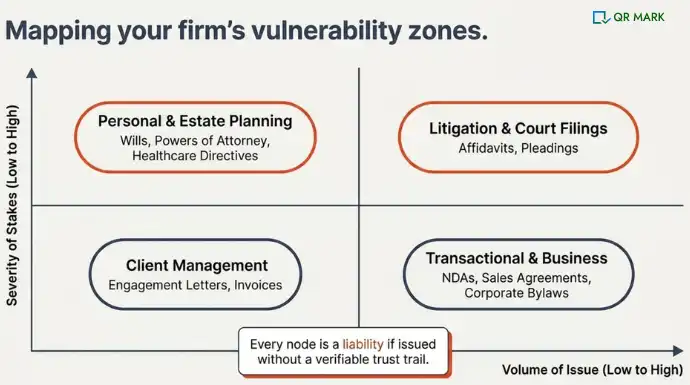
Which legal documents get verified the most, and who issues them?
The documents that most often need to be verified (and most often get forged) come from four buckets. Law firms like Kirkland & Ellis, Latham & Watkins, Baker McKenzie, DLA Piper, and Skadden issue thousands of these every month across their transactional, litigation, and private client practices.
Smaller boutique firms and solo practitioners see the same document types on a smaller scale.
- Client and internal management documents govern the lawyer-client relationship itself:
- Client engagement agreements that set the scope, fees, and terms of the engagement
- Retainer agreements covering upfront payment and ongoing billing arrangements
- Formal correspondence for dispute resolution, mediation responses, or replies to legal orders
- Internal billing and invoicing statements shared with clients for review or audit
2. Litigation and court filings are anything used in active legal proceedings:
- Pleadings and petitions, including complaints, motions, and divorce petitions filed with the court
- Affidavits, which are written statements of fact sworn under oath and submitted as evidence
When a client or a third party receives a filing copy, they often need to confirm it matches what was actually filed. A verification service handles that without another call to the clerk’s office.
3. Transactional and business documents are where most firms see the highest verification volume:
- Contracts of all kinds, including sales agreements, service contracts, and employment agreements
- Non-disclosure agreements (NDAs)
- Corporate bylaws and operating agreements
- Memoranda of Understanding (MoUs) that set out a common line of action
These documents move between multiple parties, often across borders. A counterparty signing a supply contract drafted by your firm wants to know it was not altered somewhere in the email chain.
4. Personal and estate planning documents are the fourth bucket, and they carry some of the highest stakes:
- Wills and trusts directing how property and assets should be handled after death
- Powers of attorney granting someone else the right to act on behalf of another
- Healthcare directives recording a person’s medical preferences if they become incapacitated
- Trust amendments and codicils that modify an existing will or trust document
These documents often surface years after they were drafted. When a bank or hospital is handed a power of attorney at a critical moment, they need to confirm authenticity fast. The traditional path (calling the issuing firm) does not scale and often fails at off-hours.
Verification is shifting from a post-hoc check to something baked into the document at the moment of issue. The firms that make that shift now are the ones their clients will trust five years from now.
How are legal documents actually being faked in 2026?
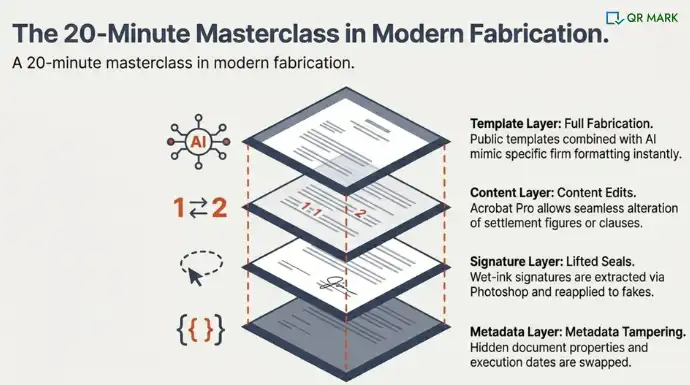
The old defenses (notary stamps, wet-ink signatures, embossed seals, letterhead watermarks) do not hold up against modern forgery tools.
A competent forger with Adobe Acrobat Pro and 20 minutes can change a date, swap a name, add a zero to a settlement figure, or replace an entire clause.
Four patterns come up again and again in our customer conversations:
- Content edits on a genuine document. Someone takes a real engagement letter from your firm, changes the fee structure or scope, re-saves it, and recirculates it as if it were the original.
- Layout and metadata tampering. The body text looks identical but the header, footer, metadata, or document properties have been swapped to reflect a different firm, matter number, or date of execution.
- Full fabrication using public templates. Free sites hand out downloadable will, NDA, retainer, and employment contract templates. A fraudster loads your firm’s logo, generates a plausible signature image, and has a convincing fake inside an hour.
- Copied signatures and seals. Anything visible on a PDF can be extracted, cleaned up in Photoshop, scaled to fit, and reapplied to a new document with a different body.
AI makes all four faster. Generative tools can now produce a plausible PDF that mimics the formatting conventions of a specific firm after training on even a few publicly available samples.
Notary stamps and embossed seals were designed for a world where physical reproduction was hard. That world is gone.
The consequence sits on the firm’s reputation. If a fraudulent “Latham & Watkins” engagement letter shows up in a dispute, the firm spends time and credibility disproving it. If a fake will from your office surfaces after a client’s death, the family’s trust in your practice never fully returns.
Bar associations across the US, UK, and India have all issued fraud advisories in the last two years warning firms that their letterheads are being misused.
“Every fake engagement letter that circulates under your firm’s name costs you about a week of cleanup, and the client remembers who was at the center of the confusion.“
Gautam Garg, CEO, QR Mark
What is the best way to make legal documents verifiable and tamper-resistant in 2026?
The short answer: embed a verification mechanism on every document at issue, host that verification on a domain your recipients can trust, and let anyone confirm authenticity by scanning. That is what QR Mark does.
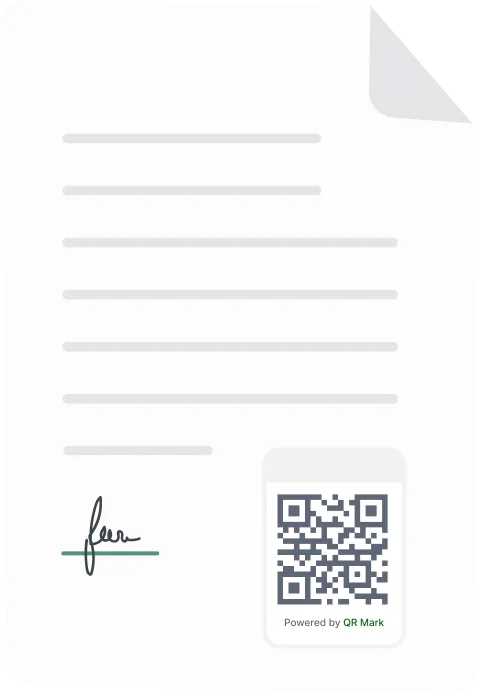
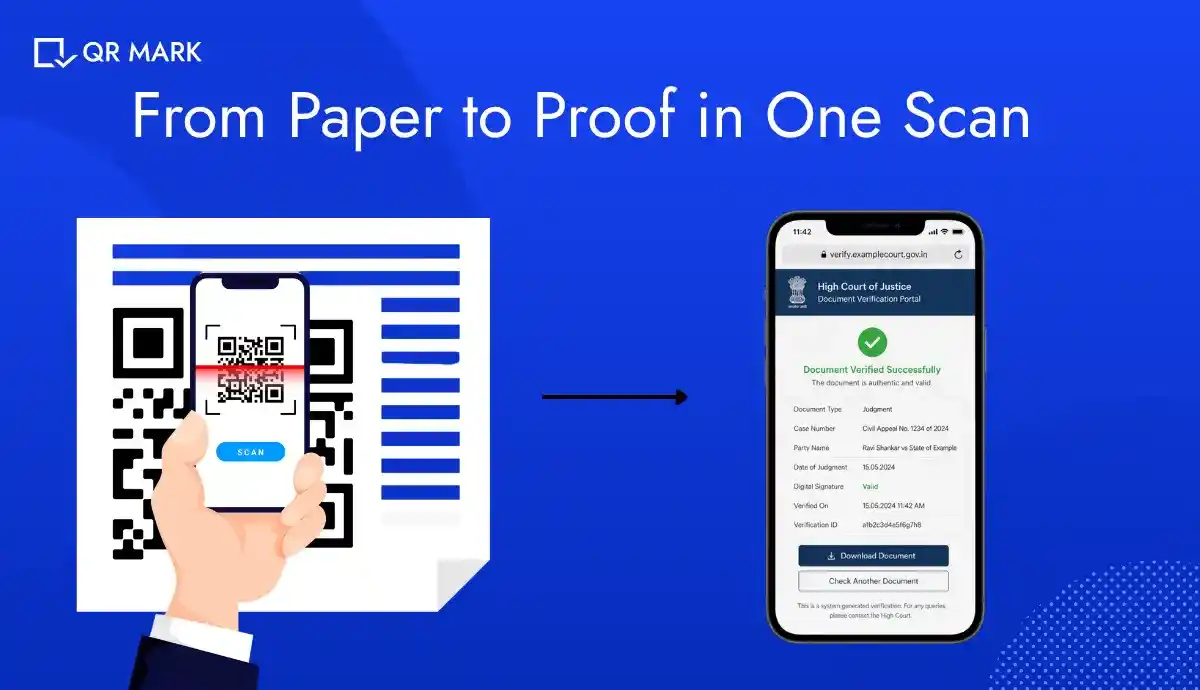
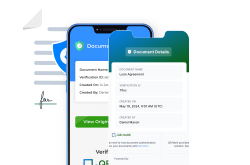
Every document you issue gets a Verification Image (a combined QR Code and verification URL) embedded in the footer, margin, or wherever your document template allows.
When a recipient scans it with any phone camera, or clicks the URL in a digital PDF, they land on a verification page hosted on your firm’s own Custom Domain (something like verify.yourfirm.com).
That Template-based verification page shows only the fields you choose to display: document type, parties, execution date, matter number, validity status. The recipient does not download an app. There is no login. Your firm does not expose the full document.
For law firms, the outcomes we have seen from our customers in legal, real estate, financial, and professional services land in four places:
- Faster verification for clients and counterparties. The “is this real?” phone calls and email threads drop by a large margin, freeing paralegal time.
- Instant detection of fakes. A forged version either fails to resolve on your verify domain or shows mismatched fields, so the fraud is caught on the spot.
- Protected firm reputation. Verification lives on your own domain, so your authority as the issuer of record is tied to infrastructure only you control.
- Long-tail trust for high-stakes documents. Wills, POAs, and settlement agreements stay verifiable for years, even after the drafting lawyer has moved on.
Does QR Mark work with legal document management software?
Yes. We have a REST API that integrates with the platforms most firms already use, including iManage, NetDocuments, Clio, MyCase, and PracticePanther. When your team finalizes a document in the DMS, the API creates a verification record and returns the Verification Image, which drops into the document template as part of the existing finalization flow. No manual step, no parallel workflow, no retraining your team.
How does it work in real time?
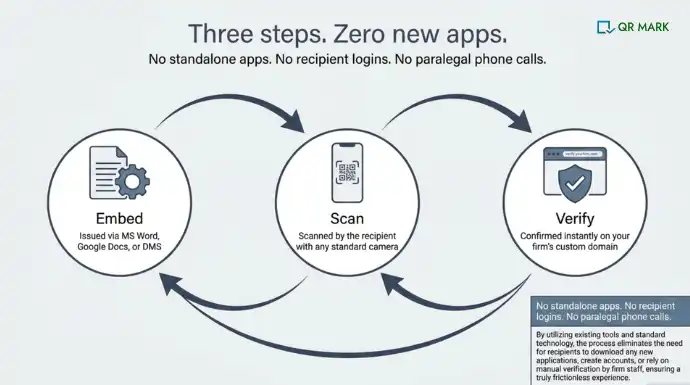
The workflow is built around three steps we call Embed, Scan, Verify.
1. Embed
Your firm adds a Verification Image to each document at the moment of issue. This happens through the Microsoft Word Add-in (for Word-based drafts), the Google Workspace Add-on (for Google Docs), the PDF upload workflow (for finalized PDFs), the Bulk dashboard (for large batches like annual retainer letters), or the API (for automated DMS integration).
2. Scan
The recipient scans the Verification Image with any phone camera. No app. No plugin. Desktop users click the verification URL in the PDF instead.
3. Verify
The recipient lands on your Template-based verification page hosted on your Custom Domain, sees the confirmed document details, and moves on. If the document has been tampered with, the verification either fails to load or displays mismatched fields. Verification takes about four seconds end-to-end.
How Do You Make An NDA Verifiable Using QR Mark? (Step-by-Step Explanation)
Let me walk through a concrete example. Your firm is issuing an NDA to a new client counterparty. Here is exactly how the flow works end-to-end.
Step 1: Create an account.
Sign up at qrmark.com. The free Starter plan gives you three verifications a month on a shared demo domain, which is enough to test the full workflow before you commit to a paid plan.
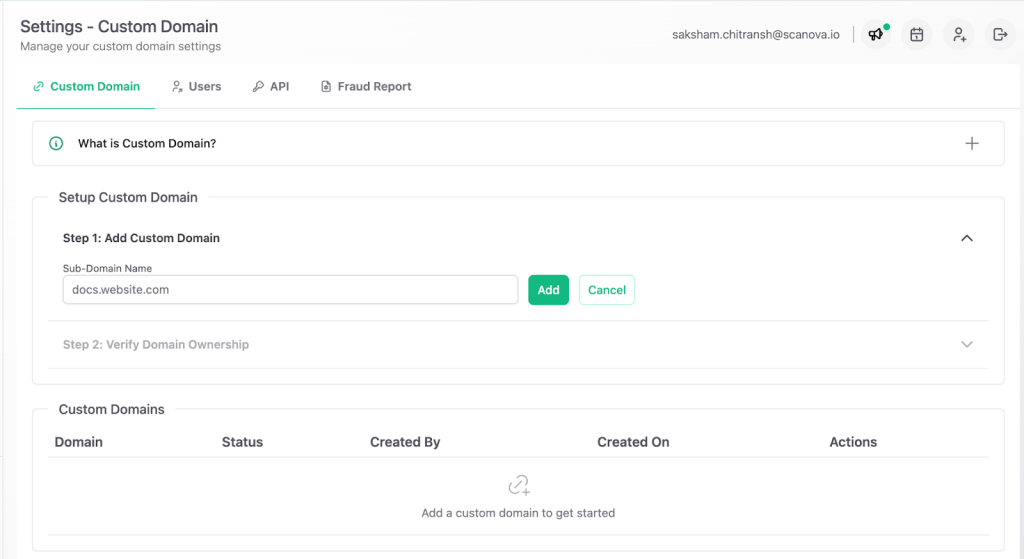
Step 2: Set up your Custom Domain.
In production, this is non-negotiable. You (or your IT team) point a subdomain like verify.yourfirm.com at QR Mark through a standard DNS CNAME record.
This takes about 10 minutes of IT time. Custom Domain is what makes verification defensible, because a forger can copy a QR Code but cannot host a matching verification page on your firm’s actual domain.
Step 3: Configure your verification page Template.
For an NDA, the fields that matter to a verifier are usually: agreement ID, parties, execution date, scope description (kept short), and validity period.
You pick those fields once, save the Template-based verification page, and every NDA you issue uses it.
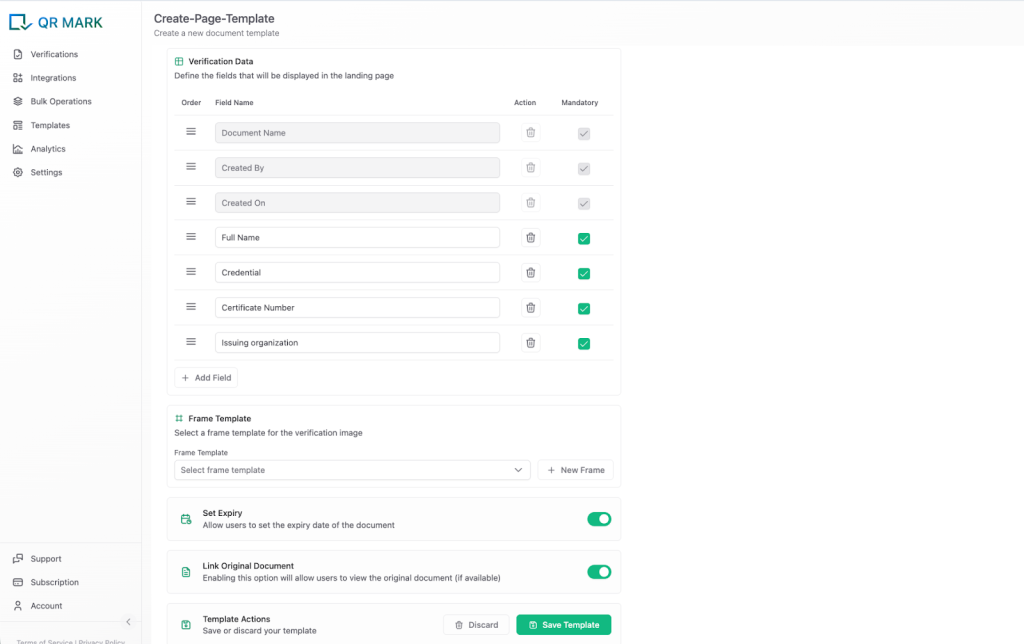
Worth noting: QR Mark’s Template-based verification page is included in every Pro plan at no extra cost. Comparable products like Qryptal charge a one-time setup fee of around $250 for the same capability.
Step 4: Create the verification.
Open the QR Mark dashboard, click “New Verification,” upload your NDA PDF (or draft in Word using the Microsoft Word Add-in), select your Custom Domain, and choose the NDA template you just built. QR Mark generates the Verification Image in about two seconds.
Step 5: Set a validity window.
For NDAs, I would recommend using the validity feature and setting it to match the confidentiality term in the agreement itself, typically 2 to 5 years.
Once the NDA period ends, the verification page clearly shows the document is no longer in force. This matters because an expired NDA floating around without that signal is a common source of disputes, especially in M&A and IP matters.
Step 6: Embed and send.
Drop the Verification Image into the footer of the NDA, export the PDF, and send. Your counterparty receives a standard-looking NDA that also happens to be instantly verifiable from any phone.
Once your account and Custom Domain are set up, the whole flow adds about 30 seconds to the document issue process.
For firms issuing NDAs at volume (transactional practices, corporate M&A teams, IP groups), the Bulk dashboard lets you process a batch in one go.
What Should Law Firms Actually Do About This?
The market is moving, and the firms that do not add a verification layer in the next 12 to 18 months will be the ones explaining to clients and counterparties why their documents are easier to fake than their competitors’. For a practice built on trust and authority, that is not a small gap.
AI-assisted document generation has made fabrication cheap. Notary fraud was flagged in state bar advisories in California, New York, Texas, and Florida last year.
For law firms, verification is not a compliance nice-to-have. It is the baseline defense of your authority as an issuer, and (increasingly) a trust signal that clients notice when choosing counsel.
FAQs
Frequently asked questions
What is a legal document verification service?
It is a system that lets anyone holding a document issued by a law firm confirm in seconds that it is authentic, unaltered, and still valid. The service typically works by embedding a scannable verification mark on the document (like a QR code) that links to a verification page hosted by the issuing firm.
Does QR Mark work for legal document verification in real estate?
Yes. Real estate is one of QR Mark’s most active verticals. Allotment letters, title documents, sale agreements, and lease deeds all sit in the high-forgery, high-stakes quadrant. The Template-based verification page lets you show only the critical fields (property reference, parties, date of execution) without exposing the full document to every verifier who scans the QR code.
What happens if someone copies my firm’s QR code and pastes it on a fake document?
The verification page still resolves, but the document details shown on the verification page will not match the fake document in the recipient’s hand. The recipient checks two things: does the page load on your firm’s Custom Domain, and do the fields match the document? If either check fails, the document is flagged as fraudulent. That is why Custom Domain matters: a forger can copy the image, but cannot host a matching page on your actual domain.
Are tools for legal document verification only useful for large firms?
No. Solo practitioners and small firms often see the strongest return because they do not have a full back-office team to handle verification requests. A single fake engagement letter or forged will can consume weeks of a small firm’s time, so the marginal value of preventing that is higher. QR Mark’s Starter plan is free.
Can legal document management software integrate with a verification service?
Yes. QR Mark has a REST API that integrates with the major platforms US law firms use, including iManage, NetDocuments, Clio, MyCase, and PracticePanther. The API creates a verification record and returns the Verification Image as part of your document finalization workflow, so the step happens automatically.
