


TL;DR
QR Code prescriptions enable pharmacies to verify medication authenticity, reduce counterfeiting risks, and improve patient safety. By embedding secure QR Codes on prescriptions, healthcare providers can link patients to verified medication information while maintaining privacy through template-based verification pages. We’ll show you exactly how to implement this using QR Mark’s secure verification system.
Prescription fraud and counterfeit medications are costing healthcare systems billions annually.
Every year, the World Health Organization estimates that 10% of medicines in low- and middle-income countries are counterfeit—and that number is rising.
But here’s what’s changing: secure QR Codes embedded on prescription documents are transforming how pharmacies verify authenticity, access patient medication histories, and reduce dispensing errors.
In this guide, I’ll walk you through exactly how QR Code prescriptions work, why they’re becoming a regulatory requirement globally, and the step-by-step process for implementing them in your pharmacy using QR Mark‘s secure verification system.
What Is a QR Code Prescription?
A QR Code prescription is a digital verification mechanism embedded on a prescription documentthat links patients, pharmacists, and healthcare providers to verified medication information and authenticity confirmation.
When a pharmacist or patient scans the QR Code using any smartphone camera, they’re taken to a secure verification page hosted on the prescriber’s domain, where they can confirm the prescription’s authenticity, access medication details, and verify that the document hasn’t been tampered with.
What does scanning a QR Code prescription show? Scanning a QR Code prescription takes you to a verification page displaying key prescription details: patient name, medication name and dose, prescriber name and credentials, prescription date, and validity status. The page is hosted on the prescribing hospital or clinic’s verified custom domain, which confirms authenticity. Some systems also display medication interactions, storage instructions, and adverse event reporting options—all without exposing sensitive patient data.
The critical insight here is that the verification page is issuer-controlled—meaning only the prescribing organization can update or verify the prescription. This is what makes QR Code prescriptions fundamentally different from blockchain-based systems: trust is anchored in domain ownership, not complex cryptography.
How Are QR Codes Currently Used in Prescriptions?
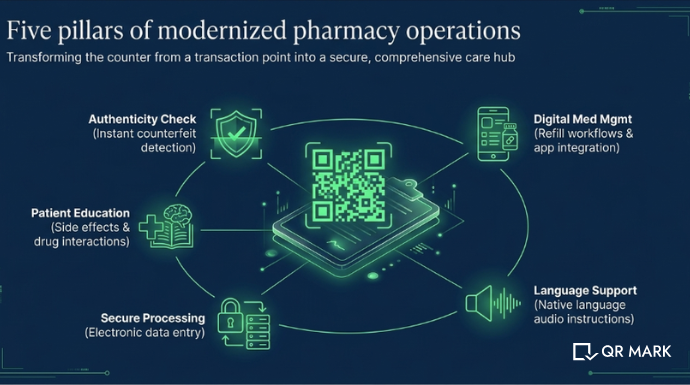
QR Code prescriptions are solving five major pain points in pharmacy operations right now. Let me break down each one.
Improved Safety and Verification
In regulated markets like India, the EU, and the UK, pharmacists use QR Codes to verify if a medication is genuine before dispensing. Counterfeit medications are detected instantly or flagged as suspicious when the verification page shows mismatched batch numbers, expiry dates, or prescriber credentials. This is precisely where QR Mark’s template-based verification pages excel: pharmacists see exactly what matters (medication details, batch verification, validity) without accessing unnecessary patient data.
Patient Education and Information
Instead of paper inserts that patients lose or ignore, QR Codes link directly to comprehensive medication information. Patients scan the code and access side effects, drug interactions, storage instructions, and even audio guidance in their native language. This is especially valuable for elderly patients or those with visual impairments.
Digital Medication Management
QR Codes on prescriptions can link to refill workflows, dosage reminders, or integration with patient pharmacy apps. A patient scans the code, confirms their refill needs, and the pharmacy is notified automatically.
Accessibility and Language Support
Pharmacists can use QR Codes to provide audio recordings of medication instructions in a patient’s preferred language removing language barriers and improving medication compliance.
Secure Electronic Processing
Secure QR Codes printed on prescription papers enable pharmacists to scan and instantly access the prescription in digital form, reducing manual data entry errors and speeding up the filling process.
How Do QR Code Prescriptions Ensure Drug Authentication and Traceability?
This is where QR Codes become a genuine anti-counterfeiting tool. Here’s exactly what happens:
Tamper-Resistant Verification Portal
The verification page is hosted on the prescriber’s verified custom domain (e.g., verify.hospital.com). A counterfeiter cannot host a fake page on the real domain. When a pharmacist scans the QR Code, they immediately see which domain the verification comes from.
A mismatch = fraud detected.
Issuer-Controlled Access and Field Matching
Using QR Mark’s template-based verification pages, the prescribing hospital selects exactly which fields appear on the verification page: patient name, medication name and strength, dosage, prescriber credentials, prescription date, and validity status. The pharmacist’s job is simple: match these fields against the physical prescription.
Any discrepancy = the prescription is forged or edited.
Audit Trail and Real-Time Validation
Every time a QR Code is scanned, the verification system logs the access. Hospitals can see how many times a prescription has been verified, from which pharmacy, and at what time. If a prescription is scanned 100 times in a day when it should only be dispensed once, administrators are alerted to potential fraud.
Real-Time Revocation and Validity Status
If a prescription is recalled or found to be fraudulent, the issuer can revoke it immediately. The next pharmacist who scans the QR Code sees “Invalid” status and knows not to dispense the medication.
“In healthcare, the biggest gap isn’t access to information, it’s trust in it. Pharmacists and patients shouldn’t have to question whether a prescription is real.Verification should happen instantly, at the point of use, without added steps. When hospitals remove that uncertainty, you don’t just prevent fraud, you improve confidence across the entire care experience.” – Gautam Garg, CEO, QR Mark
Why Is It Crucial to Adapt to Global Regulations for QR Code Prescriptions?
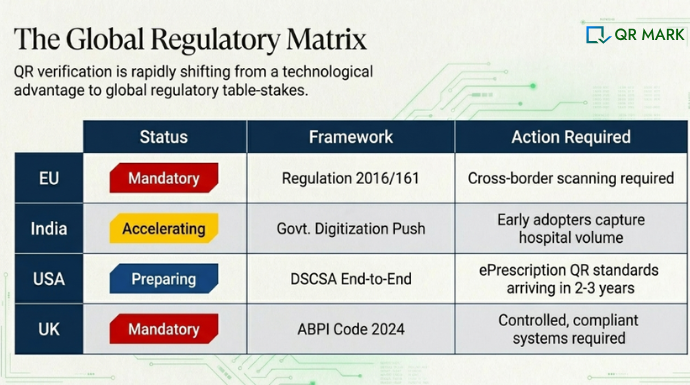
If you’re operating pharmacies across multiple regions or expecting your prescriptions to be verified internationally—you need to understand the regulatory landscape. Here’s what’s happening in key markets:
| Region | Current Status | What This Means for Pharmacies |
| 🇪🇺 European Union | EU Regulation (EU) 2016/161 mandates 2D codes (QR Codes) for medicine authentication. ePrescription workflows use QR codes for cross-border verification. | QR Codes are not optiona. They’re mandatory for regulated medicine distribution. Pharmacies must scan and verify. |
| 🇮🇳 India | Rapid adoption of QR Codes in healthcare. Government pushing digital records and drug authentication. No single mandate yet, but adoption is accelerating across private hospitals. | Early adopters gain competitive advantage. Pharmacies that support QR Code scanning will capture hospitals moving toward digital verification. |
| 🇺🇸 United States | DSCSA (Drug Supply Chain Security Act) mandates end-to-end traceability. QR Codes/2D codes used for serialization. Paving the way for broader QR-based verification. | Expect ePrescription standards to embrace QR Codes within 2–3 years. Preparing now positions your pharmacy ahead of the curve. |
| 🇬🇧 United Kingdom | ABPI Code (2024) allows QR Codes for prescribing info, patient education, and adverse event reporting. Must be clear, scannable, and compliant. | Regulatory acceptance is growing. Compliance is mandatory, but full freedom is restricted—you need controlled systems like QR Mark’s templates. |
QR Code adoption is not a future trend. It’s a present-day regulatory expectation in major markets.
If your hospital wants to serve hospitals in Europe, India, or the US, QR Code scanning capability is becoming table-stakes.
How to Add Secure QR Codes to Medical Prescriptions Using QR Mark?
If you’re a hospital, clinic, or healthcare provider looking to issue verifiable prescriptions, here’s the step-by-step workflow using QR Mark:
1. Sign up for QR Mark and choose your plan
For healthcare providers, QR Mark Pro (monthly or annual) is the standard. Monthly plans work for ongoing prescription issuance; annual plans are better if you’re doing a one-time migration of historical prescriptions or a seasonal batch (end-of-year bulk processing). Start with a free Starter account to test the workflow.
2. Set up your custom domain
This is mandatory for production use. Choose a domain like verify.yourprescriber.com. QR Mark will guide you through DNS configuration (a CNAME record). Your IT team can complete this in under 10 minutes. This custom domain is the trust anchor—when pharmacists scan your QR Code, they’ll see your verified domain and know the prescription is authentic.
3. Configure your template-based verification page.
This is the privacy-first step. Instead of showing the entire prescription, you choose which fields appear on the verification page. For medical prescriptions, we recommend showing:
- Patient name (encrypted or partial, e.g., initials + last name)
- Medication name, strength, and dosage
- Prescriber name and credentials
- Prescription date and validity status
- Batch number and expiry date (for pharmacy verification)
4. Choose your issuance workflow.
QR Mark supports three methods:
- Microsoft Word Add-in: If your prescriptions are generated in Word templates, install the QR Mark add-in. Doctors or admins simply click ‘Add Verification’ inside Word, and QR Mark generates a unique QR image for each prescription.
- Bulk Dashboard Upload: If you’re processing multiple prescriptions at once, upload all PDFs to the QR Mark dashboard. Select placement once (e.g., bottom-right corner). QR Mark generates unique verification images for each prescription and lets you download the verified batch.
- API Integration: For healthcare systems that generate prescriptions programmatically (via EHR systems), the QR Mark API allows automatic verification image generation. This is the most scalable option for large hospitals.
Tip: Don’t show the original prescription link. Template-based pages are specifically designed for healthcare to maintain confidentiality while enabling verification.
5. Embed the verification image on your prescriptions
QR Mark generates a verification image (QR Code + verification URL). Place this on every prescription—typically in the footer or bottom-right corner where it’s visible but doesn’t interfere with critical prescription details.
6. Test the verification workflow before going live
Create one test prescription, print it, and scan the QR Code from a mobile phone. Verify that:
- The QR Code scans cleanly (consider minimum size of 1cm x 1cm)
- The verification page loads on your custom domain
- The template fields display correctly and match the prescription in hand
- Domain trust is visible (your custom domain in the browser address bar)
Are QR Code Prescriptions the Future of Pharmacy Verification?
Yes. Regulatory mandates in the EU, rapid adoption in India, and emerging standards in the US all point to one reality: pharmacies that can scan and verify QR Code prescriptions will have a competitive advantage. Those that can’t will become a liability for hospitals and patients.
The implementation is straightforward. With QR Mark, a hospital or clinic can set up a custom verification domain, configure a template-based verification page, and embed secure QR Codes on prescriptions in days—not months. The pharmacist’s job becomes simpler: scan, check domain, match fields, dispense or flag as suspicious.
If you’re running a pharmacy or hospital and haven’t implemented QR Code prescriptions yet, now is the time. The regulatory window is closing. Startups and established healthcare providers that moved early are already reaping the benefits of faster verification, reduced counterfeit incidents, and improved patient trust.
Frequently Asked Questions
What happens if a pharmacist scans a QR Code and the verification page shows mismatched information?
The prescription should be flagged as suspicious or counterfeit. The pharmacist should contact the prescribing hospital directly to confirm authenticity before dispensing. If the prescription is genuinely from the hospital but details don’t match, the prescriber should revoke the original and issue a new verified prescription.
Does QR Mark work for prescriptions across different hospitals?
Yes. Each hospital sets up its own custom domain (e.g., verify.hospital1.com, verify.hospital2.com). When a prescription from Hospital 1 is verified, the QR Code points to Hospital 1’s verification page. When a prescription from Hospital 2 is verified, it points to Hospital 2’s page. Domain matching is what tells the pharmacist which hospital issued it.
Can patients see sensitive information on the verification page?
No, if you use QR Mark’s template-based pages (recommended). You control exactly which fields are visible. You can show medication details and prescriber credentials without showing dosage frequency, special instructions, or the patient’s full medical history. The verification page is designed for pharmacists to verify authenticity, not for patients to access their complete medical record.
What if a counterfeit prescription has a copied QR Code from a real prescription?
The copied QR Code will still point to the original prescription’s verification page. When the pharmacist checks, the fields on the verification page won’t match the fake prescription in hand. For example, the verification page shows patient name ‘John Doe,’ but the forged prescription says ‘Jane Smith.’ This discrepancy immediately flags the prescription as fraudulent.
Is QR Mark compliant with GDPR and healthcare privacy regulations?
QR Mark is ISO 27001 and SOC 2 certified. Template-based verification pages allow you to show only the minimum data needed for verification, which supports GDPR and HIPAA compliance. Data is stored in secure, encrypted databases. For healthcare use, we recommend using template-based pages and avoiding links to the original prescription—this minimizes data exposure and maintains compliance.
