

TL;DR
A Certificate of Authenticity (COA) confirms that a credential, product, or item is genuine and officially issued.
A proper COA must include: recipient name, certified description, date of issue, unique certificate ID, issuer details, authorised signature, and a verification method.
Design alone isn’t enough. Any static document can be copied. Adding a QR Code linked to a live verification record makes the certificate instantly checkable — without contacting the issuer.
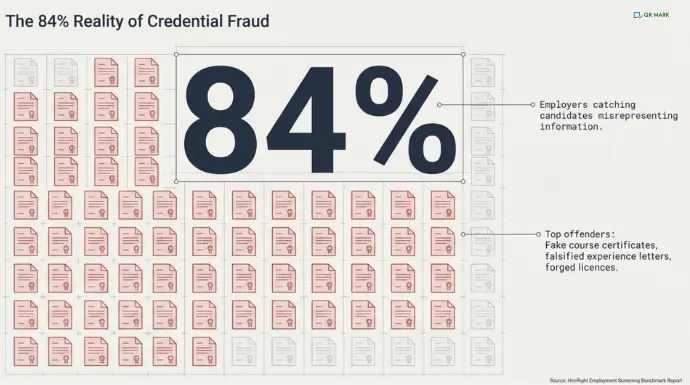
Heimdal Security’s 2024 global social media analysis (LinkedIn, Facebook, Reddit) revealed that job scams relying on fake documents were most common in finance (35.45%), IT (30.43%), and healthcare (15.41%)
Credential fraud, fake course certificates, falsified experience letters, forged licences, is consistently among the most common categories.
The root cause is simple: most certificates of authenticity give verifiers no way to check them. A logo and a signature are easy to copy and can’t be trusted.
This guide covers what a certificate of authenticity needs to contain, how to make a certificate of authenticity step by step using QR Mark, and how anyone can verify it.
What is a Certificate of Authenticity?
A certificate of authenticity is a document that confirms a specific claim is genuine. In professional contexts, it certifies that a person completed a course, holds a qualification, received a credential, or that an item is original.
For example:
- Stanford University issued a Certificate of Authenticity confirming that Emily Carter successfully completed the Advanced Data Analytics Program on 15 March 2026.
- An art gallery provides a Certificate of Authenticity stating that a painting is an original work created by the listed artist.
- A training institute issues a verified certificate confirming that a participant holds a valid safety compliance credential.
“When we speak to organisations, the biggest problem isn’t what happens after a certificate is issued — it begins during issuance. Weak authentication at this stage leaves documents vulnerable from day one. Tying every certificate to a verifiable record at the moment of creation is the only way to stop fraud before it starts.” — Gautam Garg, CEO, QR MARK
It is different from a standard certificate in one way: its value depends on whether it can be verified by someone who did not issue it. A certificate that cannot be confirmed is no more trustworthy than a document anyone could print.
What Should a Certificate of Authenticity Include?
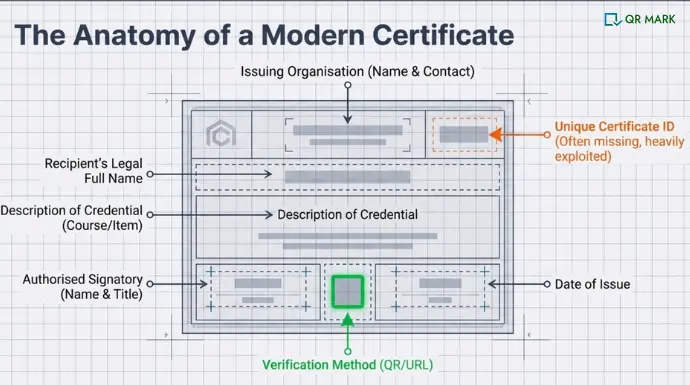
A COA is only useful if it contains the right information. In 2026, here are the fields every professional certificate must have:
- Recipient’s full name – Write the person’s legal name exactly as it appears on official documents. Do not use short forms unless they are part of the legal name.
- Credential details – Clearly mention the course name, qualification, or item being certified. Use the correct and complete title.
- Date of issue – Add the exact date the certificate was created and signed.
- Unique certificate ID – Give each certificate a unique ID number. This number should match a record in your system. This is very important because fake certificates often do not have a proper ID.
- Issuing organisation – Write the full legal name of your organisation. Also include a contact detail, such as an official email address or website.
- Authorised signatory – Mention the full name and job title of the person signing the certificate. Do not rely on a signature alone.
- Verification method – Show how someone can verify the certificate. Add a QR Code, a secure link, or simple instructions. Without a verification method, no one can confirm if the certificate is real.
If you want a richer record, these are worth adding:
- Serial number – Add a serial number for internal tracking, especially if the certificate ID alone is not enough for your records.
- Edition details – Mention edition or batch information if the certificate was issued as part of a limited run or specific group.
- Expiry date – Clearly state the expiry date if the credential is valid only for a certain period. If it does not expire, you may mention “No expiry” to avoid confusion.
How to Make a Certificate of Authenticity?(Step-by-Step Process)
Whether you are issuing a single certificate or hundreds, the process is the same. Here is the full workflow using QR Mark.
Step 1: Create the certificate
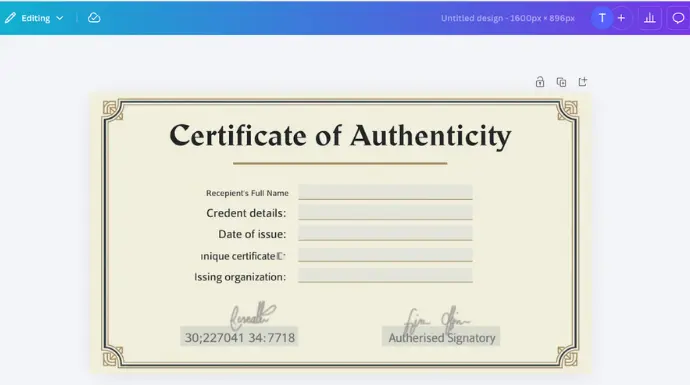
Open your existing template or build one from scratch. You can use Canva or Adobe to build a certificate template for you.
Include all the required fields listed in section B. Keep the layout clean: issuing organisation at the top, recipient details in the centre, signatory and date at the bottom.
Step 2: Make it verifiable with QR Mark
Adding a QR Mark Verification Image ties the certificate to a live record that can be checked in seconds.
Here is how:
Step 1: Sign in to your account
- Go to QRMark.com.
- Log in to your account or create one if you are new.
Step 2: Add your custom domain
- Open Settings and add your custom domain (for example, verify.yourorganisation.com).
- Complete the domain verification process.
This ensures all verification links are hosted on your own domain, not a generic QR Mark URL.
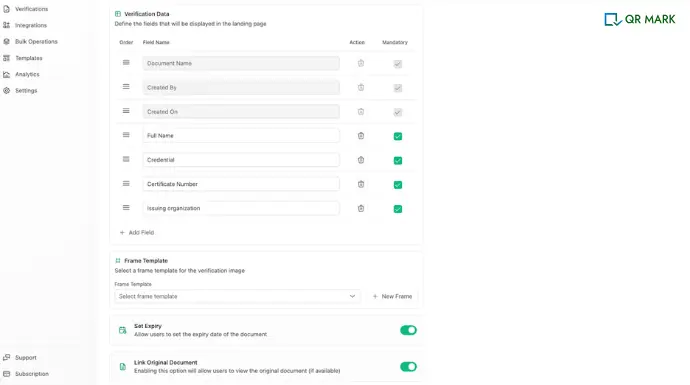
Step 3: Create your certificate template
- Go to Templates and click Create Template.
- Set the title as Certificate of Authenticity.
- Add your logo, authorised signatory name, and any other details you want to show on the verification landing page.
- Click Save.
Step 4: Upload the certificate for verification
- Click Create Verification and upload your certificate file in PDF format.
Step 5: Select domain and template
- Choose your custom domain.
- Select the template you just created.
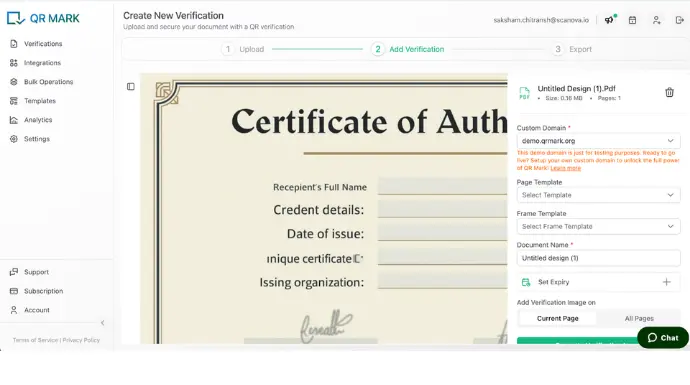
Step 6: Configure the verification record
- Name the record using the recipient’s name or the certificate ID for easy tracking.
- Choose whether the Verification Image should appear on the first page only or on all pages of the PDF.
Step 7: Generate and place the verification image
- Click Generate Verification Image.
- Adjust the size and position so it fits neatly into the space you reserved on the certificate.
- Download the updated, verified PDF.
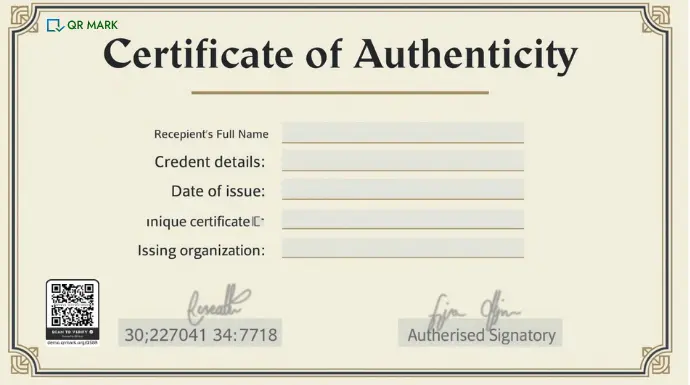
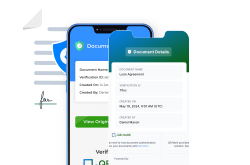
Once generated, anyone who scans the QR Code or clicks the URL lands on a live verification page showing the certificate details you entered.
No app required. A standard phone camera is enough
How Do Recipients Verify a Certificate of Authenticity?
There are several ways a recipient or third party can check whether a certificate is genuine.
- Contact the issuing organisation directly
Call or email and ask them to confirm the certificate ID. Reliable, but slow. Depends on someone being available and having access to the right records.
- Check a public registry
Some professional bodies maintain searchable databases where certificate IDs can be looked up. Only works if the issuer publishes such a registry.
- Look up the certificate ID on the issuer’s website
Faster than a phone call, but still requires finding the right page and entering details manually.
- Scan the QR Code or click the verification URL
If the certificate carries a QR Code, the recipient scans it with any phone camera and lands immediately on a live page confirming the details. No form, no waiting, no back-and-forth.
When the verification runs from the issuer’s own custom domain, it is also immediately clear that the page is genuine. Explore how custom domain feature can make document security hard to break with QR Mark.
| Verification Method | How It Works | Pros | Cons |
| Contact the issuing organisation | Call or email to confirm certificate ID | Reliable if organisation responds | Slow; depends on staff availability |
| Public registry | Look up certificate ID in a searchable database | Accessible if the registry exists | Only works if issuer publishes registry; may be outdated |
| Issuer website lookup | Enter certificate ID on the organisation’s site | Faster than a call | Requires finding the correct page; manual entry |
| Scan QR Code / click verification URL | Scan certificate’s QR Code or click link to see live verification page | Instant verification; easy for anyone | Basic QR Codes can point anywhere; can be copied |
For most HR teams, background check vendors, and individual recipients, the QR Code method is the only one that gives an instant answer without depending on the issuer being reachable.
Conclusion
A certificate of authenticity is only as useful as the trust behind it. The design, the layout, the paper quality, none of it matters if the person holding the certificate cannot confirm it is real.
Using QR Mark takes the certificate from a static document to a checkable record. Recipients verify in seconds. Forgers cannot replicate a live link on your domain. And if a certificate ever needs to be revoked, you can do it from your dashboard.
Start with the right content, follow the workflow above, and every certificate you issue will hold up to scrutiny.
Frequently Asked Questions
Can a certificate of authenticity be faked?
Yes, if it is a static document with no verification method. Logos, signatures, and layouts can all be copied. A QR Mark Verification Image links the certificate to a live record on your domain. A forger cannot replicate that without access to your dashboard.
Does a certificate of authenticity need a signature?
A signature adds weight, but it does not make a certificate verifiable. A scanned signature can be copied in seconds. A working verification link is more reliable. For high-stakes certificates, include both.
Who can issue a certificate of authenticity?
The issuing organisation issues it. For professional credentials, that is the training institute, employer, or licensing body. A third party can also issue one if they are an authorised verifier of the credential.
What happens if a certificate needs to be revoked?
QR Mark’s dashboard lets you revoke any verification record. When someone scans the QR Code on a revoked certificate, the verification page states that the certificate is no longer valid. This is not possible with a static document.
How is QR Mark different from just printing a QR Code on a certificate?
A QR Code alone points to a URL. Anyone can create a QR Code pointing to any page, including a fake verification page. QR Mark’s Verification Image is tied to a record on your custom domain. The domain itself is the trust signal. A QR Code pointing anywhere else is immediately suspicious.
