

TL;DR
Document fraud is any attempt to deceive using a fake, altered, or misrepresented document. The most common types of document fraud include counterfeit and forged documents, AI-generated fakes, stolen genuine documents, pseudo and synthetic-identity documents, invoice fraud, and credentials from illegitimate sources. This guide breaks down each type with real examples across HR, education, legal, and finance, explains why they slip past manual checks, and shows how verifying documents at the source stops them.
A degree has the right logo. A bank statement carries the correct formatting. Yet any of them could be fake.
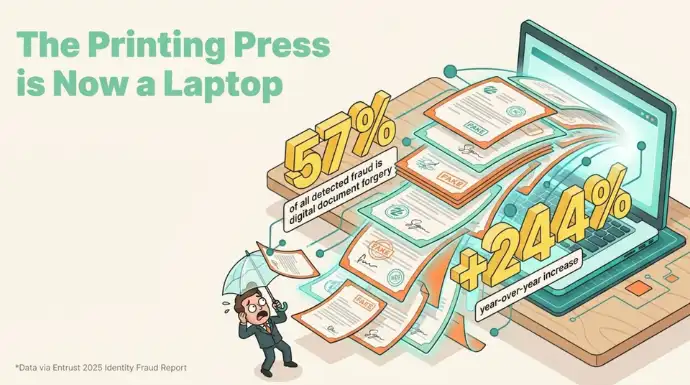
Document fraud is becoming harder to spot as fraudsters use digital editing tools, generative AI, and stolen credentials to create convincing documents in minutes. For HR teams, universities, financial institutions, and other organisations that rely on documents to make important decisions, a convincing fake can lead to financial losses, bad hires, legal trouble, or reputational damage.
The problem is that document fraud is not limited to traditional forgery. It includes counterfeit documents, altered records, AI-generated fakes, stolen genuine documents, synthetic identities, fraudulent invoices, and credentials from illegitimate sources. Each type works differently and leaves different clues.
This guide explains the most common types of document fraud, how they work, where they appear, and why traditional checks often miss them. More importantly, it looks at how organisations can verify documents at the source instead of relying on appearance alone.
What is document fraud?
Document fraud is the use of a fake, altered, or misrepresented document to gain something you are not entitled to. That could be a job, a loan, a visa, admission to a university, or a payout on an insurance claim.
People often mix up forgery and fraud, so it helps to separate them. Forgery is the act of creating or changing a document to make it look genuine. Fraud is using that document to deceive someone. A forged degree sitting in a drawer is forgery. The same degree attached to a job application is fraud. Forgery is the tool, and fraud is what it is used for.
Almost all of it relies on one weakness. The person checking the document has no fast way to confirm it came from who it claims to. They inspect it by eye, trust the format, and move on.
What are the main types of document fraud?
These fraud types sort by how the fake is made rather than by the industry it targets, and the most common ones range from full counterfeits and AI-generated fakes to altered, stolen, and copied documents. Each leaves a different weakness behind, which is what tells you where to look.
Here are the nine you are most likely to run into, with what makes each one work and how to picture it.
- Counterfeit (fully forged) documents are made from scratch to imitate a real issuer, with no genuine original anywhere behind them. A fraudster designs a degree from a real-sounding university that never enrolled the person, or a certificate from an institute that never ran the course. Because nothing was ever issued, there is no legitimate record to check against, which is exactly what makes a fast source check so useful.
- Forged or altered documents start as genuine and get changed after issue. Names, dates, amounts, photos, or grades are edited while the rest of the document stays real. A common one in hiring is an experience letter with the job title quietly changed from Executive to Manager.
- AI-generated document fraud uses generative tools to build fake IDs, bank statements, receipts, and invoices from scratch in minutes, without the tells that used to give a forgery away. A typical case is a synthetic bank statement produced to pass a loan or rental income check.
- Stolen or fraudulently obtained genuine (FOG) documents are completely real but in the wrong hands. They were stolen, bought, seized, or otherwise obtained under false pretenses, then used by someone who is not the rightful holder, such as a genuine passport or salary slip presented by an imposter. The document itself passes every authenticity check, so the only reliable defense is confirming the details belong to the person in front of you.
- Pseudo documents are official-looking IDs or cards that copy the format of a real document but carry no legal standing anywhere. A fantasy national ID or a novelty press card gets waved through when nobody knows what a legitimate version should look like. They work on unfamiliarity, which is why a verifier who knows the real issuer’s page catches them quickly.
- Synthetic identity documents blend real and fabricated details, often a real address or Social Security number paired with a made-up name, into a profile that belongs to no actual person. US regulators including the Federal Reserve describe synthetic identity fraud as the fastest-growing financial crime in the country, and Deloitte projects related losses could reach $23 billion by 2030. Because the identity is part real, it can quietly build credit or history before anyone notices.
- Invoice and financial document fraud alters or fabricates bills, invoices, receipts, and statements to redirect a payment, usually by swapping the bank details on an otherwise ordinary-looking invoice. This is the document behind most business email compromise: the FBI’s 2024 Internet Crime Report logged $2.77 billion in reported BEC losses in a single year. A verifiable invoice lets the payer confirm it came from the real vendor before money moves.
- Credentials from fake or unaccredited sources are technically real documents from an issuer that is not legitimate. Diploma mills and shell companies exist only to hand out proof that looks valid, from course certificates to employment letters. The paper can pass inspection, so the question that matters is whether the issuer is real.
- Copied or reused verification marks reuse trust rather than faking it. A logo, stamp, seal, or even a QR code is lifted from a genuine document and pasted onto a fake one, like a scanned company seal on a fabricated salary slip. A mark only means something if a verifier can check what sits behind it, which is why a scannable link tied to the issuer’s own domain matters more than the mark’s appearance.
Which industries see document fraud most often?
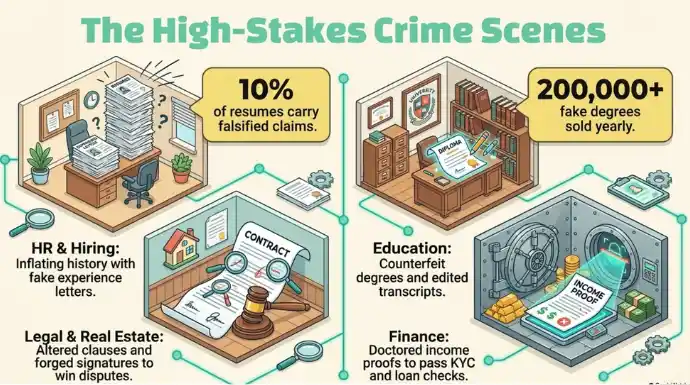
Document fraud clusters in fields where a single document unlocks money, a role, or legal standing. Four sectors see it constantly, and the fraud types above show up in each.
- HR and hiring: fake experience letters, forged offer letters, and altered salary slips used to inflate a candidate’s history or income.
- Education: counterfeit degrees, edited transcripts, and diploma-mill certificates submitted to employers and to universities abroad.
- Legal and real estate: altered contract clauses, forged signatures, and fabricated agreements used to win a dispute or close a deal.
- Finance: forged bank statements and doctored income proofs used to pass loan checks and KYC reviews.
The pattern is the same across all four. The document is trusted because checking it properly is slow, so most of the time nobody does.
Why is document fraud so hard to catch?
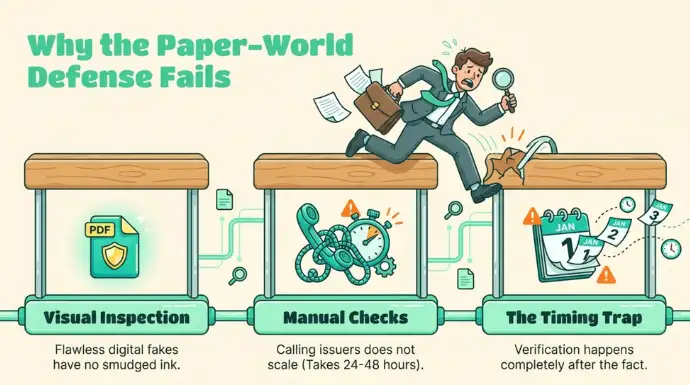
Document fraud is hard to catch because the usual checks were built for a paper world, and a well-made digital fake passes all of them.
Visual inspection fails first. A digitally altered PDF has no smudged ink or misaligned stamp to give it away. On screen it looks identical to the real thing, so a trained eye is no advantage.
Manual verification fails next. Calling the issuing company or university works only when someone picks up, still has the records, and answers honestly. For high-volume hiring or end-of-term credential checks, that does not scale. A single employment verification is often quoted at 24 to 48 hours, and academic checks can run for weeks.
The deeper problem is timing. Verification happens after the fact, done by the person receiving the document, using whatever clues sit on the page. Nothing links the document back to its real issuer in a way a stranger can check in seconds.
How can organisations prevent document fraud at the source?
The reliable fix is to make each document prove its own origin, so a verifier never has to trust the format alone. This is verification at the source, and it is where QR Mark fits.
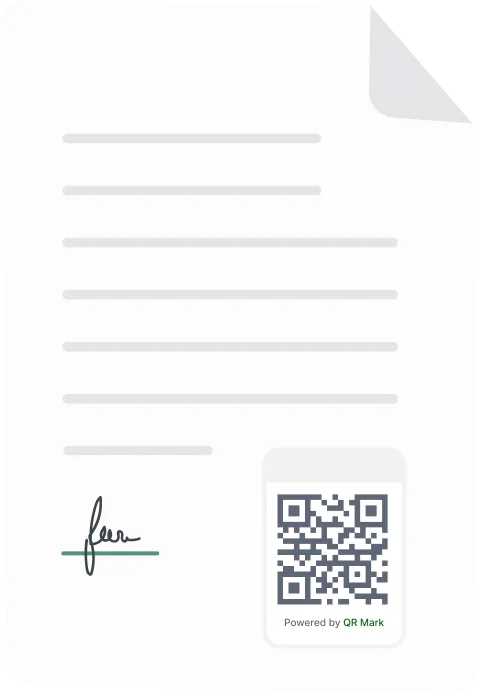
QR Mark adds a combined QR Code and verification URL, to a document at the moment it is issued. The loop is short: embed, scan, verify. The issuer embeds the Verification Image, a recipient or verifier scans it with any phone camera, and they land on a verification page that confirms the document is genuine and shows the key details to check against.
Two features carry the trust. A Custom Domain means the verification page loads on the issuer’s own address, such as verify.yourcompany.com, so a verifier can confirm they are on the real issuer’s page and not a lookalike. A Template-based verification page shows only the fields that matter, such as name, role, dates, and status, without exposing the full document. That handles the copied-mark and altered-document types directly: a copied QR Code sends the scanner to a page whose details will not match the fake in their hand.
It’s a tamper-evident verification layer, not a lock on the file itself. It does not stop someone editing a PDF. What it does is give every verifier a fast, reliable way to catch the edit, because an altered document no longer matches its verification record.
“Most document fraud does not survive one honest question: can you prove who issued this? We built QR Mark so any document can answer that in seconds, from any phone, without the verifier needing an account or an app.” Gautam Garg, Founder and CEO, QR Mark.
The takeaway
The many types of document fraud, from counterfeits and AI-generated fakes to altered, stolen, and copied documents, all exploit the same gap: no quick way to confirm a document’s origin. Naming the type is the first step. Closing the gap at issuance is the second. When a document can prove itself, most fraud stops being worth the effort.
FAQs
1. What should you do if you suspect a document is fraudulent?
Do not rely on the document alone or immediately reject it based on appearance. Compare the information with the issuing organisation, preserve the original document, and follow your organisation’s fraud-reporting or verification process.
2. Who is responsible for verifying a document during hiring or onboarding?
Responsibility typically depends on the organisation’s internal process. HR, compliance, recruitment, or designated verification teams may handle checks, but organisations should clearly define who is responsible for confirming important credentials before making a decision.
3. How long should organisations keep verified documents?
There is no universal retention period. The appropriate period depends on the document type, industry requirements, applicable privacy laws, and the organisation’s internal retention policy. Organisations should avoid keeping sensitive documents longer than necessary.
4. What should organisations do when an applicant provides conflicting document details?
The discrepancy should be investigated before relying on the document. Organisations can request clarification, compare the information with an authoritative source, and escalate the case to the appropriate compliance or verification team when necessary.
5. Can document verification protect sensitive information?
It can, if the verification process is designed to reveal only the information necessary for authentication. Showing selected fields instead of exposing an entire document can reduce unnecessary sharing of sensitive information.
6. What makes a document verification system trustworthy?
A trustworthy system should make it easy to identify the legitimate issuer, provide consistent verification information, prevent unauthorised changes from going unnoticed, and give the verifier a clear way to identify discrepancies.
7. Can organisations use document verification for documents they already issued?
Yes, depending on the verification platform and its implementation. Organisations can establish verification records for eligible documents and provide recipients with a way to validate those records when needed. QR Mark’s verification workflow is designed around connecting issued documents to an online verification record.
8. How can organisations make document verification easier for third parties?
The process should require as few steps as possible. A recipient should be able to access the verification information quickly without needing specialised software or extensive knowledge of the issuer’s internal systems. QR Mark uses a scannable verification mechanism to connect the physical or digital document with its verification page.
9. What happens when an employee or credential holder’s information changes?
Organisations should have a process for updating or invalidating the relevant verification record when information changes. This is particularly important for credentials, employment documents, and certifications where status can change after issuance.
10. How can organisations verify documents issued to large numbers of people?
They need a process that can handle verification without requiring staff to manually contact the issuer for every document. A centralised verification system can make it easier to issue, track, and validate documents at scale. QR Mark is designed to provide a verification layer that can be attached to documents when they are issued.
11. Can a verification page show only selected document information?
Yes. A verification system can be configured to display only the information necessary for confirmation. QR Mark’s template-based verification pages, for example, can show selected fields such as a person’s name, role, dates, or status rather than reproducing the entire document.
12. Why should verification links use the organisation’s own domain?
Using an organisation-controlled domain gives recipients another way to establish that they are interacting with the legitimate issuer. It can also reduce confusion caused by unfamiliar third-party verification websites. QR Mark supports custom domains for this purpose.
13. What should a verifier check after scanning a document?
The verifier should compare the information displayed on the verification page with the document they received. Key differences in names, dates, roles, credential details, or status can indicate that the document should be investigated further.
