

TL;DR
A certificate of authenticity for product is a document that proves an item is genuine and made by the brand it claims to come from. It usually lists the product name, serial number, manufacturer, issue date, and verification details. The strongest versions now link to a QR Code so a buyer can confirm the product is real in seconds. This guide covers what a COA includes, which industries use it, how it gets verified, and how to issue one buyers can actually trust.
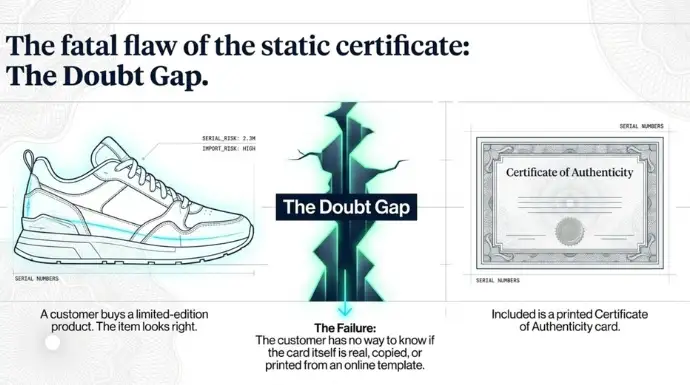
Picture a customer who just bought a limited-edition pair of sneakers from a reseller. The shoes look right. There is a printed card in the box that says “certificate of authenticity.” But the customer has no way to know if the card is real, copied, or printed from a template someone found online. The card is supposed to settle the question of whether the product is genuine. Instead it just moves the doubt one step over.
That gap is bigger than most brands realize. The OECD and EUIPO estimated global trade in counterfeit goods at around USD 467 billion in 2021, roughly 2.3% of all imports, in their 2025 report. And counterfeits are not just a problem for buyers chasing bargains: a 2025 Red Points survey found 61% of shoppers had unintentionally bought a counterfeit, usually believing they were buying from a real brand or authorized seller.
A certificate of authenticity is meant to be the thing that ends that doubt. So let me walk through what it actually is, what belongs on one, and why a piece of paper on its own no longer does the job.
What Is a Certificate of Authenticity for Product?
Certificate of authenticity for product is an official document issued by the manufacturer or brand that confirms the item is genuine and made by them. A COA ties a specific physical product to a record the brand controls, usually through a serial number, batch ID, or unique code.
People often mix it up with two other documents that show up in the same box. They are not the same thing:
| Document | What it proves | What it does NOT prove |
|---|---|---|
| Certificate of authenticity | The product is genuine and made by the brand | Who currently owns it, or that it still works |
| Warranty card | The brand will repair or replace it within a period | That the product is genuine |
| Invoice / receipt | A purchase happened, and for how much | That the item bought was genuine |
You see COAs across very different categories. A luxury handbag ships with one to support resale value. Electronics and appliances use them to confirm a unit is a real, in-warranty model and not a gray-market clone.
Collectibles and sports memorabilia lean on them heavily, because a signed item is close to worthless without proof the signature is real.
Fine art uses them as part of provenance. And everyday branded merchandise, from premium auto parts to designer eyewear, uses them to separate the real product from the fakes sitting next to it on a marketplace listing.
Why Do Products Need a Certificate of Authenticity?
Products need a certificate of authenticity because, without one, a buyer has no reliable way to tell a genuine item from a good fake. A COA gives the brand a way to vouch for the product after it has left their hands. It does four jobs:
- Proves the product is genuine. It connects the item in hand to a record the brand created when the product was made.
- Helps buyers spot counterfeits. A verifiable certificate gives the buyer something concrete to check, instead of guessing from stitching or packaging.
- Builds trust in the brand. When a brand makes authenticity easy to confirm, buyers worry less about getting cheated, and they buy with more confidence.
- Supports resale and warranty claims. On the secondhand market a COA protects resale value, and at the service counter it backs up a warranty claim.
What Information Should a Product Certificate of Authenticity Include?
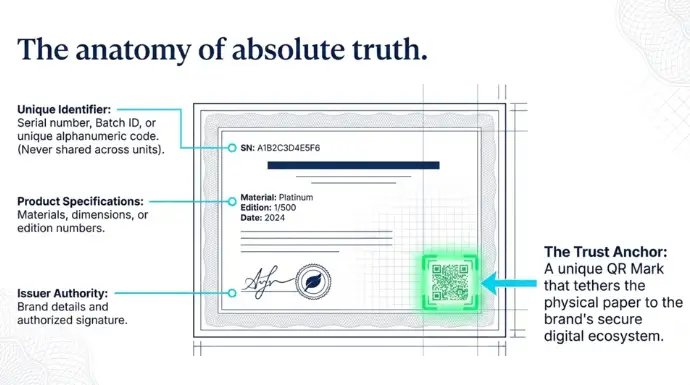
A product certificate of authenticity should include enough detail to tie it to one specific item and to the brand that issued it. At a minimum, include:
- Product name and model
- Product ID, serial number, or unique code
- Manufacturer or brand details
- Date of issuance
- Product specifications (materials, dimensions, edition number, where relevant)
- Verification details (a QR code or URL the buyer can check)
- Authorized signature or official seal
The verification detail is the part most templates get wrong. A name and a serial number printed on a card can be copied. A serial number that resolves to a record on the brand’s own verification page cannot be faked as easily, because the counterfeiter does not control that page. More on that below.
Which Industries Use Certificates of Authenticity?
Certificates of authenticity are used in any industry where a product is valuable, easy to copy, and changes hands more than once. The most common are:
- Luxury goods. Handbags, apparel, and accessories, where resale value depends on proven authenticity.
- Art and collectibles. Paintings, prints, signed memorabilia, and trading cards, where provenance is most of the value.
- Electronics. Confirming a unit is genuine and in-warranty, not a counterfeit or gray-market import.
- Watches and jewelry. High-value items where a fake can be hard to spot without expert inspection.
- Automotive parts. Counterfeit parts are a safety risk, so a COA helps confirm a part is the real component.
- Pharmaceuticals and healthcare products. Where a fake product is a direct danger to the patient, and regulators require traceability.
How Are Product Certificates of Authenticity Verified?
Product certificates of authenticity are verified using one of four methods: QR codes, digital signatures, holograms, and physical seals. Each tries to answer the same question, “is this real?”, but they are not equally hard to fake.
| Method | How it works | Weakness |
|---|---|---|
| QR code | Links the product to a verification page the brand controls | Only works if the buyer checks the page, not just that the code scans |
| Digital signature | Cryptographically signs the certificate file | Needs technical knowledge to verify; not buyer-friendly |
| Hologram | A sticker that is hard to reproduce exactly | Can be copied closely enough to fool a casual buyer; nothing to check against |
| Physical seal / signature | An embossed stamp or handwritten signature | Easy to forge, and impossible to check remotely |
The pattern here matters. Holograms and seals ask the buyer to judge whether something looks right. QR codes and digital signatures let the buyer check against a record. The difference between “looks right” and “checks out” is the whole game, and it is why QR-based verification has taken over.
How Are QR Codes Changing Product Authentication?
QR codes are changing product authentication by turning a static certificate into something a buyer can check in seconds with the phone already in their hand. Instead of judging a hologram by eye, the buyer scans a code and lands on a page that confirms the product is real.
Here is what that changes in practice:
- Instant verification. Scan the code, see the result. No emailing the brand and waiting two days for a reply.
- A mobile-friendly experience. The buyer uses their own phone camera. There is no app to download and no account to create.
- A unique record per product. Each certificate links to its own record, tied to one serial number, so a copied code does not match the product in hand.
- More customer confidence. A buyer who can confirm authenticity themselves trusts both the product and the brand more.
- A lighter support load. When buyers can self-verify, the brand fields far fewer “is this real?” emails.
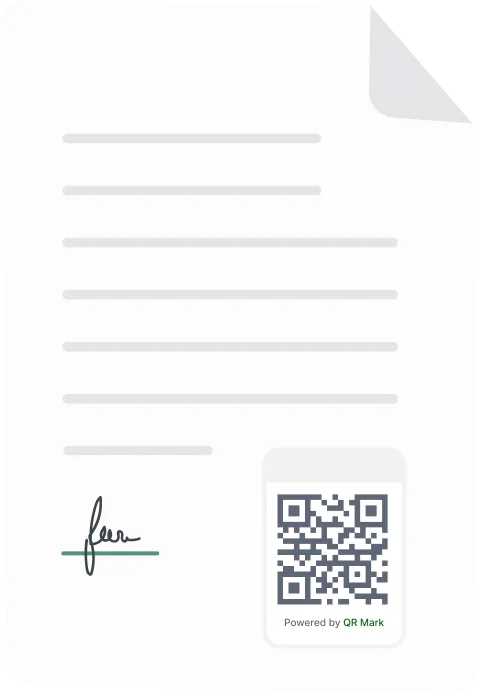
The way QR Mark handles this is with a Verification Image, a combined QR code and verification URL, that you place on the certificate. The whole model runs on three steps: embed the Verification Image on the certificate, the buyer scans it, and they land on a verification page that confirms the product is genuine. Embed, scan, verify.
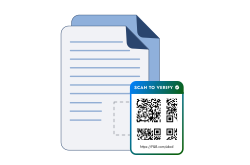
How Does QR Mark Help Businesses Issue Verifiable Certificates of Authenticity?
QR Mark helps businesses issue certificates of authenticity that buyers can verify on the brand’s own domain, in seconds, without an app. Each certificate gets a unique Verification Image linked to a secure verification page you control. Here is what that gives you:
- A unique QR code for every certificate. Each product gets its own Verification Image tied to its own record, so codes are not interchangeable between items.
- A secure verification page per product. The scan resolves to a page showing the details that confirm authenticity, the ones you choose to display.
- Verification in seconds. The buyer scans with any phone camera. No app, no login.
- Less manual verification work. Buyers and resellers self-serve, so your team stops being the verification help desk.
- Brand ownership through a Custom Domain. Verification pages are served from your own domain, like verify.yourbrand.com, so buyers can see the page belongs to you.
- A fit with your existing workflow. Generate certificates one at a time by Upload, in batches with Bulk Verification, or straight from your production system through the API.
How to issue a verifiable COA, step by step
- Create a verification record for the product, either by uploading the certificate PDF, running a batch through Bulk Verification, or calling the API from your system.
2. Choose what the verification page shows, such as product name, serial number, model, and issue date.
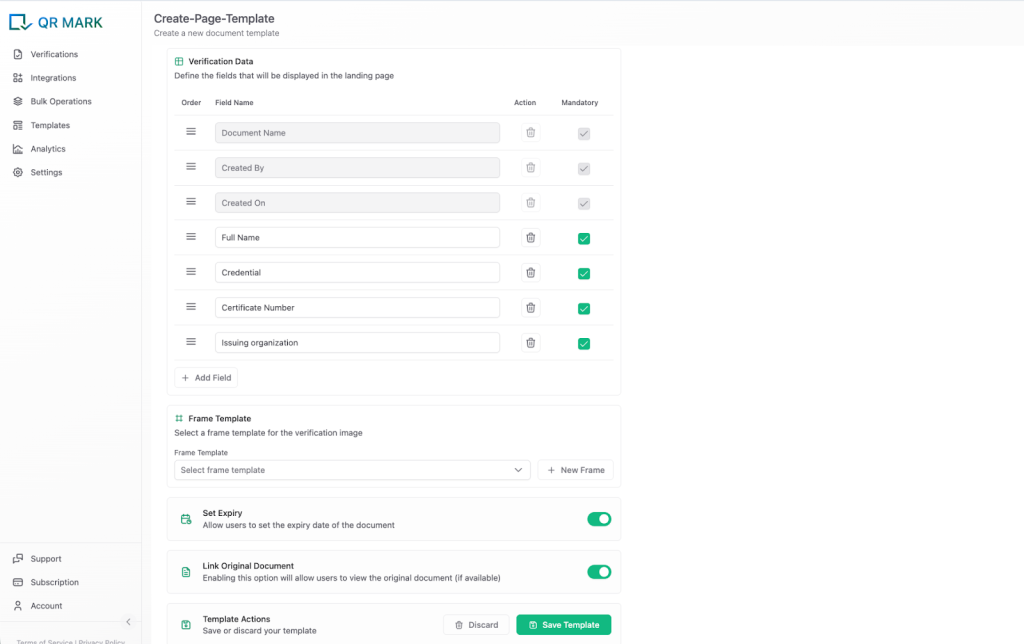
3. Place the Verification Image on the certificate, the card, or the product packaging.
4. Set up your Custom Domain once, so every verification page resolves to your brand’s domain.
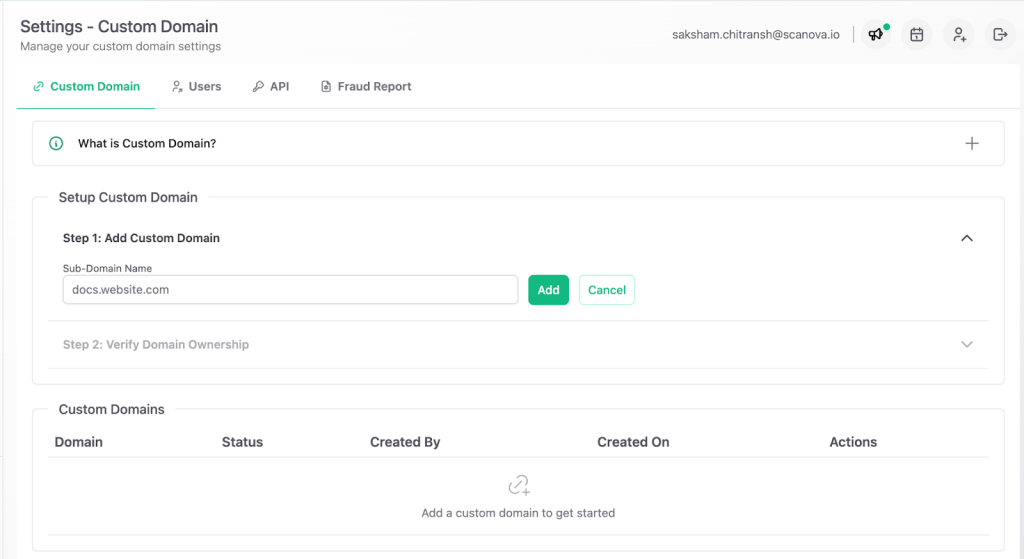
5. Ship the product. The buyer scans, lands on your verification page, and matches the details to the item in hand.
What Are the Benefits of QR Code Based COA for Manufacturers?
For manufacturers, QR-based certificates of authenticity turn authenticity from a claim into something buyers can confirm, which protects the brand and reduces the cost of dealing with fakes. The main benefits:
- Stronger brand protection. Every genuine product carries a check that fakes cannot pass.
- Lower counterfeit risk. When verification is easy, counterfeits are easier to expose and harder to pass off.
- More customer trust. Buyers who can verify for themselves feel safer paying full price.
- An easier verification process. A scan replaces back-and-forth email checks.
- A better post-purchase experience. The buyer’s first action after opening the box is a moment of confidence, not doubt.
What Are the Best Practices for Creating Secure Product Certificates of Authenticity?
The best practices for secure product certificates of authenticity all point the same way: make every certificate unique, checkable, and easy for a buyer to confirm. Five that matter most:
- Use unique identifiers. Give every product its own serial number or code. Shared identifiers defeat the purpose.
- Add digital verification. Pair the printed certificate with a QR code that resolves to a record, so authenticity is checkable, not just visible.
- Store records securely. Keep the source of truth on infrastructure you control, so the verification page cannot be spoofed.
- Make verification simple for the buyer. No app, no account. A phone camera and a scan should be the whole process.
- Audit your issuance process regularly. Check who can issue certificates and review records, so the system itself is not a weak point.
Frequently Asked Questions
How do I get a certificate of authenticity?
If you are the brand or manufacturer, you create it yourself by issuing a document that ties the product to a record you control, ideally with a QR code for verification. If you are a buyer, the COA should come from the brand or an authorized seller; a certificate from a third-party reseller with no link back to the brand is worth very little.
Is there a free certificate of authenticity template I can use?
Yes, plenty of free COA templates exist, and they are fine for the layout. The catch is that a template only produces a static document. Anyone can fill in the same template, so on its own it does not prove much. The value comes from adding verification the buyer can check, such as a QR code linked to your records.
Is a certificate of authenticity proof of ownership?
No. A certificate of authenticity proves a product is genuine, not who owns it. Ownership is shown by an invoice or receipt. The two are often confused because they travel together, but they answer different questions.
Can a certificate of authenticity be faked?
A printed certificate can be copied, which is exactly why static cards are weak. A certificate tied to a verification page on the brand’s own domain is much harder to fake, because the counterfeiter does not control that page and the product details will not match a copied code.
Do buyers need an app to verify a QR code certificate?
No. With QR Mark, the buyer uses their phone’s built-in camera to scan the Verification Image and lands on the verification page in a browser. There is no app to install and no account to create.
