

TL;DR
Document fraud is rising, so online verification is now a risk and trust decision, not a routine check. Verifying a document and verifying a person are different problems and often need different tools. OCR and digital signatures help, but don’t catch all tampering. There are methods like QR Code document verification , that helps to verify documents online. The verification is also instant, you just need a smartphone or device to scan the QR Code and match the details. The best way to judge a solution is to understand how they handle failures.
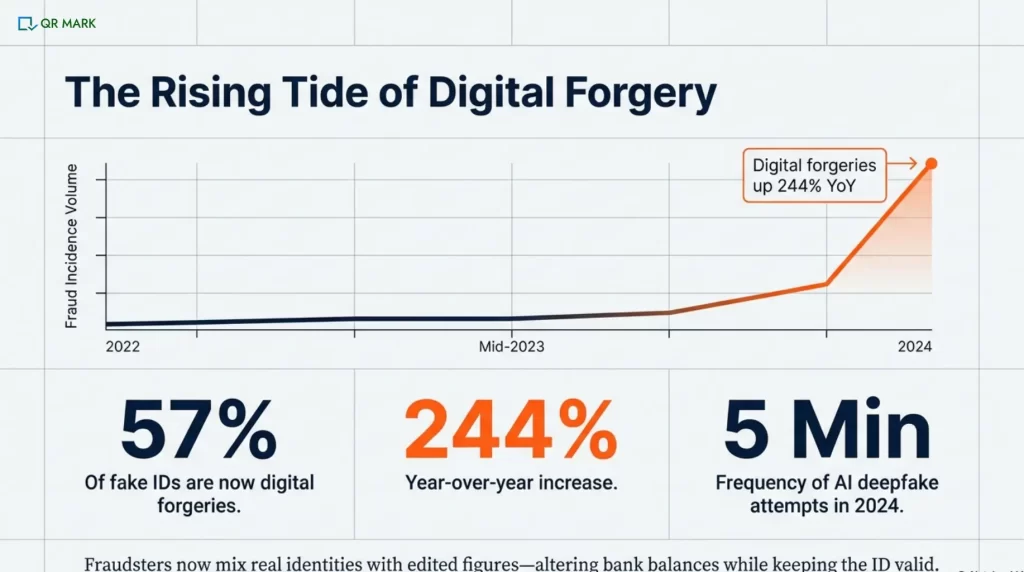
The rise of modern technologies has made document fraud easier than ever. In fact, reports show that document forgeries jumped 244% in 2024 compared to 2023.
That shift has changed how organizations think about documents. What used to be a routine check is now a risk decision.
This is hitting sectors where documents are critical to day-to-day operations the hardest:
- HR and operations teams
- Government and legal bodies
- Healthcare and pharma
- Universities and school
- Real estate and manufacturing
Most of these organizations now rely on online document verification. Offline checks are slow, expensive, and hard to scale.
But here’s the real challenge: verifying documents online is no longer just about whether it work. It’s about when it breaks.
Different technologies verify different things. Some confirm the document. Some confirm the person. Some work only inside a platform. Others fail the moment a document is shared.
In this blog, I’ll break it all down in simple terms for you:
- How document verification online actually work
- Which technologies matter and what they really prove
- How to compare options without getting lost in vendor claims
- And a practical checklist you can use to make faster, safer decisions
Let’s get started. But before we jump into decision-making, let’s clear a few basics first.
A. What does “verify documents online” actually mean for a business?
For a business, “verify documents online” means using digital tools to check whether a document is genuine, unaltered, and trustworthy.
It helps businesses reduce fraud risk and make confident decisions quickly, even when documents are shared or submitted remotely.
They want to know what methods will give them confidence. Digital verification tools often blur these lines, so it’s important to know your objective.
Document vs Identity: Are you trying to prove the paper is real, or prove the person is real?
Here’s a quick comparison that makes things more clear:
| Document Authenticity | Identity Verification | |
| What it proves | The document itself is genuine (e.g. not a fake passport or altered certificate). It checks visual/security features and data integrity. | The person presenting the document is the person named on it. Often done by face/biometrics matching a selfie to the ID photo. |
| What it doesn’t prove | It does not prove the person is who they say (anyone holding a valid ID would pass). It also doesn’t catch some tampering of the document content (like edited numbers). | It does not verify the document’s origin or authenticity. It only ties the document to the face. A real person could use a stolen but “good” document and still pass. |
Businesses often need to verify many types of documents, not just passports or licenses.
Common ones include:
- Passports, Driver’s licenses,
- National ID cards,
- Utility bills,
- Bank statements,
- Tax forms,
- Transcripts and
- Diplomas, etc.
For example, a bank might check a utility bill or a bank statement to confirm a customer’s address.
Fraud today often combines real identities with fake details. For example, criminals might use someone’s real ID but change the financial figures on a bank statement.
Research showed that some bank statements were changed. These changes hid transaction amounts or balances to conceal illegal activity.
Proof-of-address forms include utility bills and rental leases. Financial documents are bank statements and pay stubs. These often need checks for verification. This similar case happens in case of fake insurance documents as well.
A modern approach often includes checking data points or requesting various document types. Modern document fraud schemes often use real personal data but change the numbers. So, automated checks must keep track of those edits.
B. What technologies verify documents online, and what does each prove?
Different tools look at documents and identities in different ways. Businesses often use a combination of these technologies to build confidence. Understanding each method’s strengths and blind spots is crucial.
Let’s take a closer look at the most popular ones.
1. How does OCR help verify documents online?
OCR software scans document images. It changes text, such as names, numbers, and dates, into data.
OCR checks if document text matches expected formats. It can also verify database records, such as the ID number format.
It ensures the text is readable and extracted.
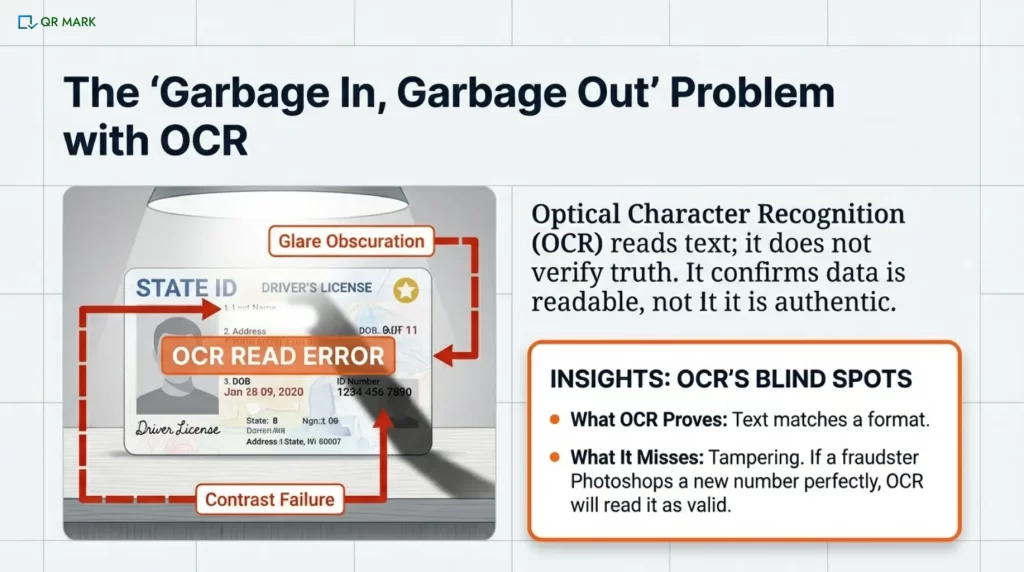
What OCR does not prove: anything about authenticity or context. OCR cannot tell if the document itself is real, or if someone edited the text.
It simply reads what is there. If a statement amount or address is wrong, OCR alone won’t notice unless logic checks are added.
OCR works well on clear, high-contrast scans. If the photo is blurry, it can cause issues. A tilted or overexposed image also leads to problems. Shadows can make OCR misread characters, too.
For example, a shadow over a line can cause the engine to misinterpret letters or miss text entirely. In practice, user-taken photos frequently suffer from poor lighting or focus. One guideline is “avoid shadows and glare for best OCR results”. Low-quality inputs directly raise the error rate.
OCR doesn’t validate that the text it reads is truthful. A fraudster can photoshop a real social security number. They can also fake a signature line. OCR will read it easily. We need more security checks. We also need data cross-references beyond OCR to catch those.
2. How do digital signatures help in document verification?
A digital signature uses cryptographic certificates. This shows that the file hasn’t changed since a trusted party signed it.
When you open a signed PDF in Adobe Acrobat or a similar viewer, the software checks the trust chain. It looks at the signer’s digital certificate. Then, it traces this certificate to a trusted root Certificate Authority (CA).
If everything lines up, it will say “Signature Valid.” This shows the PDF content is complete. It was signed by the person with the private key for that certificate.
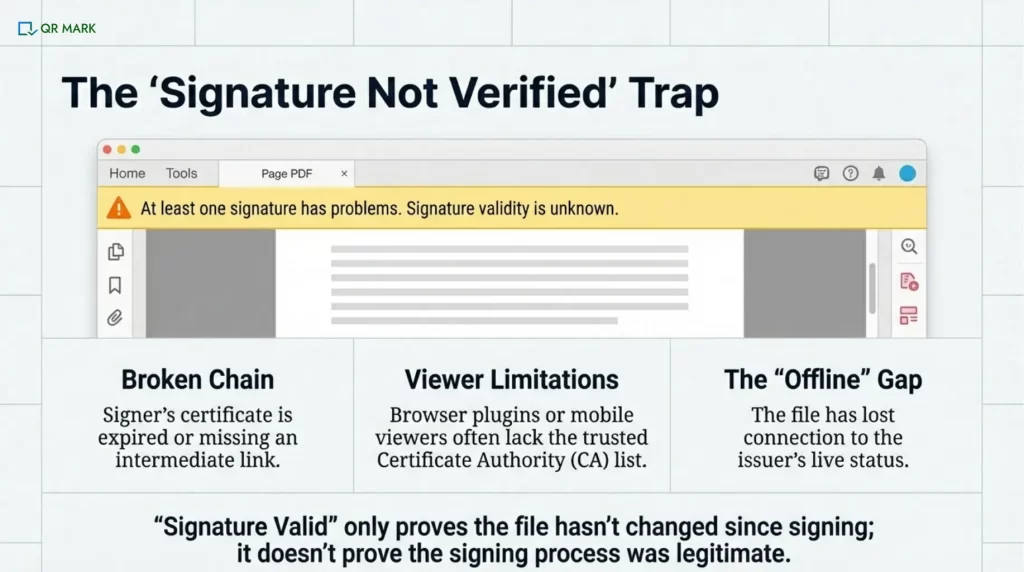
However, there are many reasons a valid signature can show as “not verified.” Often it’s not the signature that’s wrong, but the trust chain:
I. Broken trust chain
If the signer’s certificate is expired or revoked, the viewer can’t connect it to a trusted root. If it’s missing an intermediate certificate, that also prevents the link. This “broken chain” causes an error.
If an old signing certificate isn’t updated, Acrobat can’t verify the signature. It needs the latest Certificate Authority (CA) to do so. It will show a warning.
II. Viewer limitations
Not all PDF viewers trust all certificates. If a PDF is forwarded and opened in a browser PDF plugin or on a phone, the signature might show invalid. This happens because the viewer doesn’t have the right CA list.
III. What a “valid” signature really means
It’s important to realize that “Signature Valid” only means “this file hasn’t been changed since it was signed by the certificate owner.”
It doesn’t prove, by itself, that the signing process or the whole document context was legitimate.
For example, a bank could sign a fraudulent statement because their certificate was misused. It also doesn’t work once the document leaves the signing platform unless handled correctly.
3. How does QR-based authentication and verification work?
QR Code document authentication means the document is connected to the issuer’s system. This allows the details to be checked directly from the source.
In a platform-bound trust model, trust shifts to the user or the downloaded file once they get a PDF or image. It becomes “offline,” making it hard to verify again.
In a source-bound trust model (like QR Mark), each document is tied to a secure, issuer-controlled record. This means that if the file is shared or opened elsewhere, a user can still check its authenticity. It does that by going back to the source.
One way to do this is by embedding a secure link using QR Codes on the document that only the issuer can validate.
When a document has a QR Code or verification link from its origin system, scanning it takes the user to the issuer’s system to confirm details.
For example, some systems place a small QR Code on the digital certificate or PDF.
When a third party scans the QR Code, it links to the issuer’s database. Then, you can verify the document data and signature match the original issuance.
This works even after the document was forwarded or printed. Why? Because the source has the “ground truth” on record.
C. How can businesses choose an online document verification solution that actually works?
Choosing a document verification solution can be confusing, with many vendors providing fancy features. Rather than product names, businesses should compare core architectures and metrics.
Let me take you through what I mean here.
1. Which architecture is best for privacy: edge computing vs cloud verification?
I. Edge-first processing (done on the user’s device)
Think of this like checking a document in someone’s hands instead of taking it away. With edge-first processing, the document is checked directly on the user’s phone or computer. The app or browser looks at the ID, runs the verification steps, and makes a decision without sending the document image to a company’s servers.
Because the document never leaves the device:
- Personal information stays private.
- There’s much less risk of data leaks or misuse.
- The system is safer by design, not just by policy.
The downside is that the device can only do so much. If the phone or computer is old, slow, or restricted, the checks may not work perfectly. Also, since everything happens locally, it’s harder to compare the document against large databases or update checks in real time.
II. Cloud-based processing (done on company servers)
Now imagine taking the document to a secure office for inspection. In cloud-based processing, the user’s document is uploaded to a company’s servers, where powerful systems analyze it. This allows:
- More advanced checks
- Better fraud detection
- Continuous improvements using shared learning
The trade-off is privacy. Because the document is sent over the internet and stored (even briefly), the company must be trusted to:
- Encrypt the data properly
- Limit internal access
- Delete data when it’s no longer needed
Cloud systems can be very effective, but they depend heavily on how responsibly the company handles sensitive information.
2. When does “hybrid AI + human review” outperform automated verification?
Fully automated AI document verification (using OCR, AI face match, etc.) is fast but not perfect. Sometimes a borderline case or a rare document format trips it up.
A hybrid approach is often best in practice: AI handles the easy, clear cases (the bulk), and any “uncertain” or suspicious cases go to a human reviewer.
For example, a top vendor reports using AI for most checks, then human experts check the tricky ones. This keeps false rejections very low while still catching fraud.
In general, hybrids can dramatically lower false reject rates (FRR) without letting fraud slide in (because humans catch what AI doubts).
The downside is cost and latency. Humans aren’t 24/7 and cost more, but a small delay in edge cases is often worthwhile.
Metrics matter as well. if your automated FRR is, say, 5%, but adding human review can cut it to <1%, that could justify the effort.
3.What should you choose when documents must be verified by third parties?
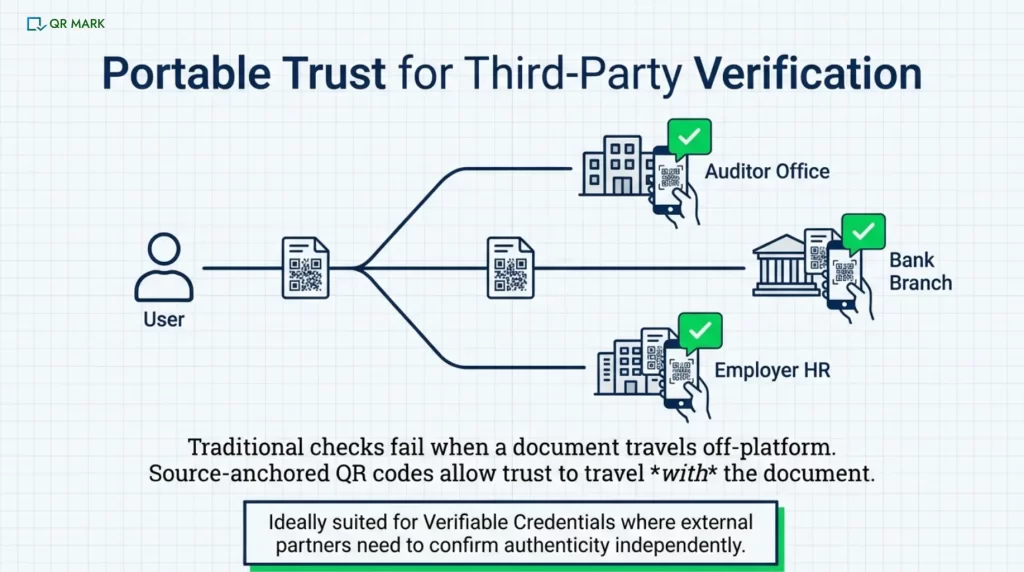
If others (like auditors, partners, or customers) need to confirm documents, source-anchored methods are ideal. That way, anyone can independently check the record. Edge or platform-bound systems without such linking won’t allow it.
Essentially, if third-party verification is needed, look for solutions that support verifiable credentials or secure QR links back to the issuer.
This often means opting for a system where the document stays connected to a central source.
| Approach | Privacy | Failure Recovery | 3rd-Party Verification | Auditability |
| Edge-First | High (data stays local) | Low (no server fallback) | Not supported | Limited (device logs) |
| Hybrid Precision | Medium (some cloud use) | Medium (mix of AI/human) | No (centralized control) | Medium (partial logs) |
| Platform-Bound | Low (uploads to server) | High (server backups) | No (no public trace) | High (central logs) |
| QR Code Based Verification | Medium (data shared via link) | High (issuer records) | Yes (QR Codes or digital seal) | High (full audit trail) |
D. How do you verify non-standard documents?
Non-ID documents often need extra care. For example, like proof of address, transcripts, and bank statements. Their verification is difficult because the chances that these might be edited is very high. These are also the most common spoofed documents you might be receiving at your workplace.
Here are some of them:
1.Proof-of-Address:
Allow many document types (utility bill, lease agreement, government letter). Often the key is matching the address and name on the doc to the customer’s info.
Verification might include checking the format against known bill templates, or requiring a date (e.g. within last 3 months).
The main goal is to ensure the address is valid, not to parse every detail. Some systems also cross-reference the address via third-party data (if available).
Always have a manual fallback: if OCR fails, a person can verify the key fields or use QR Code present in the document. Just Scan and verify.
2. Academic Transcripts/Certificates:
These vary widely by institution and country. The best option is to verify the document with the issuer, for example by checking a diploma in the university’s system.
In the absence of that, require clear scans of the full document and maybe an English translation.
Look for security features (watermarks, official seals, QR Codes). You can also use other specialized academic verification services.
3.Financial Documents:
Bank statements, pay stubs, or Tax forms are prone to tampering. Fraudsters often keep personal info the same but tweak financial numbers. (e.g. deposits increased or balances rolled forward)
To verify, systems might compare numbers against what the user reported or use heuristic checks (e.g. consistency of totals). In some cases, verification services can confirm the data straight from the bank using secure APIs. A manual review is often needed for anything suspicious.
The key is to catch when only the values have been manipulated while the identity remains unchanged.
These non-standard documents are harder to verify and often require extra human checks.
My pitch: If you work with documents often, you’ve noticed that many of them include digital signatures or QR Codes built into them. These are the most important cues you should be looking for when it comes to verification. While useful, these technologies can also cause delays and raise overhead costs. But, QR Code allows instant verification.
E. What should you check before choosing an online document verification solution?
This table should be used as a decision checklist. If a solution fails any critical item above (like lacking alternate flows or no audit logs), it may struggle when pushed.
No vendor pitch, just a checklist of must-haves:
| Requirement | What to Check |
| Resiliency (conflict zones, alt. pathways) | Does the system allow alternative document types? Can you override checks for known disruptions (e.g. postal outages)? |
| Failure-state handling (timeouts, retries) | Are there timeouts and retries on email/SMS/API calls? Does it confirm each step to users? Are SLAs defined for slow steps? |
| False-rejection recovery | Does it prompt for better inputs (hints if blurry photo)? Allow multiple tries? Offer human review fallback? |
| Non-standard docs support | Can the system ingest custom documents (bills, letters)? Are there manual review workflows for unusual formats? |
| Auditability & compliance | Are all verification steps logged and timestamped? Does the vendor provide SOC 2/ISO/GDPR evidence on data handling? |
| Third-party verification support | Does it offer source-anchored IDs or QR Codes for external validation? Can a partner verify the credential independently? |
Conclusion
Online document verification looks simple, until reality hits.
Documents move. They get shared, printed, compressed, and uploaded again. Quality drops. Context is lost. Fraud slips in through these cracks.
That’s why speed alone is a weak filter.
Resilience is what counts.
Can the document be checked after it leaves your system? Is there a backup when automation fails? Can an external party verify it without asking you? Is there a clear audit trail?
No single method covers everything. OCR reads what’s visible. Signatures protect files. Identity checks link faces to IDs. Source-linked verification, like QR Codes, keeps the document tied to its origin.
Don’t choose only for ideal conditions. Trust is proven when the system still holds under pressure.
FAQs
1.How can I verify a document online and know it’s authentic?
Start by using a trusted document verification tool. For PDFs or digital files, check the digital signature. Newer systems also add a QR code or verification link from the issuer. Scanning it confirms the document against the original record. For documents, OCR is used to read and confirm the text. The most reliable approach is to use multiple checks together. Also include security features, trusted certificates, and database lookups.
2. What’s the difference between document verification and identity verification?
Document verification checks the authenticity of a document itself (e.g. “Is this passport real or fake?”). Identity verification checks that the person presenting the document is the person named on it (e.g. “Does this face match the photo on the passport?”). They overlap in practice but solve different problems: one is about the paper/file, the other is about the person. Both may be needed for high security.
3. What is false rejection in verification, and how do businesses reduce it?
A false rejection (false non-match) is when a genuine user/document is incorrectly rejected by the system. For example, a person might upload a perfectly good ID but the OCR fails or the selfie scan doesn’t match just due to lighting. To reduce this, you can improve data capture and use fallback options. Many use a hybrid approach: automated checks first, and if something looks off, a human reviews it. Also, systems can allow retries (e.g., retake a photo if the first is blurry). Monitoring the false rejection rate (FRR) and adjusting thresholds or adding human review for borderline cases is key.
4. What should a business do if users submit documents but never get confirmation?
This usually points to a backend issue, such as an email not being sent or a status update being lost.
Businesses should have safeguards to catch this early. Use retry queues so failed emails are sent again. Show clear progress updates so users know what’s happening. Set up alerts when a request stays in a “pending” state for too long.
5. Can document verification work when physical address verification is impossible?
Yes, If a system normally mails a code but can’t (for example, conflicts or rural areas), then use alternate checks. For example, instead of a postcard, accept a notarized affidavit, or an in-person video call showing the address. You could let users upload utility bills or other local proofs. The key is to plan for exceptions: flag the situation and automatically switch to alternate documents or manual review. That way, being unable to use the postal service doesn’t deadlock the user.
