


TL;DR
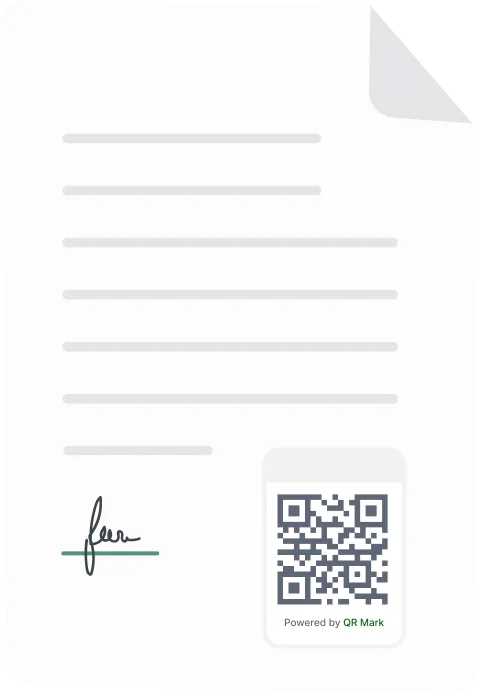
A course completion certificate is a document you give a learner to confirm they finished your course. A good one carries the learner’s name, the course title, the date, your branding, and a way to check it is real. This guide covers what to put on the certificate, how to issue one or a whole cohort, how to deliver them, and whether they count as legally binding.
Issuing course completion certificates is often more complicated than creating the course itself. Between designing the certificate, managing learner data, fixing name errors, and sending hundreds of PDFs, what should be a five-minute task can turn into hours of manual work.
In this guide, you’ll learn how to create professional course completion certificates, what information they should include, how to issue them individually or in bulk, and how to make them instantly verifiable so employers and other third parties can trust them. All in less than 15 minutes.
What Is a Course Completion Certificate?
A course completion certificate is an official document you issue to confirm that a learner has successfully finished a course or training program. It includes key details such as the learner’s name, the course title, and the completion date.
For training providers, schools, and businesses, these certificates do more than mark the end of a course. They recognize learners’ achievements, strengthen the credibility of your programs, keep accurate training records, and give learners a trusted way to prove they completed your course.
While a course completion certificate is not the same as an accredited qualification or professional license, it serves as an official record of completion issued by your organization.
What Do You Need Before You Start Creating Course Completion Certificates?
Before you design or issue certificates, make sure you’ve decided how they will be created, managed, and verified. A little planning upfront helps you avoid manual work, inconsistent certificate formats, and verification requests later.
Here’s what you should have ready:
- Clear completion criteria so you know exactly when a learner qualifies for a certificate.
- A design of certificate template with your logo, branding, signatures, and required fields.
- Learner information, such as names, course titles, completion dates, and certificate IDs.
- A clear idea of a secure verification method, such as a QR code or unique certificate ID, so anyone can confirm the certificate is genuine.
- A delivery plan, whether you’ll email certificates automatically, let learners download them, or issue them in bulk for an entire cohort.
Once you have these essentials in place, you’re ready to create and issue professional course completion certificates at scale.
How Do You Issue Course Completion Certificates Using QR Mark?
You design the certificate once, add your recipient data, then generate and deliver. I’ll be using QR Mark’s certificate generator to show you how you can generate bulk certificates for your entire course in one-go in less than 15 minutes.
Step 1: Prepare Your Learner Data
Get your data ready first. Put each learner’s details in a spreadsheet: name, course, completion date, email, and anything else your certificate shows, like a score or the program mentor.
Clean data now saves rework later, and your column headers should match the fields on your certificate.
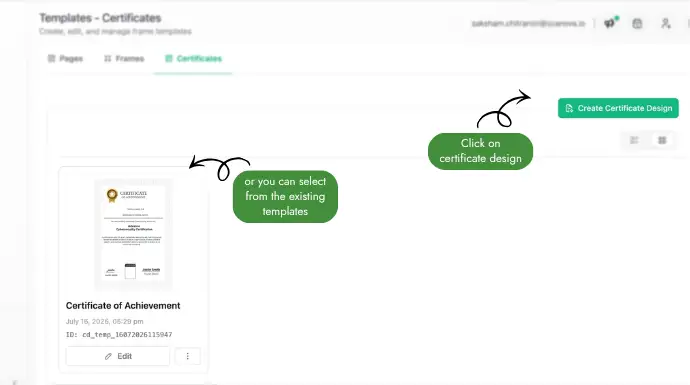
Step 2: Design a Reusable Certificate Template
In the Certificate Generator you build your template in the browser. Place the text fields, your logo, the signature, and the spot for the Verification Image.
Then bind each field to a variable so it fills in automatically, for example student name, course name, program mentor, completion date, and certificate ID. You design it once and reuse it for every cohort.
Step 3: Generate Certificates for One Learner or an Entire Cohort
Open Create Certificate and pick the template you just saved. The template you choose decides which fields the next steps ask you to fill.
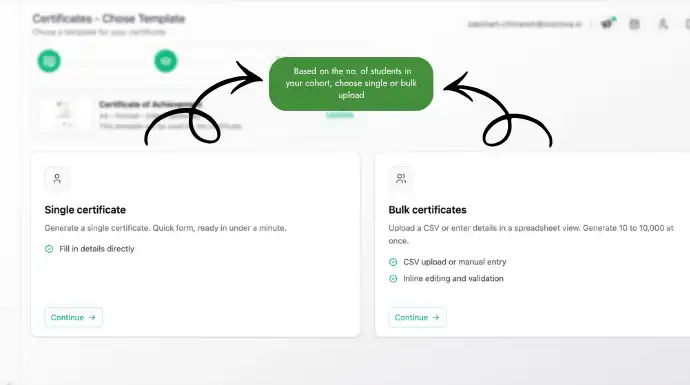
Decide how many you are issuing. Single fills a short form for one learner. Bulk lets you upload your CSV or Excel file, or type rows straight into the in-app grid, for a whole cohort at once.
Step 4: Fix Any Flagged Errors and Generate Your Certificates
Fill in the fields or map your spreadsheet columns, fix any errors QR Mark flags at the cell level, then click generate.
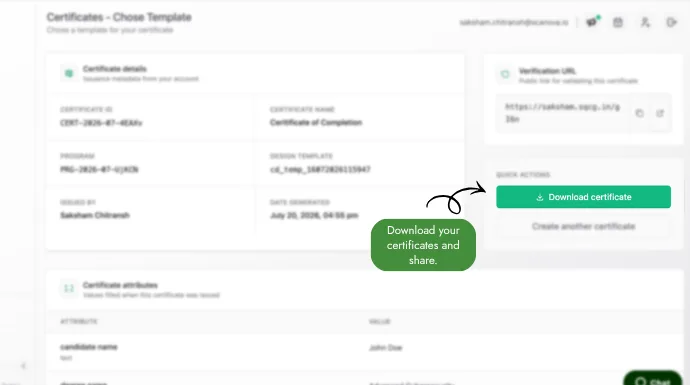
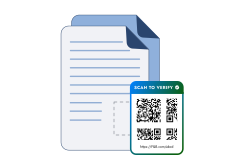
Each learner gets a personalized PDF with a unique ID and Verification Image. Your certificate is ready to download as a ZIP or email out in bulk, and the verification link keeps working if a learner loses their copy.
What Should You Keep in Mind When Generating Certificates?
Most certificate mistakes come from rushed data and untested output, not the design. A few habits keep a bulk run clean:
- Proofread names and course titles in your spreadsheet before you generate. A typo copied across 200 certificates is 200 reprints.
- Keep one column per field and match your headers to the template, so the right data lands in the right place.
- Give every certificate a unique ID and never reuse one, even across different courses.
- Test-scan the QR code on one certificate, on screen and on a printout, before you send the whole batch.
- Only show the fields you need on the verification page, so you are not exposing extra personal data.
- Save the records file with each learner’s details and verification link, so you can resend or check a certificate later.
What Should a Professional Certificate of Completion Include?
Every certificate of completion should carry the core details of who finished what, plus your branding and a way to prove it is genuine. Skip any of those and the certificate is either confusing or easy to fake.
What core text must be on the certificate?
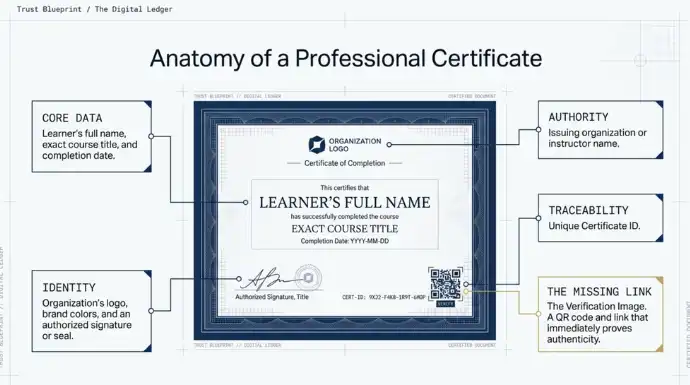
At a minimum, include the learner’s full name, the exact course title, the completion date, and a unique certificate ID.
Add the name of the issuing organisation or instructor. Some providers also show the course duration or a final score. Keep the wording plain, so anyone reading it understands exactly what was completed.
With QR Mark, you can map dynamic attributes to each field on the certificate. For example, [attribute.candidate_name] automatically pulls the learner’s name from your uploaded data, while attributes such as [attribute.course_name] or [attribute.score] populate the corresponding fields for every recipient. This lets you design the certificate once and generate personalized certificates for an entire cohort automatically.
What branding elements should you add?
Add your organisation’s logo and brand colours, plus an authorised signature or seal.
Branding does two jobs. It makes the certificate look credible to an employer, and it ties the credential back to you. A certificate that could have come from anyone is easy to forge and easy to dismiss.
QR Mark, allows you to design your certificates according to the branding elements of your organization. One more plus size to branding is that on the QR Code, you can add your company’s logo making authenticity more strong and credible.
Where Should You Start?
A course completion certificate is more than a document, it reflects your organization’s credibility. A well-designed, verifiable certificate gives learners something they can confidently share while making it easy for employers to confirm its authenticity.
Whether you’re issuing certificates to ten learners or ten thousand, the right process saves hours of manual work and ensures every credential is accurate, professional, and easy to verify.
By combining reusable templates, bulk issuance, and QR code verification, you can turn certificate issuance into a reliable part of your learner experience instead of an administrative headache.
Frequently Asked Questions
Can I issue a course completion certificate without being an accredited institution?
Yes. Any individual, business, training provider, or online educator can issue a course completion certificate. However, it only confirms that the learner completed your course. It does not make the course government-approved or professionally accredited unless you have the appropriate accreditation.
Can a course completion certificate be faked?
Yes, a plain PDF certificate can be copied or edited by anyone with basic design skills. That is why verification matters. A unique certificate ID plus a QR code that resolves on the issuer’s own domain makes a forgery easy to catch, because the details on the fake will not match the verification page.
Are digital course completion certificates valid?
Yes. Digital certificates are widely accepted, provided recipients can verify their authenticity. Adding a unique certificate ID and QR code verification makes digital certificates much more trustworthy than static PDF files.
How long is a course completion certificate valid?
Most course completion certificates do not expire, since they record that you completed the course on a given date. Some fields, such as safety or compliance training, require renewal after a set period. If yours has an expiry, put the valid-until date on the certificate and on the verification page so it is clear.
Is there a standard size for a course completion certificate?
There isn’t a mandatory standard. Most organizations use A4 size for printable certificates or US Letter size for North American audiences. Landscape orientation is the most common format.
Can I customize certificates for different courses or cohorts?
Yes. Most certificate generators let you create reusable templates with dynamic fields, making it easy to issue different certificates for multiple courses, batches, or training programs without redesigning each one.
How can learners verify a course completion certificate?
Learners can share a certificate that includes a unique certificate ID and QR code. With QR Mark, every certificate can be linked to a hosted verification page where employers, institutions, or anyone else can instantly confirm that the certificate was issued by your organization.
Can I generate course completion certificates in bulk?
Yes. If you’re issuing certificates for an entire class or cohort, QR Mark lets you upload learner data from a CSV or Excel file and generate personalized certificates in bulk. This eliminates repetitive manual work and ensures every learner receives a certificate with the correct details.
Can I add QR codes to course completion certificates?
Yes. QR Mark automatically adds a unique QR code to every certificate you generate. When scanned, it takes the recipient to a verification page containing details such as the learner’s name, course title, completion date, and certificate ID, making it easy to verify authenticity.
How do I prevent duplicate or fake course completion certificates?
The best way to reduce certificate fraud is to make every certificate verifiable. QR Mark assigns a unique certificate ID and QR code to each certificate, allowing anyone to compare the certificate with its official verification record. If a certificate has been altered or copied, the verification page makes discrepancies easy to spot.
