

TL;DR
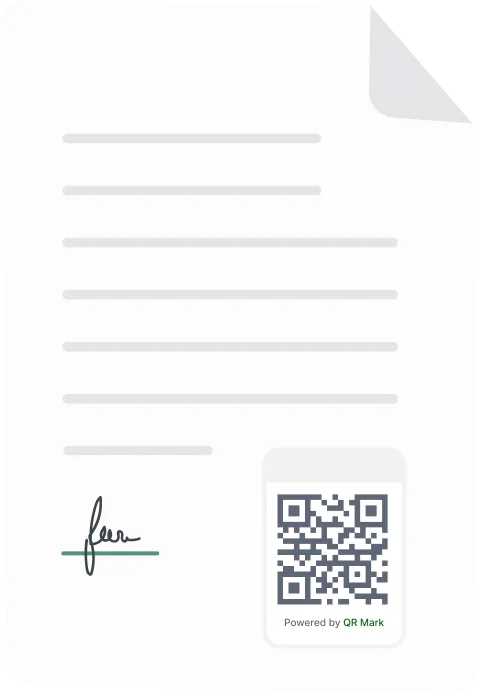
An internship certificate generator lets you create completion certificates for a whole batch of interns at once, instead of editing a Word file one name at a time. The better tools also add a QR code to each certificate, so an employer or a college can confirm it is real. Below: why the document matters, how to choose a tool, and how to set one up with QR Mark.
If you run an internship program, the certificate is the last thing an intern walks away with. HR teams, program coordinators, and training institutes usually hand these out at the end of a cohort, sometimes dozens or hundreds at a time.
Doing that by hand works until the list gets long, and none of those files can prove they are genuine once they leave your inbox. Having a certificate generator can easily help you to sign off on that batch and wants it done faster, kept on-brand, and hard to fake.
Why This Document Matters More Than Companies Assume
For many students and fresh graduates, the internship certificate is their first piece of official professional documentation. It goes to university departments for academic credit. It gets attached to early job applications where the candidate has little else to show. It goes into scholarship portfolios.
A good certificate says two things at once: the intern behaved professionally enough to earn formal recognition, and the company was organised enough to issue proper documentation. Hiring managers do check these. Universities do ask for them. A sloppy or incomplete certificate can hurt the intern’s credibility, even when the work itself was strong.
Even for a four-week internship, a properly formatted certificate takes under fifteen minutes to produce and leaves a good impression of your company.
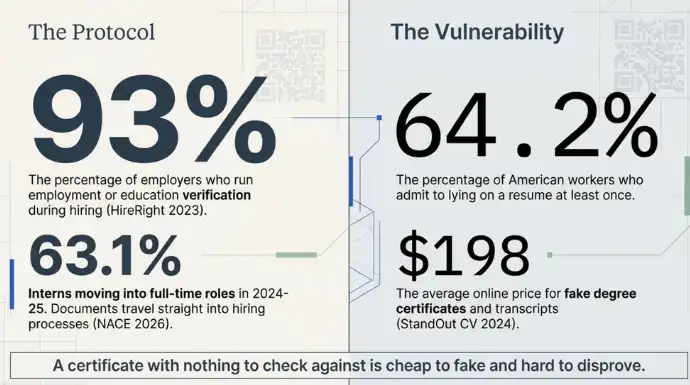
HireRight’s 2023 Employment Screening Benchmark Report found that 93% of employers run some form of employment or education verification during hiring, which means how an internship is documented feeds straight into a candidate’s prospects.
Why do internship certificates need to be verifiable?
Because interns use them to get things. A completion certificate backs up a resume, supports a college credit claim, or stands in as proof of experience for the next employer. If nobody can check it, anybody can copy it.
The stakes are real. 63.1% of interns moved into full-time roles with their employer in 2024-25, the highest rate in five years.. That certificate travels with the intern straight into a hiring process where documents get checked.
And documents do get faked. A 2024 StandOut CV survey of more than 2,100 American workers found 64.2% admitted to lying on a resume at least once, and reported that fake degree certificates and transcripts sell online for about $198 on average. A certificate with nothing to check against is cheap to fake and hard to disprove.
A verification layer fixes the checking problem. It does not stop someone editing a PDF, but it makes any change evident, because the details on the certificate have to match a page you control. QR Mark is tamper-evident in exactly this sense: it does not lock the file, it lets a recipient confirm what is genuine.
How to Choose the Right Internship Certificate Generator for Your Cohort
Match the tool to the size of your cohort and to what happens to the certificate afterwards. Five things decide it.
- Batch size. Can it build the whole cohort from a spreadsheet in one run, or does it slow down and start charging as the numbers climb? If you issue a few hundred at a time, one-at-a-time tools are a dead end.
- Verification. Does each certificate come with a built-in way to prove it is real, like a QR code or a verifiable link? This is the feature most free tools skip, and the one employers and universities actually use.
- Price and hidden extras. Check how you are billed and whether core features cost more. Some tools charge extra for QR codes or verification on top of the base plan. Certifier reviewers on G2 also note the cost can climb quickly at high volume.
- Design and brand fit. Can you drop in your logo and match your colours without a fight? Some Certifier users on G2 report that styling customization feels limited and the editor can be finicky.
- Performance at scale. Does it stay quick when you push hundreds or thousands of certificates at once? Several Credly users on G2 report a sluggish interface and badge-management friction that drags on day-to-day usability, which shows up most when handling larger cohorts.
Why should you choose QR Mark?
QR Mark answers those same five questions in a plain way. It is built to generate certificates and get out of your way.
- Design. The interface is minimal and easy to use. You are here to generate certificates, and that is what it does. No busy dashboard to learn, no fancy editor to fight, just a clean flow that gets the job done.
- Price. You pay for the number of certificates you generate. There is no extra charge for QR codes. In fact the QR code is created automatically with every certificate, so verification is part of the product, not an add-on.
- Performance. Bulk generation runs in the background, so you are not stuck watching a progress bar or feeding files in one at a time. Cell-level checks catch missing or wrong rows before generation starts, so you fix them once instead of re-running the whole batch.
- Batch size. You can generate certificates for up to 10,000 students in a single batch, which covers a full graduating cohort or a season of internships in one go.
What does the intern’s certificate verification look like?
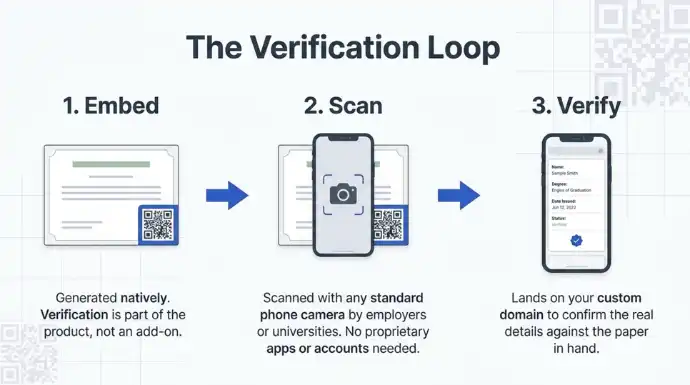
It follows one loop: embed, scan, verify. The QR code is embedded on the certificate. An intern, an employer, or a college scans it with any phone camera, no app needed, and lands on a verification page.
Served on a Custom Domain, like verify.yourcompany.com, that page carries your branding and shows the certificate details: who it was issued to, the program, the issue date, the certificate ID, and its status.
The verifier checks two things. Is the page on your real domain, and do the details match the certificate in hand. A copied or edited certificate falls down on one of those two.
FAQ
1. What information should an internship certificate include?
An internship certificate should typically include the intern’s full name, company or organization name, internship role or program, start and end dates, and the issuer’s name, designation, signature, and logo. Adding a unique certificate ID can also make the document easier to reference and verify.
2. Can I customize an internship certificate template with my company branding?
Yes. Most certificate generators let you add your company logo, colors, signature, and other branding elements. With QR Mark, you can create a reusable certificate template with your branding and verification QR code, then use it for an entire cohort.
3. What file formats can I use to create internship certificates?
PDF is the most common format for final internship certificates because it preserves the design and is easy to share. Some tools also let you create or manage certificate templates through formats such as Word before generating the final PDFs.
4. How long does it take to generate certificates for an entire internship batch?
The time depends on the size of the cohort and the tool you use. A batch-based generator can process a spreadsheet of recipient details and create certificates together, making it significantly faster than editing individual documents manually.
5. Can internship certificates be sent directly to interns?
Yes. Depending on the platform, certificates can be downloaded and distributed manually, emailed individually, or sent in bulk. QR Mark also allows generated certificates to be emailed directly from its dashboard.
6. What is a certificate ID, and why is it useful?
A certificate ID is a unique reference assigned to an individual certificate. It helps an organization identify a specific record and gives employers, universities, or other recipients another way to reference the certificate during verification.
7. Can employers verify an internship certificate without creating an account?
Yes, when the certificate uses a publicly accessible verification page. With QR Mark, scanning the certificate’s QR code takes the verifier to a page containing the certificate details, without requiring an account or app.
8. Can I use my own domain for certificate verification?
Yes. A custom domain can make the verification experience more recognizable and consistent with your organization’s brand. QR Mark supports verification pages on the issuer’s own domain, allowing recipients to check both the certificate details and the domain they are visiting.
9. Can I generate certificates for hundreds of interns at once?
Yes. Look for a generator that supports spreadsheet-based bulk issuance rather than requiring each certificate to be created individually. QR Mark allows an Excel or CSV recipient list to be uploaded and generates an individual certificate with its own certificate ID for each person.
10. Are digital internship certificates accepted by employers and universities?
Digital certificates can be used for job applications, academic documentation, portfolios, and other professional purposes. Their usefulness depends on the receiving organization’s requirements, but adding verifiable details can make digital certificates easier for third parties to trust and check.
