

TL;DR
Fake offer letters are becoming a major problem for both companies and job seekers. Traditional verification methods like emails, portals, and manual HR checks are slow, unreliable, and easy to exploit. This blog explains how offer letter verification works, why QR-based verification is becoming the new standard, and how companies can use systems like QR Mark to make offer letters instantly verifiable through secure QR Codes, custom domains, expiry controls, and audit trails. The result: faster verification, lower fraud risk, stronger employer trust, and a better candidate experience.
According to HireRight’s 2024 Global Benchmark Report, employment and education verification checks frequently uncover inconsistencies and falsified information — highlighting how common document fraud has become in modern hiring.
From forged offer letters to edited employment records, organizations today are not just hiring candidates; they are constantly verifying authenticity.
This growing trust gap is why offer letter verification is no longer optional — it is becoming a critical layer in protecting both employers and job seekers.
In this blog, we’ll explore how fake offer letter scams work, why traditional verification methods fall short, and how QR verification systems are helping organizations build faster, more secure, and instantly verifiable hiring workflows.
What Is an Offer Letter Verification?
Offer letter verification is the process of confirming that a job offer is legitimate and issued by the claimed employer. It protects candidates from fake job scams and helps organizations protect their brand by proving documents are authentic and unedited.
Real-world example: A software engineer at Bangalore receives an offer letter promising a role at a top tech company. The letter looks official, complete with company logo and letterhead. But did it actually come from the company’s HR team? An offer letter verification system lets the candidate scan a QR code embedded in the letter, land on the company’s official verification page, and instantly confirm that yes, this offer is legitimate.
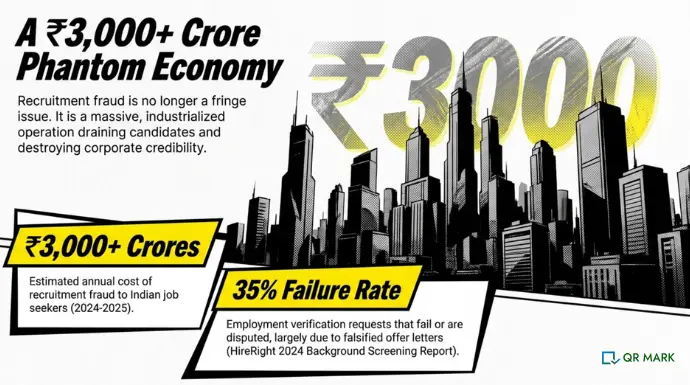
This is especially critical in India, where recruitment fraud costs job seekers an estimated ₹150 crores in 2025, according to a report by IDfy. The verification layer stops fraud before it starts.
What Details Should You Include in an Offer Letter?
An offer letter should always include the core employment terms so verifiers can match them against the document they’re checking:
- Employee name and unique identifier (employee ID or code)
- Designation and reporting structure (who they report to, department)
- Period of employment (start date, contract length if applicable)
- Company name and official contact details
- Salary or compensation summary (without full transparency, if confidentiality is a concern)
- Issuance date and valid-until date (when the offer expires)
These fields are what a verifier will check against the verification page when they scan the QR code. The more specific these details, the harder it is for a fraudster to replicate the document.
Fake Offer Letters Are on the Rise — Here’s Who Should Be Worried
Fake offer letters are no longer rare exceptions. They’re becoming a standard fraud tool.
Major companies have had to publicly warn candidates about forged offer letters in their names. TCS (Tata Consultancy Services) published multiple advisories in 2023-2024 warning candidates of fake offer letters circulating.
Amazon did the same, telling both job seekers and recruiters to verify carefully before trusting documents. Jio, Infosys, and dozens of smaller firms have made similar announcements.
The problem isn’t just external fraud. According to HireRight’s 2024 Background Screening Report, 35% of employment verification requests fail or are disputed, often because candidates presented edited or falsified offer letters.
Here’s who should be losing sleep over this:
- Organizations and HR departments. Your offer letters are being faked in your name right now. A fraudster uses a free online offer letter generator (like Canvas or similar tools) to create something that looks official enough to fool a fresh graduate or a desperate job seeker. The candidate accepts the fake offer, potentially pays application fees or visa processing “advances” to the scammer, and then your HR team gets the angry call from someone who just lost money. Your brand’s reputation takes the hit.
- Candidates and job seekers. Recruitment scams are sophisticated. Fake offer letters land in your inbox from what looks like the company’s official email. You provide your identity documents, bank details, or upfront fees. By the time you realize it’s a scam, the damage is done.
- Third-party verifiers. HR teams at hiring companies, background verification firms, and financial institutions all spend time manually verifying offer letters. They email the candidate’s previous employer, wait for a response (which may never come), and then make a hiring decision with incomplete information. This friction slows hiring, increases costs, and leaves room for fraud to slip through.
How Do Fraudsters Fake Offer Letters?
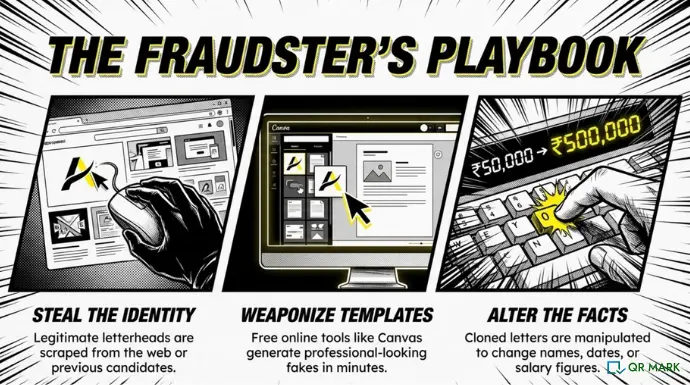
Fraudsters use surprisingly simple methods to create convincing fake offer letters. They start with a legitimate company’s letterhead (grabbed from the web or a previous document), use generic office software to add text, and distribute via email or job portals. The letter looks official. Most people don’t have a mechanism to verify it, so they believe it’s real.
The sophistication increases from there. Some fraudsters:
- Clone existing offer letters they’ve accessed, changing only the candidate’s name and a few details.
- Use templates from online services like Canvas, Canva, or Microsoft templates to produce professional-looking documents in minutes.
- Edit the date or salary figures on real offer letters they’ve seen, banking on the candidate not checking details with the employer.
- Copy QR Codes or verification URLs from legitimate offer letters and paste them onto forgeries, hoping verifiers won’t look closely enough to notice the domain mismatch.
As Gautam Garg, CEO, QR Mark, puts it: “The companies issuing documents have to make them verifiable. Fraud thrives in ambiguity. The moment you add a verification layer, the fraudster’s job becomes ten times harder because they can’t replicate domain trust or a backend database record.”
What Are the Current Methods Companies Use to Verify Offer Letters?
Most organizations use a mix of these approaches today. All of them have gaps.
| Verification Method | How It Works | Limitations |
| Manual email verification | HR team emails the candidate’s previous employer to confirm employment and offer details. | Slow (24–48 hours), expensive, often ignored, creates friction, doesn’t scale. |
| Centralized online portals | Companies like TCS, Amazon, and Jio host offer letters in a private portal. Candidates log in to access their offer. | Only works if both parties are on the same system. External verifiers can’t access it. Creates silos. |
| Digital signatures | Offer letters are cryptographically signed using eSignature tools. | Requires specific software to verify, steep learning curve for job seekers, doesn’t help with portable verification. |
| Email-based verification | HR replies directly to a verification email, confirming the candidate’s employment. | Completely dependent on email responsiveness, easy to fake email addresses, provides no audit trail. |
| Document tampering detection | AI tools scan for signs of editing (font mismatches, layout shifts, suspicious metadata). | Catches obvious forgeries but not skilled editing, reactive rather than preventive, still requires manual review. |
| QR codes and verification URLs | Offer letters include a QR Code or URL pointing to the issuer’s verification page. Scanning confirms authenticity instantly. | Only works if the issuer has set up the system correctly and trained verifiers on what to look for. Older offer letters without QR codes remain unverifiable. |
The trend is clear: single methods fail. Organizations are moving toward layered approaches. And QR Codes are becoming the backbone of that strategy because they’re the only method that works across all parties (internal, external, candidates, employers) without requiring special software or access to proprietary systems.
How Are QR Codes Changing Offer Letter Verification?
QR codes have done for offer letter verification what mobile apps did for banking: made it instant, accessible, and personal.
Here’s what QR Code validation is actually doing in the field:
Instant Verification Is Now Possible
When a candidate scans a QR Code embedded in their offer letter, they land on a verification page in seconds. They can see:
- Confirmation that the document is authentic
- Key details (their name, role, start date, offer validity date)
- The company’s official domain (the strongest trust signal)
No email wait. No phone call to HR. Just scan and confirm.
Your Domain Is Your Trust Anchor
When you embed a secure QR Code in your offer letter, that code points to a verification page on your domain. Let’s say you’re TCS. The QR Code points to verify.tcs.com (your custom domain). A fraudster can fake a letter. They can even copy the QR code. But they cannot create a verification page on your domain. Domain ownership is unfakeable.
This is why custom domains matter. A secure QR Code pointing to a generic third-party domain (verify.qrcode.com) is much weaker than one pointing to your own (verify.yourcompany.com). The candidate sees your official domain and trusts it immediately.
You Can Set Expiry Dates on Offers
One of our HR clients came to us with a specific problem: candidates were reusing offer letters to negotiate higher salaries elsewhere. “I have an offer from Company A. Now I’m negotiating with Company B. Can I use the offer letter from Company A as leverage even though I’ve already declined it?”
We built expiry control into the verification system. Now, when you issue an offer letter via QR Mark, you can set an expiration date. The offer letter is valid until that date. After that, the verification page shows “This offer has expired.” The offer letter itself doesn’t change, but the verification system marks it as no longer current. Candidates can’t reuse old offers as proof.
You Have a Secure Audit Trail
Every scan of an offer letter is logged. You know who verified the offer, when, and from which location. This creates accountability and helps you spot fraud patterns. If you see hundreds of verification scans for an offer that should have gone to one person, you’ve caught internal fraud or a breach.
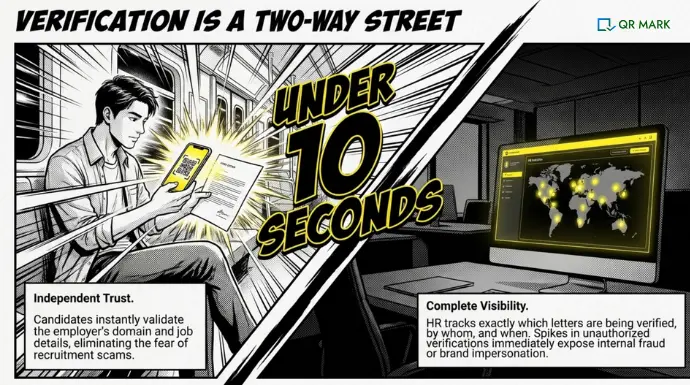
Authenticity Verification Is Now a Two-Way Street
From the candidate’s perspective: You can independently verify that your offer is real, reducing the risk of falling prey to a recruitment scam. You scan the QR Code, see the company’s official page, match the details, and you’re confident this job is legitimate.
From the company’s perspective: You can track which of your offer letters are being verified, by whom, and when. This helps you understand whether employees are showing their offers to lenders, other employers, or third parties. It also helps you catch if someone is forging offers in your name because you’ll see verification requests for offers you never issued.
How QR Mark Helps Verify Offer Letters
Here’s how we’ve simplified offer letter verification for organizations just like yours.
When you use QR Mark to issue offer letters:
- Each offer letter gets a unique verification layer. You don’t just hand over a PDF and hope for the best. You create a verification record in QR Mark. The system generates a unique QR Code and verification URL, which you embed in the offer letter. No two offers have the same code, so fraud attempts are immediately obvious.
- Recruiters and candidates can instantly validate authenticity. Scan the code. Land on your verification page on your custom domain. See the key details. Done. The entire verification happens in under 10 seconds.
- You reduce forgery risk significantly. A fraudster would have to: forge the letter itself, create a fake verification page, host that page on your domain (impossible if you own the domain), and maintain a backend database that tracks all the fake offers. By the third step, they’ve already given up.
- You create trust in your hiring workflows. Candidates see your official custom domain on the verification page. New employers trust the verification because it’s hosted on your actual infrastructure. Banks and financial institutions accept the verification as proof of employment because it’s verifiable and dated.
- Your HR team maintains document integrity without constant manual effort. Instead of responding to “Is this offer real?” emails all day, your team handles verifications through the system. You can see who’s verifying, when, and how often. Template-based verification pages let you control exactly what information is shown (if you want to keep salaries private, you can hide them and show only the role, dates, and employee ID).
-
Instant verification means you can track how many times each offer is being verified. This gives you analytics. Are candidates showing their offers to multiple employers? Are third-party verifiers checking them? You have a complete audit trail.
Why Choose QR Mark
- You pay per document secured per month. Start free with 3 verifications. Scale to hundreds of offer letters without per-scan costs. Monthly or annual billing, depending on whether offers are ongoing (monthly) or seasonal (annual).
- Add a QR Mark verification image in seconds using our Microsoft 365 add-in or Google Workspace add-on. If you issue offers in Word or Google Docs, you’re three clicks away from a verifiable offer. No IT involvement needed.
- Issuing 500 offer letters at the end of a hiring cycle? Use our bulk dashboard. Upload the batch, set the verification fields once, and QR Mark generates unique verification images for each letter automatically.
- If offer letters are generated from your HRIS or internal system, use our API to create verifications programmatically. Offers come out verification-ready without manual steps.
- Multiple HR managers issuing offers? Set permissions so only authorized roles can create verifications. You get governance without friction.
Are You Losing Candidates and Trust to Unverifiable Offer Letters?
Here’s the question that matters: If someone calls your HR team today asking “Is this offer from you?”—can you verify it in 10 seconds?
Most companies answer no. They say “Send us the document, we’ll check our records.” That takes a day. The candidate moves on. Or worse, they fall for a fake offer from a scammer because your real offer wasn’t easy to verify.
Offer letter verification isn’t optional anymore. Candidates expect it. Employers demand it. Fraudsters are exploiting the gap between those expectations and reality.
The simplest, fastest way to close that gap is to make your offer letters verifiable from the moment they leave your HR inbox. Add a QR Code. Point it to your domain. Let candidates and verifiers confirm authenticity in seconds with QR Code validation.
That’s how you turn an offer letter from a document that can be faked into a document that proves authenticity.
Frequently Asked Questions
What if a candidate loses their offer letter but still has the verification URL?
The verification URL remains valid as long as the offer is valid (or until you set it to expire). They don’t need the physical letter to verify. They just need the link.
Can I hide salary information on the verification page?
Yes. Use our template-based verification pages. You can choose exactly which fields show: role, designation, start date, employee ID, offer validity date. You can hide salary, reporting structure, or any other sensitive field. The verifier still sees enough to confirm authenticity without exposing confidential details.
Do we have to use our own custom domain?
For production use, yes. Our demo domain is available for testing, but the strongest trust signal for verifiers is seeing your official domain. It’s what prevents fraudsters from faking the entire thing.
What happens if we update an offer letter after issuing it?
If you issued an offer and need to change a detail, you create a new verification record with the updated information. The old QR Code becomes invalid (or shows “superseded”). This prevents confusion and audit trail gaps.
How do we train our verifiers on what to check?
We provide a simple verifier checklist: (1) Check the domain matches the company’s official site. (2) Match the key details on the verification page to the document in hand. (3) Check the validity date. That’s it. It takes 10 seconds.
Can offer letter verification work for part-time or contract roles?
Absolutely. The system works for any employment relationship: permanent, contract, temporary, part-time, freelance. You define the fields you want to show, and we handle the verification.
Is there a setup cost?
No setup fees. You only pay per offer letter verified per month, based on your plan. Start free, scale as needed.
