

TL;DR
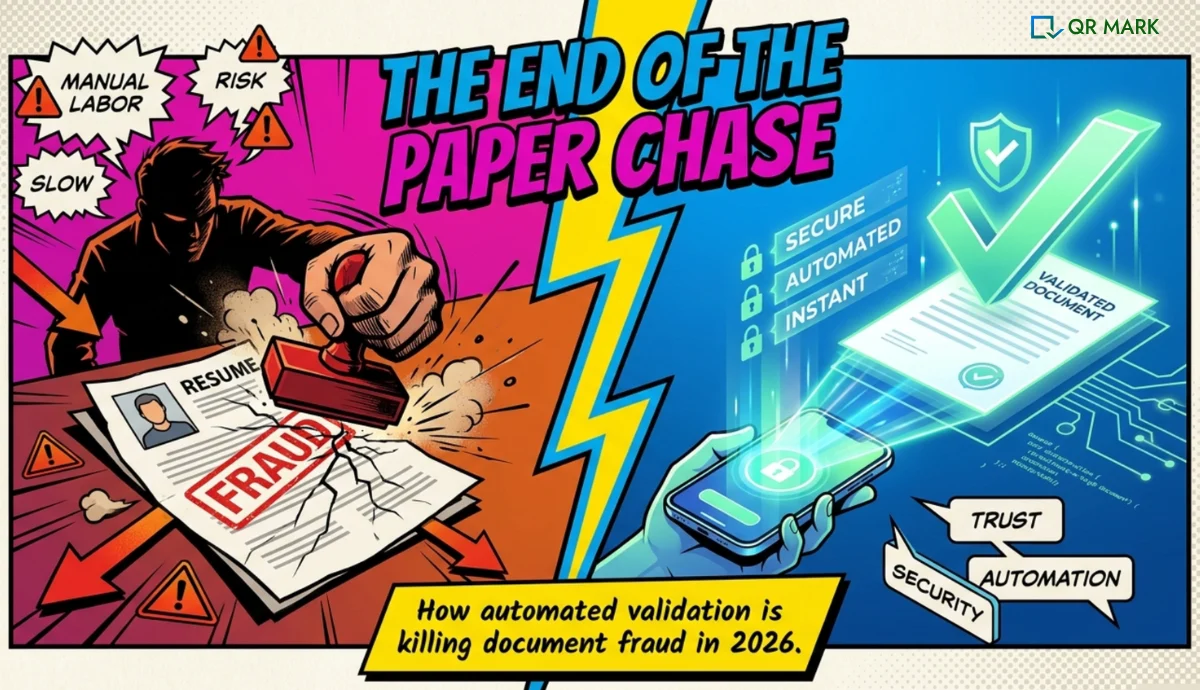
Document validation is the process of verifying that a document is genuine, unaltered, and issued by the claimed organization. In 2026, it’s become essential for fighting forgery, meeting compliance requirements, and building trust. Whether through manual checks or automated document validation software, the goal is the same: confirm authenticity instantly. This guide shows you how document validation works, why it matters now, and which solutions actually prevent fraud.
In 2024, the International Maritime Bureau (IMB) reported an 11.4% increase in suspicious trade documents worldwide, including fake bills of lading and shipping certificates.
One major reason this problem continues is the lack of focus on document validation. Many organizations issue documents without paying enough attention to their security. Because of this, checking whether a document is real becomes difficult, and document forgery becomes much easier.
In this guide, we will break down what document validation actually means, why it matters more than ever in 2026, the key elements behind an effective validation system, and how technologies like QR Codes are transforming the way organizations verify documents at scale
What Is Document Validation?
Document validation is how you confirm a document is real. When someone hands you an experience letter, a certificate, a contract, or an ID, document validation answers one question: “Is this actually from the organization that claims to have issued it?”
Here’s a practical example. Say a job candidate gives a new employer an experience letter. The employer has two choices: trust the document on face value, or validate it. With document validation, they scan a QR code or check a verification portal, match key details, and confirm authenticity in seconds instead of waiting days for an email reply.
Document validation works in two main ways: automated and manual. Let me break both down because they serve different purposes.
Automated vs. Manual Document Validation
Manual document validation is what most organizations do today. An HR person receives a verification request, pulls out the employee file, and manually checks whether the details match. It’s slow, inconsistent, and doesn’t scale.
One verification might take 24 hours; another might take a week depending on who handles it and whether they can even find the person who issued the original.
Automated document validation uses technology to do this work instantly. A document validation software system links a verification code or QR image to a database, so anyone can verify authenticity by scanning or opening a link.
No human email needed. No guessing whether someone actually worked at the company. The verification is instant, consistent, and permanent.
| Aspect | Manual Document Validation | Automated Document Validation |
| Time to verify | 24-48 hours (or longer) | Seconds |
| Consistency | Varies by person handling it | 100% consistent every time |
| Scalability | Breaks at high volume | Handles unlimited verifications |
| Cost | High (staff time) | Low (one-time setup) |
| Verifier experience | Depends on HR responsiveness | Self-serve for the verifier |
| Audit trail | Often no record | Complete, permanent record |
| Real example | HR manager emails back “Yes, we employed John from 2020-2024” | Verifier scans QR, sees verification page showing employment dates |
Why Is Document Validation Critical in 2026?
Document forgery is not a rare edge case anymore. It’s widespread, costly, and getting more sophisticated. Here’s why document validation has moved from “nice to have” to “essential.”
Increased Document Forgery
Forged documents are easier to create than ever. Online fraud providers issue fake experience letters, certificates, and contracts at scale. Our research across hiring teams shows that up to 10% of resumes contain falsified employment claims. That’s not 1 in 100. That’s 1 in 10.
For academic credentials, the problem is even worse. The U.S. sees an estimated 200,000+ fake degrees sold annually. When a university doesn’t have document validation in place, they have no way to fight back.
Data Breaches and Identity Theft
When verification happens via email or phone, sensitive data gets shared through insecure channels. An HR person emails a copy of an employment letter to a background verification firm. That email is not encrypted. Someone could intercept it, copy the letter, and paste the verification details into a forged document.
With document validation software, the original document never needs to be shared. A verifier checks the authenticity of the document in the person’s hands without the issuer exposing confidential information.
Regulatory Compliance
In 2026, regulators across industries are tightening requirements around document authenticity. Banks need to verify customer documents for KYC (Know Your Customer) compliance. Insurance companies need to validate medical documents. Employers need documented proof that they’ve validated employment history before hiring.
Without a systematic document validation process, you cannot prove you did due diligence if something goes wrong. With document validation, you have a permanent, timestamped record: who verified what, when, and what the verification showed.
Building Trust and Security
Every forged document that slips through damages trust. One fake experience letter leads to a bad hire. One counterfeit certificate damages institutional reputation. One altered contract creates legal disputes.
Customers, employees, and partners increasingly expect organizations to validate documents. If you can’t prove authenticity, you look either unprofessional or negligent.
What Are the Key Elements of Document Validation?
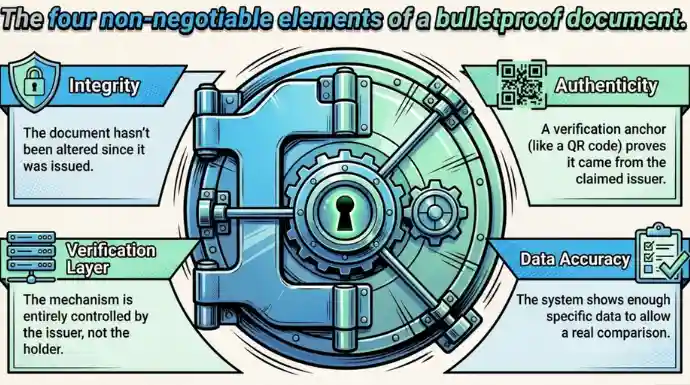
For document validation to actually work, four things must be present. Miss any one, and the system breaks.
Document Integrity
The document being validated must be the original, not an edited copy. Document validation relies on comparing what’s in front of the verifier with what’s recorded in the validation system.
If the issuer recorded “Employee worked from Jan 2020 to Dec 2024,” but the physical letter says “Jan 2020 to Dec 2025,” the document has been tampered with. Document integrity means confirming the document hasn’t been altered since it was issued.
Document Authenticity
This is the core of document validation: proving the document actually came from the claimed issuer. Anyone can print a letterhead. Anyone can fill in dates. Document validation adds a verification mechanism that cannot be faked.
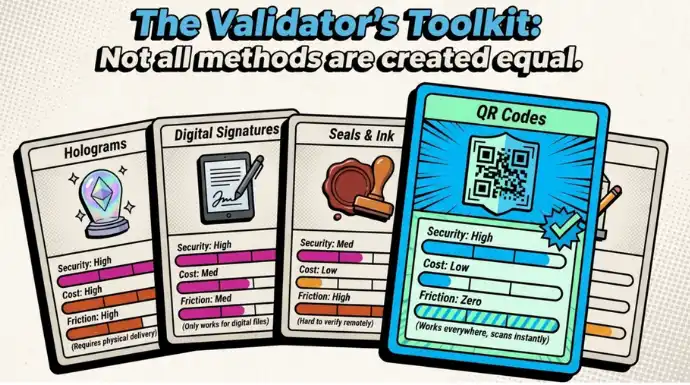
A QR code, a digital signature, a hologram, or a security feature that’s nearly impossible to replicate. The verification mechanism is the anchor. Without it, you’re back to trusting the letterhead, which is not validation at all.
A Verification Layer
The verification mechanism must be controlled by the issuer, not the document holder. If someone can edit the verification mechanism after the document is issued, it’s worthless. That’s why a custom domain is critical for document validation software.
An organization’s domain (verify.company.com) proves the verification portal is genuinely theirs. A verifier can’t be fooled because they know the domain belongs to the company.
Data Accuracy
The data shown during document validation must match what the verifier can check. If a certificate shows the graduate’s name, year, and degree, the verifier can match those details against the physical document.
If the system only shows “Verified certificate,” the verifier learns nothing. Effective document validation shows enough information to actually confirm the document is legitimate.
How to Choose the Best Document Validation Software in 2026?
Not all document validation software works the same way. Some focus on visual inspection. Some use blockchain. Some use QR codes. Here’s what to actually evaluate when you’re choosing a solution.
Workflow Integration
Does this document validation software fit into how we actually issue documents? If your HR team creates letters in Microsoft Word, you don’t want a solution that requires uploading to a separate platform every time.
You want an add-in that works inside Word. If you’re issuing certificates in bulk, you want dashboard batch processing. If you’re automating document generation via your HRIS, you want an API.
The best document validation software adapts to your workflow, not the other way around.
Verifier Experience
The person scanning or verifying the document matters as much as the issuer. If verification requires a special app, most verifiers won’t do it. If verification requires a login or registration, adoption drops.
The simplest document validation is: scan a QR code with any phone camera, see a verification page, match details, done.
Custom Domain Support
For production use, document validation software must support custom domains. A verification page on the issuer’s own domain (verify.company.com) is a trust signal. A verification page on the vendor’s generic domain (app.verificationvendor.com) is not. Custom domain is the difference between “this is real” and “this could be fake.”
What Are the Practical Solutions for Document Validation Today?
Beyond software, organizations are using multiple physical and digital methods for document validation. Here are the ones actually working.
QR Codes
A QR code printed on or embedded in a document links to a verification portal. Scan the code with any smartphone camera, and you land on a verification page that shows the document’s details. It’s instant, requires no special app, and works on printed and digital documents.
Tools like QR Mark work exactly like that. They fit in your workflow easily and can be used to verify documents instantly because of the QR Code tech.
Digital Signatures
A cryptographic signature proves the document was signed by a specific key held by the issuer. The signature is embedded in the document file itself. Verification tools can confirm the signature is valid and hasn’t been tampered with.
Holograms
A physical holographic element is nearly impossible to replicate without industrial equipment. A document with a hologram is harder to counterfeit than one without.
Security Seals
An official seal from the issuing organization signals authenticity. Seals can be physical (embossed) or digital (embedded in the document).
Color-Shifting Ink
Ink that changes color depending on the viewing angle is difficult to replicate without specialized printing. It’s a physical security feature visible on the document itself.
How Are QR Codes Changing Document Validation Today?
QR codes have quietly become the most practical document validation method because they solve a real problem: verification at scale without adding friction to the issuer’s workflow.
Here’s why QR codes are winning.
- Instant Verification: A verifier doesn’t need to call HR or email a request. They scan the QR code and immediately see a verification page. Employment dates, designation, employee code, certificate ID, all on one page. The answer is there in seconds.
- Simple Scan: No app required. No account creation. No special software. Any smartphone camera reads a QR code. That universality is huge for adoption.
- Linked to a Verification URL: The QR code is not magic. It’s a shortcut to a verification URL. If someone can’t scan the QR (printed document with bad lighting, or QR code worn out), they can type or copy-paste the URL. Both paths lead to the same verified information.
- Audit Trail: Every scan creates a record. You know when someone verified a document, what they saw, and whether they confirmed it. That audit trail is critical for compliance and legal defensibility.
How Does QR Mark Help With Document Validation (Step-by-Step)
We built QR Mark specifically to make document validation practical for teams that issue documents at scale. Here’s how it works.
Step 1: Create a Verification Record
You issue a document (experience letter, certificate, contract). Instead of hoping someone calls to verify it, you create a verification record in QR Mark. You decide what information the verifier will see: the full document (standard), or just key fields like name, designation, and employment period (template-based). The template approach is especially useful for HR documents where you don’t want to expose the entire letter.
Step 2: Generate the Verification Image
QR Mark generates a verification image: a QR code plus a verification URL. This image is placed on the document. For Microsoft Word users, our add-in does this inside Word itself. No downloading, no uploading. For bulk issuance, you upload a batch of documents, place the verification image once, and QR Mark generates unique verification images for each one.
Step 3: Embed and Share
The document with the embedded verification image is now ready. You issue it as you normally would. No special process. No disruption to your workflow.
Step 4: Verifier Scans
A recipient or employer scans the QR code with any smartphone camera. They land on a verification page hosted on your custom domain (e.g., verify.company.com). The domain match is the first trust signal. The page shows the information you configured (name, dates, designation, employee code). The verifier matches these details against the physical or digital document in front of them.
Step 5: Confirm Authenticity
If the details match, the document is authentic. If they don’t match, the document has been tampered with or forged. The verification takes seconds. No emails. No delays. No guesswork.
Real Example: An experience letter issued by ABC Company includes a QR Mark verification image. A job candidate gives the letter to a new employer. The employer HR team scans the QR code, sees a verification page on verify.abccompany.com showing:
Name: John, Designation: Senior Developer, Period: Jan 2020 to Dec 2024, Employee Code: E1234.
The employer matches these against the letter. Everything matches. The letter is authentic. Verification complete in 15 seconds.
Conclusion
Document validation is no longer optional. Forgery is too common, regulatory requirements are too strict, and verifiers expect instant answers instead of email tag.
You have options: manual processes that don’t scale, physical security features that are hard to replicate, digital signatures that work for signed documents, or QR codes that work everywhere.
The best document validation software does both without asking the issuer to change their workflow.
If you’re issuing documents that people verify regularly, document validation isn’t an afterthought. It’s the foundation.
Start by understanding what you need verified, choose the right document validation process for your use case, and pick document validation software that fits your workflow.
FAQs on Document Validation
What’s the difference between document validation and document verification?
Document validation confirms a document is genuine and has not been altered. Document verification typically means confirming ownership or identity. They’re related but different processes. Document validation answers “Is this real?” Document verification answers “Does this belong to you?”
Can someone fake a QR code verification page?
They can create a similar-looking page, but they cannot host it on your domain. That’s why custom domain is mandatory for document validation software. A verifier checks that the verification page is on YOUR domain (verify.yourcompany.com), not a fake domain. Domain matching is the security anchor.
Do I need to expose the full document for verification?
No. With template-based verification pages, you show only the fields needed to confirm authenticity. For an HR letter, that might be name, designation, employment period, and employee code. The full letter stays confidential. Document validation doesn’t require full transparency.
How long does it take to set up document validation software?
If you choose software with add-ins (like our Microsoft Word add-in), you can generate your first verification within minutes. The main setup step is configuring your custom domain with your IT team, which usually takes a few hours to a day for DNS changes to propagate.
What happens if we stop paying for document validation software?
Existing verifications remain accessible for the period your plan supports (typically 1-3 years depending on plan type). You cannot create new verifications without an active plan. This is why annual plans often make sense for one-time batches like academic certificates.
Can document validation catch every type of fraud?
Document validation is a strong deterrent and makes fraud detection instant when verifiers scan and check details. It’s not foolproof because it depends on verifier behavior. If a verifier doesn’t scan the QR or doesn’t check domain, they can be fooled. That’s why verifier education (scan, check domain, match fields) is part of the system.
Which documents benefit most from document validation?
Experience letters, offer letters, academic certificates, contracts, agreements, training certificates, and any document that’s regularly verified externally. If people call or email asking “Is this real?” that’s your signal document validation solves the problem.
