

TL;DR
Certified translation verification lets a receiving party confirm, in seconds, that a certified translation was issued by your agency and was not altered. A certification statement names your agency but cannot prove it, because every part of it can be copied. This guide explains what a certification statement really proves, why callbacks and notarisation fall short, and how QR Mark makes each translation verifiable against your own records with one scan.
Certified translation verification is how a receiving party confirms that a certified translation was actually issued by your agency and has not been altered. It matters because a certified translation, on its own, cannot prove its own source.
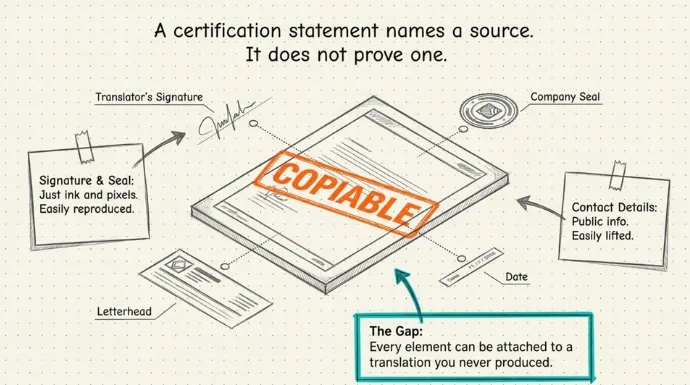
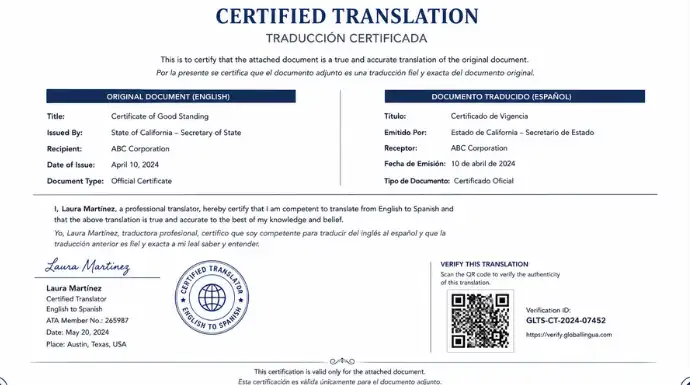
Look at what the document carries: a certification of translation accuracy statement, the translator’s signature, your agency name, sometimes a seal, plus contact details, letterhead, and a date. All of it names you as the source. But, every element can be copied, reprinted, or attached to a translation you never produced.
That leaves the receiving party with a document that claims a trusted source but gives them no fast way to confirm it. They either accept it on faith or call your office to check.
This guide covers what a certified translation statement actually proves, why callbacks and notarisation do not close the gap, and how to make every certified translation you issue verifiable against your own records with a single scan.
What information does a certified translation include to prove who issued it?
A certified translation carries several details that identify the issuer. Most of them assert a source rather than prove one.
The certification statement and signature
The certification statement is the heart of the document. It declares the translation is complete and accurate, and the translator or an agency representative signs it. That signature is a mark of accountability, but it is still ink on a page. Anyone with the file can reproduce it.
Translator or agency name, credentials, and seal
Below the statement you usually find the agency name, the translator’s credentials, and sometimes a membership number or a company seal. These signal legitimacy. A seal looks official. But a seal is an image, and an image copies cleanly from one PDF to the next.
Contact details, letterhead, and date
The document rounds out with your address, phone, email, letterhead, and the date of certification. This is how a receiving party would reach you if they wanted to check. It is also the easiest part to lift and reuse, because it is public information printed in plain sight.
When we spoke with one of our customers, The House of Business (THB), they pointed to a gap none of these details close:
“Once a certified translation is with the client, there is no way to detect whether someone alters it before presenting it to a foreign institution. A client could change a grade, a date, or a name and hand that version to an embassy or university. The institution has no way to know it was changed.”
The usual fixes do not close this gap. A digital signature only holds up in a digital check. A hologram or an embossed seal only holds up in a physical one. A certified translation moves through both, printed for one office and emailed as a PDF to the next, so a fix that covers only one side leaves the other exposed.
This is why agencies like THB add a secure QR Code. A scan opens a verification page that confirms the translation is genuine, whether it arrives on paper or in an inbox. It is faster than a manual check by email or portal, and it keeps working after the document leaves your hands, which a one-time notarisation does not. Let’s understand how QR Mark helps you do that efficiently.
How does certified translation verification work with QR Mark?
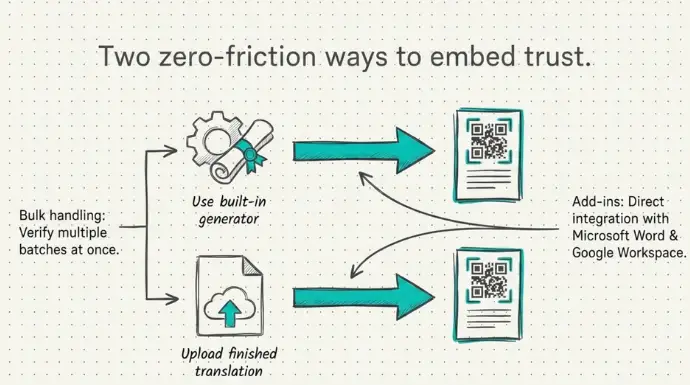
QR Mark gives you two ways to make a certified translation verifiable.
1. Generate a certificate of translation accuracy with a QR Code
Design and generate a certificate using QR Mark’s certificate generator, and it automatically adds a QR Code when the certificate is generated.
2. Add a QR Code to the translated document
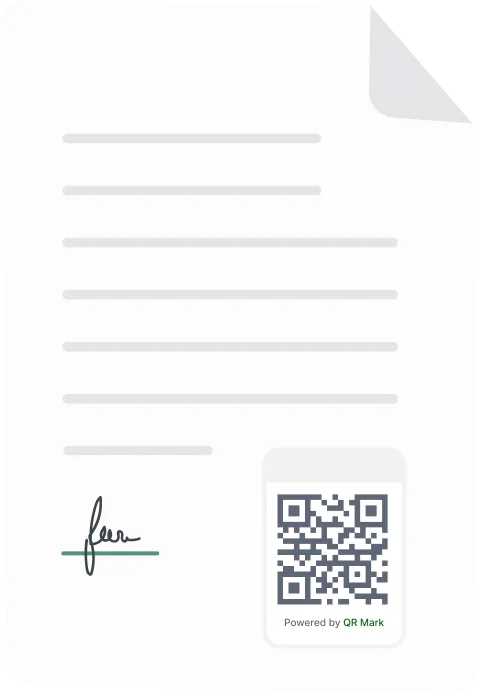
Upload the finished translation and QR Mark returns the PDF with a QR Code added. Anyone receiving the certified translation document can scan and instantly verify it. If you want to know how it works, you should read this.
With QR Mark, you can also do Bulk Verification handling multiple batches at once, and the Microsoft Word Add-in and Google Workspace Add-ons can help you do your work faster without using any software and issue verifiable translation documents from the moment you finish generating your certified translation document.
What the recipient sees is the part that proves the source. The verification page is served from your own Custom Domain, something like verify.youragency.com, not a generic link. Anyone can copy a QR Code. Nobody else can make it resolve on a domain you own.
The page shows the fields you choose, such as translator name, language pair, certification date, document type, and agency name, so the receiving party can match them against the document.
However, whatever process you follow, the end result stays the same. Your certified translation will have a secure QR Code that anybody can scan and instantly verify.
What are the added benefits of using QR Mark for certified translation verification?
A few things set it apart for a translation agency: verification anchored to your domain, your branding on every check, certificate designs you can match to each country’s rules, and enterprise-grade compliance.
- Your agency’s branding. The verification page carries your logo, colours, and domain, so every check reinforces your agency rather than a generic vendor.
- Certificate designs that match each country. Canada (IRCC), the United States (USCIS), and Australia (NAATI) each set their own rules for the certification wording and the document format. You can match the certificate design to the standard the receiving country expects.
- Instant verification for foreign institutions. A receiving office overseas can confirm a document in seconds, with no email chain across time zones.
- Verification as part of what you sell. Agencies that adopt this describe QR-backed verification as part of their service, not a bolt-on. It becomes a reason clients pick them.
What changes once your translations carry a QR Code?
The verification burden shifts off your team, and receiving parties can accept your translations faster. Here is what agencies get out of it:
- Fewer callbacks, because receiving parties self-serve instead of emailing you to confirm.
- Faster acceptance for your clients, since the receiving party can verify on the spot.
- A deterrent against anyone reusing your letterhead, because a reused certification no longer matches your record.
Certified translation verification: frequently asked questions
How do you verify a certified translation is genuine?
Scan the QR Code on the document or open its verification URL. Confirm the page loads on the issuing agency’s own domain, then check that the translator name, language pair, date, and document type match the translation in hand.
Can a certified translation be faked?
Yes. A certification statement, signature, and seal are printed elements, so they can be copied or attached to an altered translation. Matching the document against the issuer’s own record is what exposes a fake.
Does the recipient need an app to verify?
No. Any smartphone camera or a web browser opens the verification page. There is no app to install and no account to create.
Is a notarized translation automatically protected against fraud?
No. Notarization verifies the identity of the signer, not whether the document has been modified afterward.
Can certified translations be verified from another country?
Yes. If the issuing agency provides an online verification method, institutions worldwide can verify the document without contacting the agency directly. With tools like QR Mark, you can reduce the verification time and make verification instant.
What happens if someone copies the QR Code onto a different document?
The verification page will display the original document’s information. If the printed document doesn’t match those details, the alteration becomes immediately apparent.
What is the difference between a certified and a sworn translation?
Both the translation documents are quite different. A certified translation includes a signed statement of accuracy from the translator or agency. Notarisation only confirms the identity of the person who signed, not the accuracy or later integrity of the translation.
