
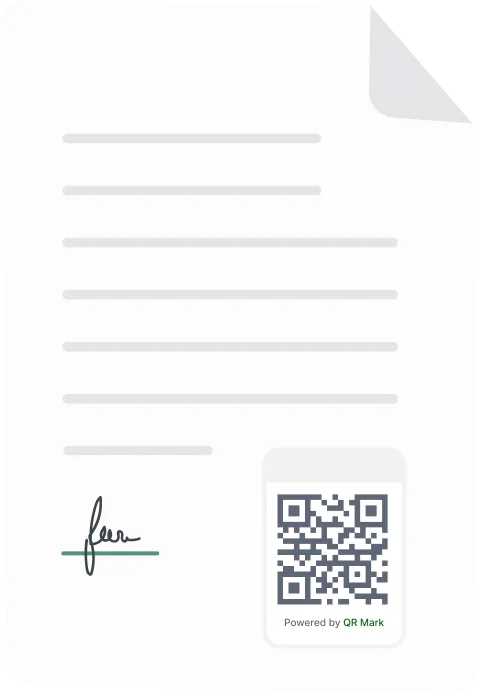


TL;DR
Looking for a provisional certificate generator for universities? The task has two parts: producing the certificate and proving it is genuine. Your office already creates provisional certificates from its own templates. What is usually missing is instant verification. This guide covers the correct provisional certificate format, the steps to issue one properly, and how QR Mark adds a scannable Verification Image so employers and other institutions can confirm each certificate in seconds, with no phone call to your office.
A provisional certificate generator for universities should do more than produce a PDF. It should generate certificates that are easy to issue at scale, difficult to tamper with, and simple for anyone to verify independently. Without built-in verification, even a correctly issued provisional certificate can be copied, edited, or forged, putting both the institution’s reputation and its graduates at risk.
This guide explains what a provisional certificate is, the correct provisional certificate format, the common challenges universities face when issuing certificates in bulk, and how to issue verifiable provisional certificates using QR Mark.
You’ll also learn how employers and other institutions can verify each certificate instantly without contacting your examination office.
What are the main problems with issuing provisional certificates at scale?
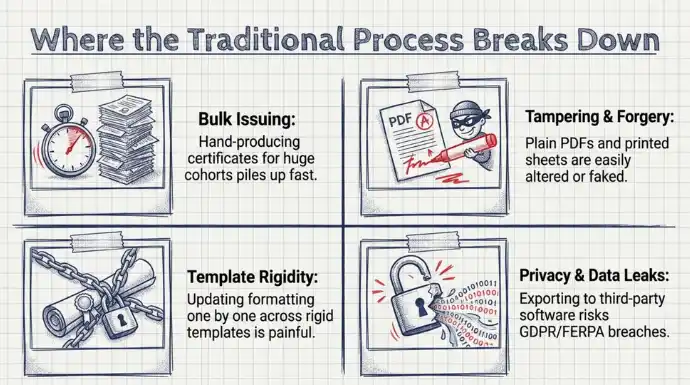
Four problems come up again and again when an institution issues provisional certificates in volume.
Bulk issuing
Producing provisional certificates for hundreds or thousands of students by hand is slow, and the work piles up during result season.
Tampering and forgery
A PDF certificate can be edited after you issue it, and a plain provisional certificate is easy to fake. According to the Association of Certified Fraud Examiners (ACFE), organisations lose an estimated 5% of their annual revenue to fraud worldwide, with document-related fraud making up a substantial share of these incidents.
Template rigidity
When wording or formatting has to change, updating certificates one by one is painful, and rigid templates make it worse.
Privacy and data leaks
Exporting sensitive student data into third-party certificate software can break data protection rules such as GDPR or FERPA if the platform is not secure.
The scale is what makes this urgent. Universities and colleges have a very large cohort of students every year, and each graduate can trigger one or more verification requests.
How to issue a provisional certificate generator using QR Mark?
In practice, generating a provisional certificate has two parts: creating the document and making it verifiable. Your institution already creates the document from its own template or student system. The part worth fixing is verification, and that is where QR Mark fits.
Here is how we set it up so each certificate can prove itself:
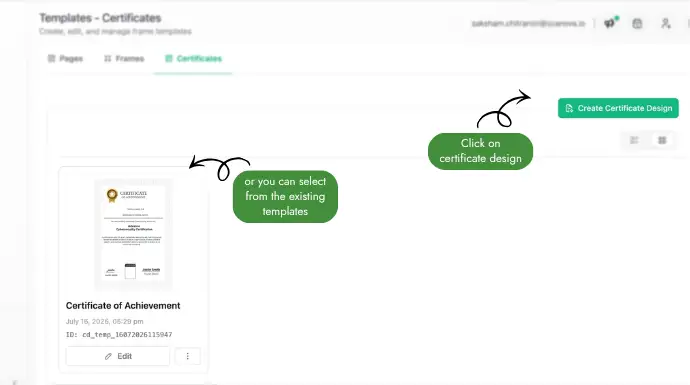
1. Build your provisional certificate template
Create your provisional certificate once using the template designer, or upload your existing certificate design as the background. Map the student fields you want to appear on each certificate, such as name, roll number, programme, CGPA, date of passing, certificate ID, and date of issue.
2. Upload your student records
Download the sample CSV, populate it with your student data, and upload it as a CSV, XLS, or XLSX file. You can also enter records directly into the in-app grid. Depending on your needs, you can issue a single provisional certificate or generate an entire graduating batch in one upload.
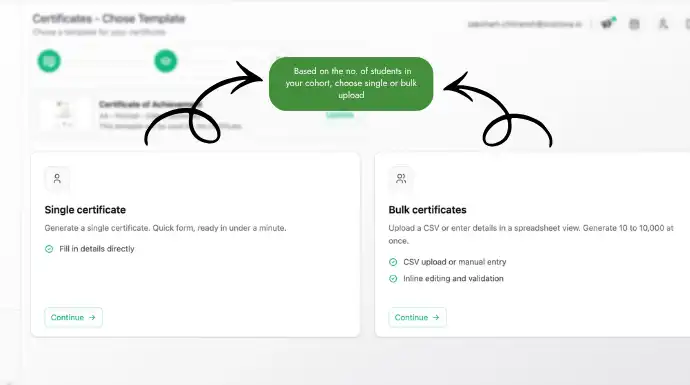
Note: Make sure the columns in your CSV/XLS/XLSX file are mapped to the corresponding fields in your certificate template before generating the certificates.
3. Generate verifiable provisional certificates
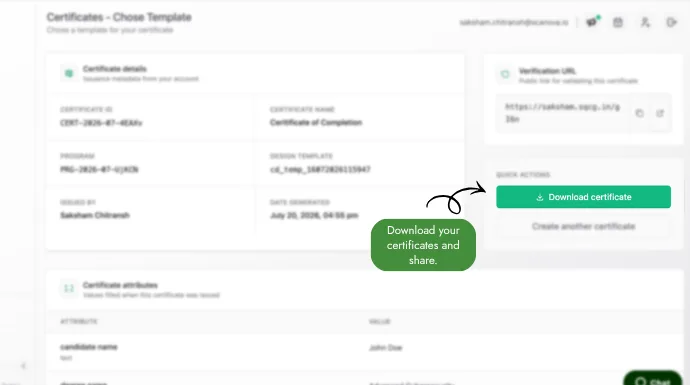
Generate the certificates with a single click. QR Mark creates an individual PDF for every student and automatically embeds a unique Verification Image (QR Code paired with a verification URL). Anyone can scan the QR Code to instantly verify that the provisional certificate was issued by your institution and that its details have not been altered.
4. Download or distribute your certificates
Download the certificates as a ZIP archive or a merged PDF, or email them directly to students. Every provisional certificate is issued with built-in verification, reducing manual verification requests while making forgery significantly harder.
How is a provisional certificate different from a degree certificate?
A provisional certificate is a temporary confirmation of qualification, while the degree certificate is the final record. Here is how the two compare:
| Provisional certificate | Degree certificate | |
|---|---|---|
| Purpose | Confirms the student passed and qualified for the degree | The final, permanent record of the awarded degree |
| When issued | Soon after results, before the degree is ready | At or after convocation |
| Status | Temporary, used while the degree is pending | Permanent |
| Typical use | Job applications and higher-study admissions in the interim | Long-term proof of the qualification |
What is the correct provisional certificate format?
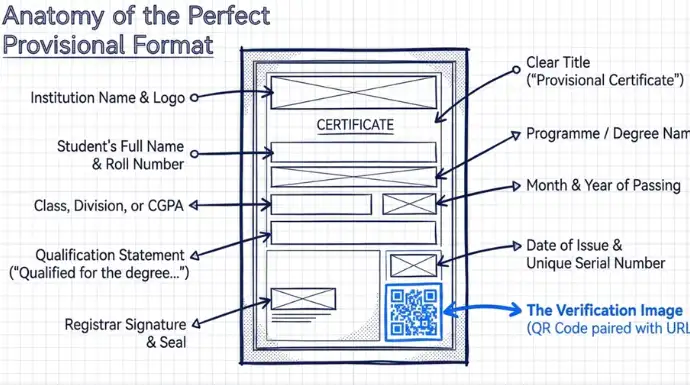
A provisional certificate should carry every detail a verifier needs to match it to your records, and nothing that would confuse them. A standard provisional certificate format includes:
- Institution name and logo
- The title, clearly marked as a provisional certificate
- Student’s full name
- Enrolment or roll number
- Name of the programme or degree
- Class, division, or CGPA awarded
- Month and year of passing
- A line stating the student has qualified for the degree
- Date of issue and a unique certificate serial number
- Signature and seal of the Registrar or Controller of Examinations
- A Verification Image, so the certificate can be checked online
What changes once your provisional certificates verify themselves?
Set up this way, one cohort can be issued with verification built in during a single Bulk Verification run. The verification emails that used to fill your inbox drop off, because employers answer their own question by scanning. Forged provisional certificates become easy to catch, and your students get proof they can use right away.
Frequently asked questions
How long is a provisional certificate valid?
In most cases it is valid until the final degree certificate is issued for approximately from 6 months to a year. Some institutions set a fixed period, so confirm your own policy and print it on the certificate.
Can a student use a provisional certificate for a job or for higher studies?
Yes. Employers and universities widely accept provisional certificates while the degree is pending. A verifiable one is accepted more readily because it can be confirmed on the spot.
How does an employer verify a provisional certificate?
They scan the Verification Image with a phone camera and check that the page opens on the university’s own domain and that the details match. This takes seconds and needs no app.
Can we use our existing provisional certificate template?
Yes. You can upload your current certificate design or create one in the template designer. QR Mark works with your existing branding, layout, logos, signatures, and certificate format.
Can every provisional certificate have a unique QR Code?
Yes. Each provisional certificate generated through QR Mark receives its own Verification Image (QR Code paired with a verification URL), allowing anyone to verify that specific certificate independently.
