


TL;DR
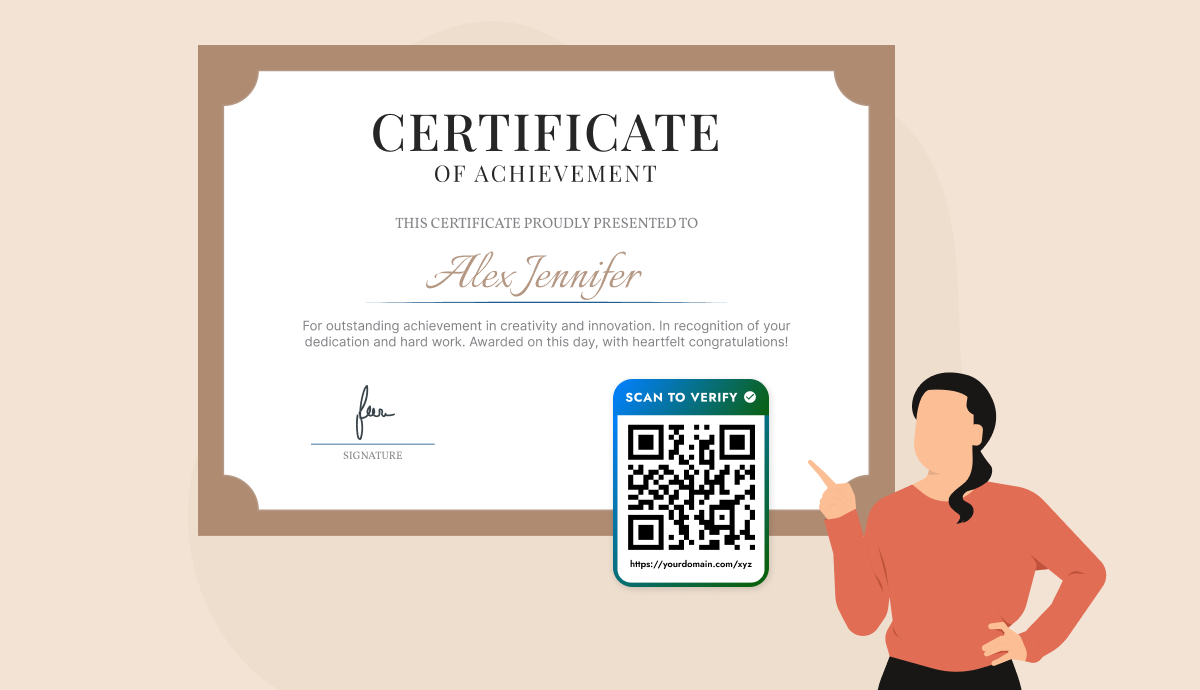
A QR code generator for certificates adds a scannable link that opens a secure verification page, confirming the issuer, recipient, and date in seconds. But a plain QR from a free tool only opens a link, and proves nothing. Real protection comes from a verification record tied to your own domain. This guide shows the difference, how to set one up with QR Mark, and what a verifier should check.
As digital forgeries grow harder to spot, certificate authenticity has become a serious challenge for schools, certification bodies, and HR teams. Traditional checks are slow and error-prone, making QR Codes a smarter solution.
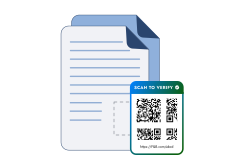
A QR Code generator for certificates (like QR Mark) embeds a scannable code that links to a secure verification page, instantly confirming details such as issuer, recipient, and issue date.
This article explains why QR Codes are vital for certificate security, highlights real-world uses, and shows how QR Mark makes verification simple and reliable.
Why do certificates need QR Code verification?

Because visual checks no longer catch modern forgeries, and manual verification does not scale. A QR code lets anyone confirm a credential in seconds without contacting the issuer.
More broadly, fraud losses have been skyrocketing. According to Sumsub Identity Fraud Report, 50% of frauds is from document fraud related cases, indicating the scale of document-related fraud in today’s world.
Certificate verification QR Codes address these challenges by making it easy to validate documents’ authenticity.
Instead of relying on physical seals or contacting issuing bodies manually, anyone can scan the QR Code on a certificate to instantly check if it’s legitimate.
For example, a university that issues provisional certificate with a QR Code can let employers verify an applicant’s degree in seconds by scanning, no phone calls or mailed transcripts required.
The QR Code directs to an official verification page (often under the institution’s own domain, like verify.universityname.edu), confirming the certificate’s details.
This immediate, self-service verification builds trust by proving the certificate’s origin and integrity.
How to generate a certificate verification QR Code with QR Mark?

Implementing QR Codes for certificates using QR Mark is a straightforward process.
Below is a step-by-step guide on how to create and add a certificate verification QR Code to your documents using the QR Mark platform:
Step 1: Sign up on QR Mark
Go to QR Mark and create a free account to get started. QR Mark offers a free trial (e.g., three free verifications per month), which is great for testing and basic usage. Logging in brings you to the QR Mark dashboard.
Step 2: Add a custom domain
In the dashboard, navigate to Settings and set up your custom domain for verifications. For example, a university or company can add a domain like verify.yourdomain.com and verify ownership through QR Mark.
Using a custom domain means that when people scan your certificate’s QR Code, they will see your official domain in the URL – greatly increasing trust.
Step 3: Build your certificate template
Create your certificate once using the template designer, or upload your existing certificate design as the background. Map the fields you want to appear on every certificate, such as the recipient’s name, certificate ID, course or program name, organization name, issue date, completion date, grade, and any other custom fields.
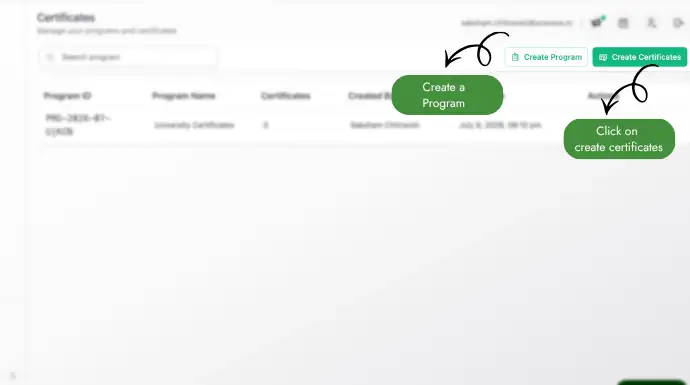
Step 4: Upload your recipient records
Download the sample CSV, populate it with your recipient data, and upload it as a CSV, XLS, or XLSX file. You can also enter records directly into the in-app grid. Depending on your needs, you can issue a single certificate or generate hundreds or thousands of certificates in one upload.
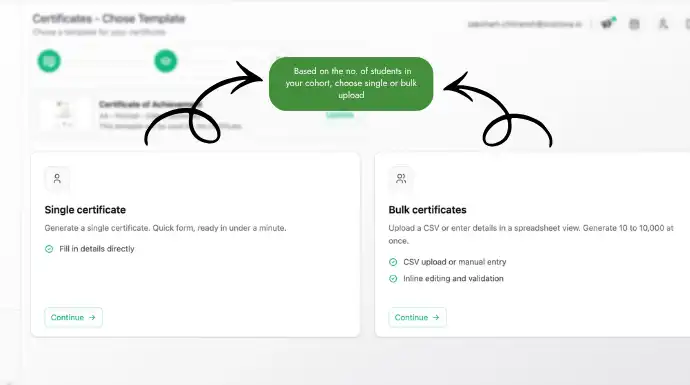
Note: Ensure the columns in your CSV/XLS/XLSX file are correctly mapped to the corresponding fields in your certificate template before generating the certificates.
Step 5: Generate verifiable certificates
Generate the certificates with a single click. QR Mark creates an individual PDF for every recipient and automatically embeds a unique Verification Image (a QR Code linked to a secure verification page). Anyone can scan the QR Code to instantly verify that the certificate was issued by your organization and that its contents have not been altered.
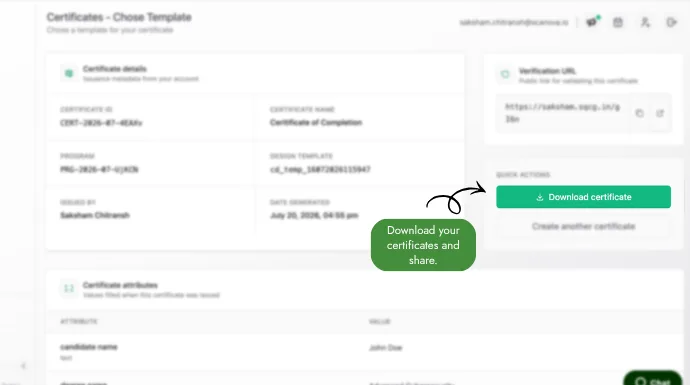
Step 6: Download or distribute your certificates
Download the certificates as a ZIP archive or a merged PDF, or email them directly to recipients. Every certificate is issued with built-in verification, reducing manual verification requests while making forgery significantly more difficult.
Once tested, you can now issue the certificate to its recipient(s), either by emailing the PDF, giving a printout (the QR Code works in printed form too), or making it available via a portal.
Recipients and anyone who needs to validate the certificate can scan the QR Code using any standard smartphone; no special app is required beyond the phone’s camera.
Upon scanning, they will be taken to the secure verification page, confirming that the certificate is authentic and providing any relevant details for cross-reference.
By following these steps, you can quickly implement a robust QR Code validation system for your certificates.
What makes QR Mark different from a generic QR generator?
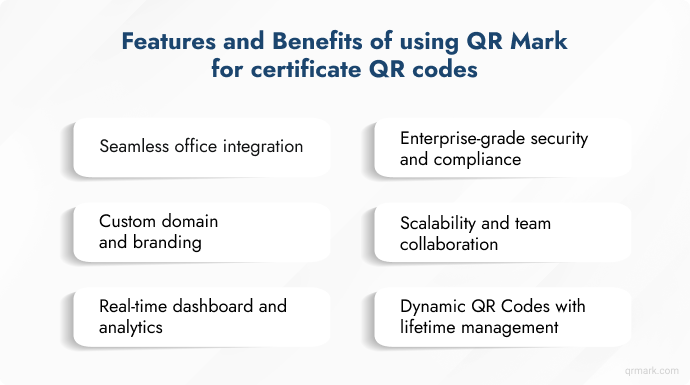
While one could attempt to use a generic QR Code generator for certificate links, a dedicated solution like QR Mark offers far greater capabilities tailored to secure certificate issuance.
QR Mark is a platform designed specifically for secure QR Code certification and document verification, with features that address the needs of educators, enterprises, and certification authorities.
Here are some of the standout features and benefits of using QR Mark for certificate QR Codes:
1. Seamless office integration
QR Mark integrates smoothly with Microsoft Office and Google Workspace applications. There are built-in add-ins for Word, Excel, PowerPoint, as well as Google Docs, Sheets, and Slides.
This means educators or HR professionals can generate and embed verification QR Codes while creating certificates in their usual tools.
For example, an instructor designing course certificates in MS Word can insert the QR Code via QR Mark’s add-in with a few clicks, without leaving MS Word.
This integration simplifies adoption and reduces manual steps, especially when issuing certificates in bulk.
2. Custom domain and branding
QR Mark allows issuers to use their own custom domain for all verification links and QR Codes.
Instead of a generic URL, those who scan the certificate QR Code will be taken to a page on an address that reflects the issuing organization (e.g., verify.yourinstitution.com). This builds instant trust, as users recognize the domain as official.
Additionally, the verification pages can display the organization’s name, logo, and brand colors. This not only enhances security (harder for phishers to spoof) but also reinforces the brand’s professionalism in every issued certificate.
3. Enterprise-grade security and compliance
As a platform focused on document security, QR Mark adheres to high security standards. It is fully compliant with data protection regulations (GDPR) and certified for information security (ISO 27001 and SOC II).
All verification data and documents are stored securely, and the system uses encryption to protect sensitive information. For industries like healthcare or finance that handle confidential certificates, this compliance is crucial.
QR Mark’s infrastructure ensures that using QR Codes for certificates does not introduce vulnerabilities. In effect, you get a secure, trusted environment for all your digital certificates.
4. Scalability and team collaboration
QR Mark is built to support organizations of all sizes. It offers multi-user access with role-based permissions.
This means a certification department can have multiple team members (admins, contributors, viewers) managing the verification process on a single platform.
A corporate HR team, for example, can collaboratively issue and monitor verified offer letters and training certificates through one dashboard, with proper access controls in place.
The platform’s cloud-based nature and enterprise scalability ensure it can handle high volumes of certificates and verifications, which is vital for large universities or companies that issue thousands of credentials.
Benefits of QR Code Generator for Certificate
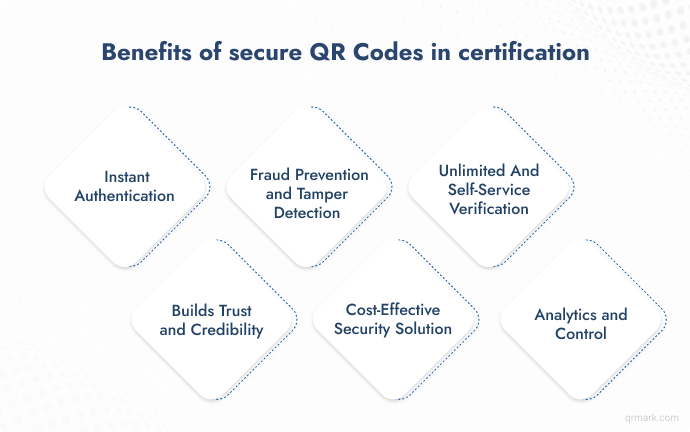
Implementing QR Codes on certificates offers numerous benefits that enhance both security and usability. Here are the key advantages of using a certificate verification QR Code system:
1. Instant authentication
QR Codes enable one-scan verification. Anyone with a smartphone can scan the code and immediately see if a certificate is authentic, without needing special software or contacting the issuer. Instant mobile authentication is crucial in situations where time matters.
For example, customs officers or hiring managers can verify documents on the spot, speeding up processes. No logins or lengthy checks, just point a camera at the code and get answers.
2. Fraud prevention and tamper detection
Only the original issuer can create a valid secure QR Code, since it’s linked to their database. Fraudsters can generate a fake code, but without database access, it won’t verify, making forgeries nearly impossible.
If a document is altered or forged, the QR Code on it will still pull up the original, unmodified record, making any tampering immediately obvious. In other words, the QR Code is a tamper-evident seal.
Even if someone copies a legitimate QR Code onto a counterfeit certificate, the scan will show data that doesn’t match the fake document, exposing the fraud.
3. Unlimited and self-service verification
Once a QR Code is embedded in a certificate, it can be scanned any number of times for verification without any additional cost or effort by the issuer.
There’s no limit; multiple stakeholders (employers, institutions, regulators, the certificate holder themselves) can all verify the document whenever needed.
This is especially useful for credentials that may be checked repeatedly over time (academic degrees, professional licenses, employee IDs, student IDs, compliance certificates, etc.)
4. Builds trust and credibility
A QR Code on a certificate that resolves to a branded, secure verification page immediately signals authenticity to anyone who scans it.
Seeing the official domain (e.g., verify.company.com) and the organization’s branding on the verification page leaves no doubt that the credential is legitimate. This transparency strengthens trust in the issuer’s brand.
Recipients and verifiers feel confident in the documents, knowing they can independently confirm their validity at any time.
5. Cost-effective security solution
Compared to traditional anti-fraud measures (embossed seals, holograms, special paper, or manual verification services), QR Codes are highly cost-effective.
Printing a QR Code is inexpensive and doesn’t require altering the certificate design much.
More importantly, the cost of fraud can be enormous; if a fake certificate slips through, the damage (financial or reputational) often outweighs any upfront prevention costs.
Real-world use cases across industries
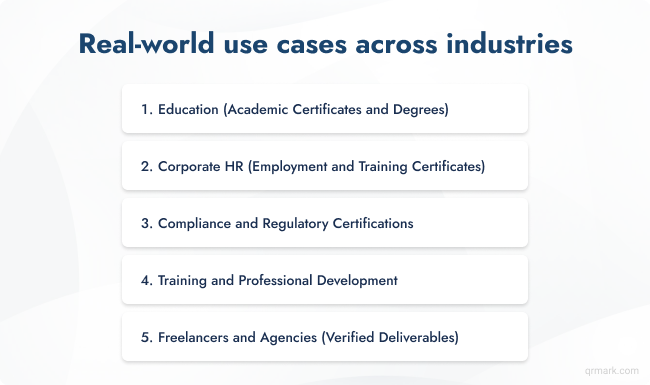
QR Code certificate verification is being adopted across various industries to combat forgery and streamline credential validation. Here are some examples and scenarios in different domains:
1. Education (Academic certificates and degrees)
Educational institutions such as universities, colleges, and training academies use QR Codes to secure academic credentials.
Diplomas, degree certificates, transcripts, and even letters of recommendation can carry a QR Code that links to the school’s verification page.
This helps combat the rise of diploma mills and fake degrees by giving employers and other schools an easy way to confirm a graduate’s credentials.
For example, when a job applicant presents a university degree certificate with a QR Code, the hiring team can scan it to see confirmation on the university’s official site that the degree is valid and earned by that individual.
2. Corporate HR (Employment and training certificates)
Human Resources departments are leveraging certificate verification QR Codes for documents like offer letters, experience certificates, and employee training certifications.
Cases of candidates faking experience letters or job offers have become common, which poses risks to employers.
By embedding QR Codes in official HR documents, companies ensure that only the original, employer-issued version will verify as true.
For instance, a genuine job offer letter with a QR Code will, when scanned, show it was indeed issued by the said company (with details like date, position, etc.), preventing scammers from using forged offer letters in employment scams.
Corporations also conduct internal training and award certificates for compliance or skill development – these training certificates can include QR Codes so that auditors or partners can verify their legitimacy.
3. Compliance and regulatory certifications
In industries like manufacturing, healthcare, finance, and IT, organizations often need to display compliance certificates or regulatory approvals (for example, ISO quality certifications, safety inspection certificates, licenses, and regulatory permits).
Fraudsters sometimes forge such regulatory certificates to bypass requirements or deceive customers.
By adding QR Codes to these official certificates, the issuing regulatory bodies or companies make verification instant for anyone who checks.
For example, a food processing plant’s ISO 22000 certification can have a QR Code that customers or auditors scan to see a validation on ISO’s or an accredited registrar’s website, confirming it’s up-to-date and legitimate.
If someone tries to pass off an expired or fake certificate, the QR Code would expose it (or wouldn’t scan to a valid page).
4. Training and professional development
Beyond formal education, QR Codes are enhancing verification in the realm of professional training and certification programs.
Many industries rely on certified skills – from IT certifications (like a cloud service proficiency) to project management (e.g., PMP certificates) to online course completions (such as MOOCs or e-learning platforms). Training providers and certification authorities are using QR Codes to secure these digital certificates.
For instance, Maritime Institutes like Auburn Institute use QR Mark on their certificates and document to prevent their crucial documents from getting tampered.
This helps hiring managers or clients validate the certificate’s authenticity directly with the provider. It’s also useful for certificates that may expire or require updates (like certain compliance trainings) – a dynamic QR for certificates allows the issuer to update the verification page if the certificate holder renews their qualification, or if the certificate expires, the QR can indicate it needs renewal.
Freelancers and agencies (Verified deliverables)
Freelancers, consultants, and agencies often need to prove the integrity and originality of the documents or work they deliver to clients.
For example, a translation agency like THB, uses QR Mark to each translated document to prove it’s an official, unaltered version. One translation company, Larynx, uses QR Mark’s verification QR on every translated document it issues – when the client scans the QR Code, they see a confirmation that the document was generated by Larynx and hasn’t been modified or machine-translated.
In the gig economy, trust is paramount, and a secure QR Code certification of deliverables helps independent professionals assure clients of authenticity.
Conclusion
Certificate fraud is on the rise, and visual checks alone are no longer enough. Embedding dynamic QR Codes with tools like QR Mark makes certificates instantly verifiable, secure, and trackable.
This modern best practice protects issuers, builds trust with recipients, and ensures every credential remains credible in today’s digital world.
FAQs
1. Can I add a QR code to an existing certificate PDF?
Yes. You don’t need to redesign your certificate. Most verification platforms let you add a QR code or verification image to an existing PDF before issuing it.
2. Should every certificate have a unique QR code?
Yes. Each certificate should have its own unique QR code linked to its individual verification record. Reusing the same QR code across multiple certificates defeats the purpose of verification.
3. What’s the difference between a QR code and a certificate ID?
A certificate ID is a unique identifier for the document, while a QR code is simply the method used to access the verification page. The QR code typically contains or links to the certificate ID.
4. Where should I place a QR code on a certificate?
Place it in a corner with sufficient white space so it remains easy to scan without covering important text, signatures, or seals.
5. Will the QR code still work if I print the certificate?
Yes. As long as the QR code is printed clearly with adequate size and contrast, it can be scanned from both printed and digital certificates.
