Document Fraud Detection
With QR Mark’s document fraud detection feature, every document you issue can now report back to your inbox with a live fraud alert the moment a verifier suspects any tampering.
The hidden risk of issuing without a feedback loop


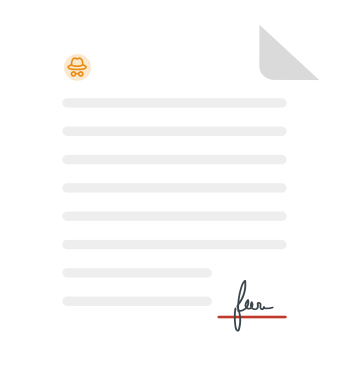

A suspicious document gets scanned

Verification feedback doesn't reach you
The verifier sees something off, flags it internally, and moves on.

Fraud gets caught, but not reported
Without a direct reporting channel to the issuer, fraud reports die in the inbox.

Patterns stay hidden, damage compounds
The tampered document circulates around until it surfaces in a lawsuit.

Your responses arrives after consequences
By the time you learn about the forgery, it often gets too late.

What people notice
The obvious. The visible.
What business lose
The hidden impact. The real cost.
A suspicious document gets scanned
Verification feedback doesn't reach you
The verifier sees something off, flags it internally, and moves on.
Fraud gets caught, but not reported
Without a direct reporting channel to the issuer, fraud reports die in the inbox.
Patterns stay hidden, damage compounds
The tampered document circulates around until it surfaces in a lawsuit.
Your responses arrives after consequences
By the time you learn about the forgery, it often gets too late.
What is document fraud detection?
Document fraud detection is the ability of a document-issuing body to identify, flag, and respond to suspected counterfeiting or tampering of its own documents in real time, from the moment a verifier raises a concern.
With QR Mark's document fraud detection feature, you can enable a 'Report Fraud' mechanism embedded on every verification landing page, which allows verifiers to alert you about suspected fraud. The analytics dashboard displays the total scans, total views, total fraud reports, fraud detected percentage, scans by month, and location (cities and countries), helping you monitor suspicious activity across your entire document portfolio.
Most organizations issue documents at high volumes and have no visibility into what happens to them after they leave their systems. A forged document or a certificate that has been tampered with won't get through to you until the damage has already compounded into 4 layers of exposure - and by then, it gets too late for damage control.
How does document fraud detection work?
Enable document fraud detection
Configure once to activate it across every document you issue. Log in to QR Mark, go to Settings > Report Fraud, and enter the email address where fraud alerts should be sent. Once saved, the reporting prompt activates automatically on every verification landing page across your account.
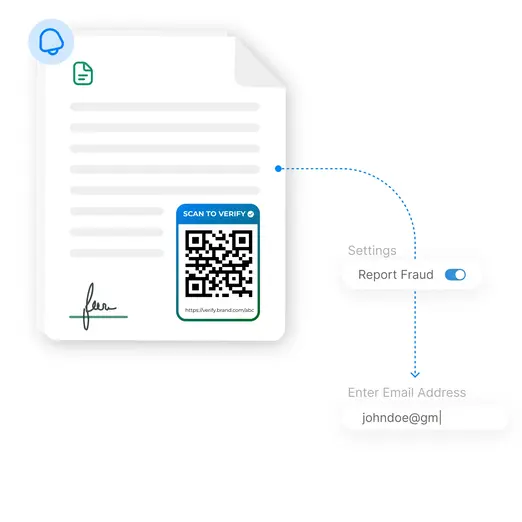
A verifier flags a suspicious document
When someone scanning your document suspects a mismatch or tampering, a prompt appears at the bottom of the verification page: “Suspect fraud or tampering? Send Report.” The verifier can click this, describe what looks wrong, and submit without requiring an additional account or an app.
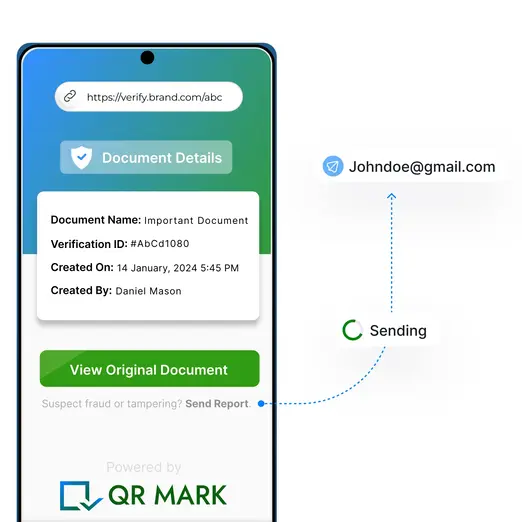
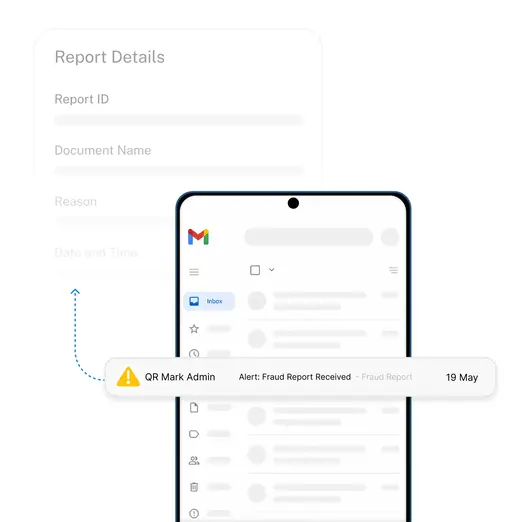
You get the alert on your registered email
The report lands in your configured inbox instantly with the document name, verification ID, time of submission, and the verifier’s stated reason. You review, investigate, and act while the fraud attempt is still active instead of realising it months later, after the damage is already done.
Why no feedback loop means fraud compounds silently
The absence of a fraud reporting channel means that teams start operating entirely blind to how your documents are being used, misused, and misrepresented across channels.
How QR Mark’s document fraud detection helps
QR Mark gives you a live fraud detection layer that works across every document you issue with instant alerts to your inbox, anonymous reporting for verifiers, and a full document audit trail across your entire document portfolio.
Fraudulent document detection alerts to your inbox
When a verifier submits a fraud report, the alert goes directly to the email address configured in your QR Mark account and not to QR Mark’s team. You decide who receives alerts. You can update the email address at any time. The moment a report is filed, it is in your inbox.
One-click fraud reporting for verifiers
The ‘Report Fraud’ prompt appears automatically on every verification landing page once enabled. Verifiers don’t need an account or any knowledge of QR Mark. Lower friction in reporting fraudulent activities also means that more reports actually get filed the moment they are spotted.
Anonymous reporting supported
Verifiers are not required to provide contact information to submit a report. If they choose not to, the report is processed anonymously. This matters for BGV firms and third-party HR teams who are willing to flag a suspicious document but not willing to be known to alert.
Monitor fraud reports across all documents
Every fraud report filed against a document is logged in the QR Mark dashboard under Fraud Reports. You can see total reports filed, which documents were flagged, and when, giving compliance and legal teams a documented record of such incidents across the issuance history.
See which documents are the most vulnerable
The most flagged documents viewed in the analytics dashboard surface concentration risk. If multiple fraud reports are accumulating against the same document ID then the dashboard makes that visible as a pattern instead of an isolated incident discovered one by one.
Detailed document audit trails
Total verifications and total fraud reports are distinct metrics in the dashboard. A document with high scan volume and no fraud reports is a trust signal, but a document with low scan volume and multiple fraud reports is a risk, needing investigation. A document audit trail is built so issuers see this clearly.
Who uses document fraud detection and for what?
QR Mark’s document fraud detection feature is used wherever high-stakes documents are issued at volume. Here’s how organizations across multiple industries are already using it.
Legal and Real Estate
Legal and Real Estate
For contracts, agreements, and property deeds
Government and Regulators
For permits, licenses, and individual identity documents
Financial Institutions
For loan documents, insurance policies, and bank statements
Healthcare
For medical certificates, prescriptions, and lab reports
CPG and Manufacturing
For certificates of authenticity, compliance certificates, and warranty cards
HR and Corporate Operations
For experience letters, offer letters, and relieving letters
Built on a trust model that actually works
The alert goes to you, not to QR Mark
Fraud reports are routed to the email address the issuer configures and not to QR Mark’s team or a shared platform. The issuing organization owns the alert, reviews it, and decides what action to take. QR Mark does not access, monitor, or act on fraud reports filed against your documents.
What happens if someone files a false report?
A submitted fraud report triggers an email notification to the issuer. It does not automatically revoke the document, alter its verified status, or expose any document data to the person who filed the report. A mistaken or false report results in no change to the document’s status unless the issuer acts on it.
What QR Mark does and doesn’t do
QR Mark’s ‘Report Fraud’ feature closes the feedback loop between verifiers and issuers. It does not encrypt or prevent access to document content and does not guarantee that every fraud attempt will be caught. QR Mark, as a deterrent, requires a verifier to scan the document and choose to report.
Enterprise-grade security infrastructure
QR Mark ensures all legal workflows are secure, transparent, and compliant. With enterprise-grade security and global certifications, your documents remain verifiable and tamper-resistant worldwide. QR Mark is ISO 27001:2022, SOC2, and GDPR certified.
Fits the way you already issue documents
QR Mark adapts to your existing workflow seamlessly. Choose the integration method that best fits how your team already creates documents.
Microsoft Word Add-In
Enable fraud detection on verifiable documents issued directly from MS Word, MS Excel, or MS PowerPoint
Google Workspace Add-On
Enable fraud detection on verifiable documents issued directly from Google Docs, Google Sheets, or Google Slides
Bulk Dashboard Upload
Upload multiple docs, set placement once, and generate unique verification codes with active fraud detection for every document in the batch
API Integration
Programmatically create verification records with fraudulent document detection enabled from any internal system or document automation workflow
Frequently asked questions about fraudulent document detection