Document Verification QR Code
Every document you issue can now prove its own authenticity instantly, with a single smartphone scan. Embed QR Mark's Document Verification QR Code once to verify documents anytime.
The hidden risk of forged documents


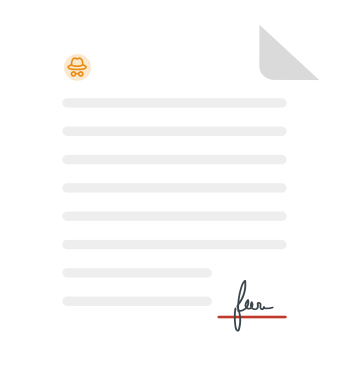

A single fake document

Direct financial damage
Unwarranted payouts and lost revenue

Reputation on the line
Years of trust undone by 1 mistake

Hidden productivity drain
Manual verification wastes time and resources

Tomorrow's compliance, today's problem
Digital verification will soon be non-negotiable

What people notice
The obvious. The visible.
What business lose
The hidden impact. The real cost.
A single fake document
Direct financial damage
Unwarranted payouts and lost revenue
Reputation on the line
Years of trust undone by 1 mistake
Hidden productivity drain
Manual verification wastes time and resources
Tomorrow's compliance, today's problem
Digital verification will soon be non-negotiable
What is a document verification QR Code?
A Document Verification QR Code is a scannable code embedded in an issued document, such as a PDF, Word file, or printed copy, that links to a secure, issuer-controlled verification page. When a verifier scans the code, they land on a page hosted on the issuer's domain, showing the key details needed to be verified. Unlike a generic QR Code that simply opens a URL, this verification record is tied to a specific document, a specific issuer, and a specific validity window. No third-party app or platform is required to verify.
Most organizations identify document fraud too late in the form of a wrong hire, a disputed contract, or a fraudulent claim paid out. What looks like an isolated incident is almost always the visible tip of a much larger risk. Every fake document that passes undetected creates 4 layers of damage that your organization is left to deal with.
How does a digital Document Verification QR Code work?
How does a digital Document Verification QR Code work?
Create or upload your confidential document and add a unique QR Code and a branded verification URL via QR Mark. QR Mark integrates directly with existing workflows for frictionless document security.
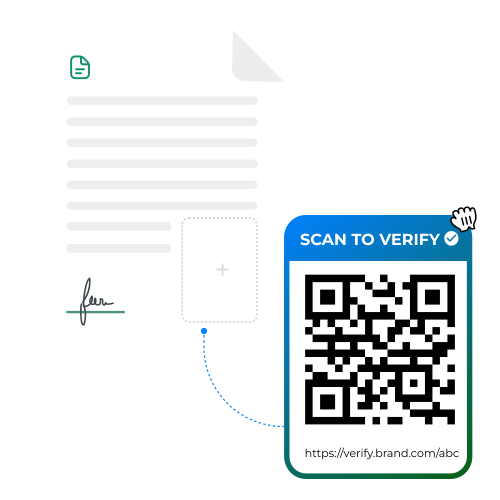
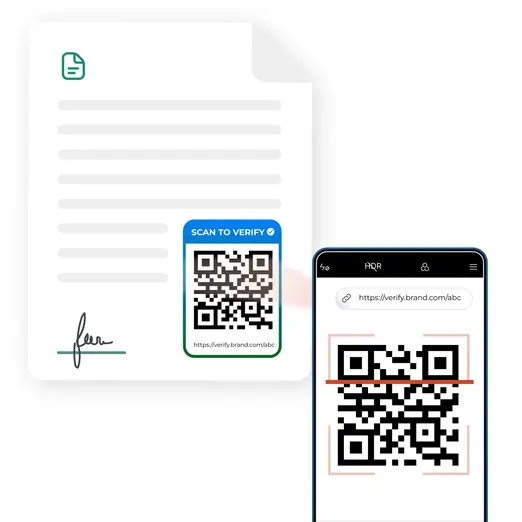
Recipient scans with a smartphone
Clients, judges, regulators, or counterparties manually scan the document authentication QR Code using a smartphone camera or a standard QR scanner for online verification or from a printed copy.
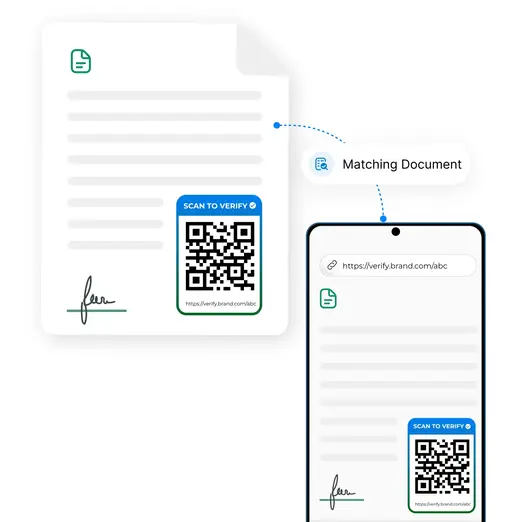
Manual matching against the original document
A secure webpage instantly opens up after scanning the document authentication QR Code, showing the original document's details, which can be manually matched with the physical/online copy with the verifier.
Why fully manual verification doesn't scale?
Manual verification cannot keep up with a world where documents leave systems instantly, are distributed online with a single click, and face constant exposure to fraud.
How QR Mark's Document Verification QR Code helps
QR Mark gives you an issuer-controlled verification layer that works for every document type, every workflow, and every verifier, with no special tools required on either end.
Tamper-resistant verification page on your domain
Every verification page is served under your brand's custom domain. This way, all verifiers can trust what they see because it appears on a domain your brand owns and controls. Anyone can create the document authentication QR Code, but no one can fake your domain, which signals trust.
Template-based pages: Show only what needs verification
For HR documents, contracts, and financial records where confidentiality matters, you choose exactly what data appears on the verification page — employee name, designation, employment period, employee ID — all without compromising the full document's privacy.
Standard pages: Display the original document
For certificates, awards, and credentials where full transparency builds trust, you can display a link to the original document alongside the verification metadata (created date, created by, document name). Verifiers can get the complete context from a single scan.
Expiry and QR Code validation control for landing pages
Set a specific validity window for time-sensitive documents such as permits, compliance certificates, and temporary authorizations. Once a document expires, there is no need for manual deactivation. Anyone scanning it sees an expiry message instead of an active verification.
Works on both printed and digital documents
Every verification image includes both a QR Code for phone scans on printed copies and a clickable verification URL for digital PDFs. Document verification works the same way regardless of how the document is shared — in person, via email, or over WhatsApp.
Bulk issuance for high-volume workflows
For bulk workflows, upload your batch, set the placement once, and generate a unique verification image for every document in the set via QR Mark. This is ideal for academic institutions issuing end-of-term certificates or HR teams processing batch offer letters.
Custom branding on every verification page
Add your logo, your colors, and your domain to every verification interaction. The verifier's first impression becomes your brand, not a third-party platform or app. Brand consistency at the point of verification is a trust signal as well as a good design choice.
Multi-user access with role-based permissions
Multiple team members in an organization can create and manage verifications under a single account for enterprise plans. Role-based access control ensures that only authorized personnel can issue or modify verification records when document authority matters more.
Who uses QR Mark's enterprise document verification solution and for what?
QR Mark is used wherever documents with stakes are issued. Here's how organizations across multiple industries are already using it.
Legal and Real Estate
Legal and Real Estate
For contracts, agreements, and property deeds
Government and Regulators
For permits, licenses, and identity documents
Financial Institutions
For loan documents, bank statements, and bank policies
Healthcare
For medical records, prescriptions, and lab reports
CPG and Manufacturing
For certificates of authenticity, invoices, and warranty cards
HR and Corporate Operations
For experience letters, offer letters, and payslips
Built on a trust model that actually works
Your domain, not ours
Verification pages appear under your domain. QR Codes can be copied, but they can't be hosted on your custom domain. Domain matching is the single most decisive trust cue a verifier can use, and it's built into every QR Mark verification by default.
What if the QR Code is copied?
As mentioned above, a QR Code can be copied, but the document linked to the verification page cannot be changed. The document that the code's URL leads to would show different details than the document in hand, and the verifier can immediately locate the mismatch.
What QR Mark does and doesn't do
QR Mark is a verification layer, not an encryption tool. It does not prevent someone from editing a document. What it does is give verifiers a quick, trusted, and issuer-controlled way to confirm that the document in hand matches what the issuer actually issued.
Enterprise-grade security infrastructure
QR Mark ensures all legal workflows are secure, transparent, and compliant. With enterprise-grade security and global certifications, your documents remain verifiable and tamper-resistant worldwide. QR Mark is ISO 27001:2022, SOC2, and GDPR certified.
Fits the way you already issue documents
QR Mark adapts to your existing workflow seamlessly. Choose the integration method that best fits how your team already creates documents.
Microsoft Word Add-In
Create and embed a document authentication QR Code directly in MS Word, MS Excel, and MS PowerPoint
Google Workspace Add-On
Create and embed a verification QR Code directly in Google Docs, Google Sheets, and Google Slides
Bulk Dashboard Upload
Upload multiple docs, set placement once, and generate unique codes for every document in the batch
API Integration
Programmatically create and retrieve verification records from any internal system or document automation workflow
Frequently asked questions about document verification QR Codes
Start issuing verifiable documents today