Document Verification API
With QR Mark’s document verification API, you can automate document verification at scale by embedding verifiable QR Codes into every document that your existing system generates, without any manual effort or separate setup.
The hidden cost of verification that isn't built into your pipeline.


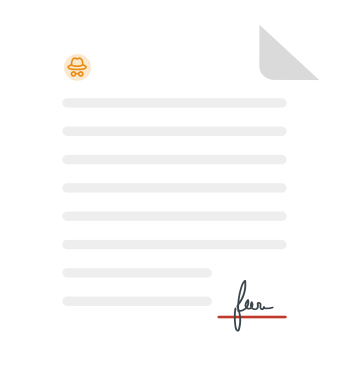

A single unverified document leaving the system

Operational bottleneck
Every document still requires manual verification, creating a process gap.

Fraud slipping by easily
Systems generate several documents without embedded verification, open to fraud.

Developer overhead required
The tampered document circulates around until it surfaces in a lawsuit.

Compliance risk in every release
Unverifiable system-generated documents become a regulatory liability.

What people notice
The obvious. The visible.
What business lose
The hidden impact. The real cost.
A single unverified document leaving the system
Operational bottleneck
Every document still requires manual verification, creating a process gap.
Fraud slipping by easily
Systems generate several documents without embedded verification, open to fraud.
Developer overhead required
The tampered document circulates around until it surfaces in a lawsuit.
Compliance risk in every release
Unverifiable system-generated documents become a regulatory liability.
What is document verification API?
Using QR Mark's document verification API, you can programmatically create unique verification records and embed tamper-resistant QR Codes into every document your system generates without any additional manual step.
You can configure template-based verification pages that control exactly what verifiers see, set and update document validity windows, and retrieve verification data for audit and compliance purposes. You can also manage verification records in bulk across thousands of documents, multiple brands, and role-based user access - all from within the pipeline your team already operates, eliminating considerable costs.
Every document your team creates in Microsoft, Google Workspace, or an internal system without an automated verification QR Code added at the point of creation becomes easy to forge once it leaves your workflow. The same tools and processes you trust to create real documents are being used to replicate them. What looks like a workflow gap is actually 4 layers of compounding risk.
How does QR Mark’s document verification API work?
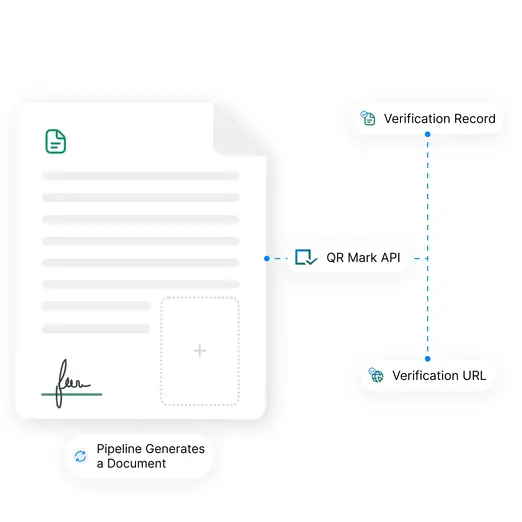
Your system calls document authentication API to create a record
When your pipeline generates a document, it calls the QR Mark API. A unique verification record is created instantly, and a QR Code with a verification URL is returned for automated document verification.
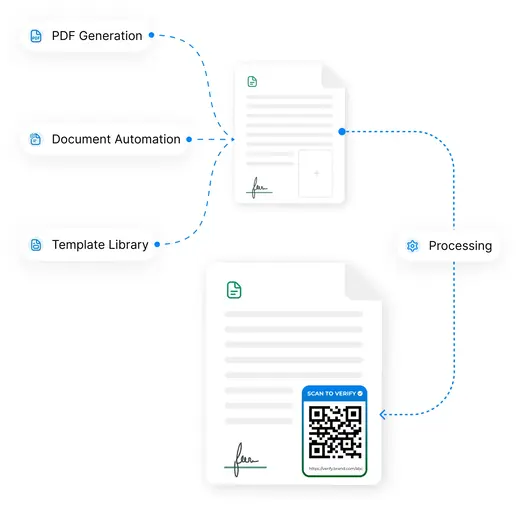
Your system embeds the verification image before delivery
The document generation layer places the verification image onto the document before it reaches the recipient. Works with any PDF generation library, templating engine, or document automation platform your team already uses.
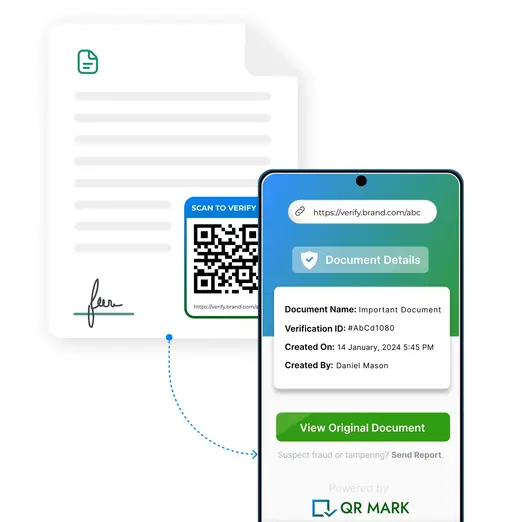
The recipient scans and verifies on your branded domain
A verifier scans the QR Code with a smartphone without requiring any app. They land on your customized domain verification page, showing only the fields you configured. Verification is instant, and the trust signal is your brand’s.
Why document generation pipelines need built-in verification
Adding verification later, after the document is generated programmatically, creates an operational bottleneck. To manage document generation at volume, a manual verification layer becomes a risky and time-consuming liability.
How QR Mark’s document verification API helps
QR Mark gives your pipeline a purpose-built verification layer that scales with your document generation volume, adapts to your organization’s confidentiality requirements, and puts the trust signal on your chosen domain.
Automated document verification in your system
One API call per document creates a unique verification record. This does not require any additional process or manual triggers. Your pipeline itself runs the automated document verification.
Instant, seamless, and ready-to-embed verification image
The API response includes a QR Code image and a verification URL, formatted and ready to place into your document template. No additional rendering step or third-party image processing is required on your end.
Show only what verifiers need to see, not the entire document
Configure which fields appear on the verification page via API. Verifiers see only what you choose to show on the page. The original document is not exposed unless you explicitly include it.
Link the original document for full transparency
When full transparency is the stronger trust signal, configure the API to serve a standard verification page that links directly to the original document alongside the verification metadata.
Set expiry and validity windows at point of creation
Set document validity windows programmatically at the time of record creation. Time-bound documents like certificates, compliance approvals, and permits reflect their expiry status the moment a verifier scans them.
Bulk issue thousands of verifiable documents in one run
The API is built for high-throughput workflows, supporting up to 30 requests per minute, allowing for upto 1,000,000 requests per month. Verify documents in bulk within your existing system.
Custom branding on every verification page
Verification pages served by the API carry your domain, template page, and logo, not QR Mark’s. The verifier’s first impression is your organization, not a third-party tool. Branding at the point of verification becomes a trust signal.
Role-based access and audit logs via API keys
API keys are scoped to users and roles within your QR Mark account. Every verification record created, modified, or revoked via the API is logged, giving compliance and IT teams a complete, time-stamped audit trail of all activity.
Who uses QR Mark’s document verification API and for what?
QR Mark’s API is used wherever documents are generated at volume and manual verification attachment is not viable. Here’s how organizations across multiple industries are already using document authentication API.
Legal and Real Estate
Legal and Real Estate
For agreements, deeds, and notarized documents generated programmatically
Government and Regulators
For permits, licenses, and approvals generated by regulatory portals
Financial Institutions
For loan documents, account statements, and policy letters issued by banking systems
Healthcare
For medical records, discharge summaries, and lab reports generated by healthcare platforms
CPG and Manufacturing
For certificates of authenticity, invoices, and COAs generated within ERP workflows
HR and Corporate Operations
For experience letters, offer letters, and payslips generated by automated HR systems
Built on a trust model that actually works
Your domain, not ours
Every verification page generated via the API resolves on your custom domain. Verifiers see your URL as the trust anchor. Forgers cannot host a verification page on a domain your organization owns and controls.
What if someone puts the QR Code onto a fake document?
The QR Code is a pointer to a verification record. A verifier must match the fields shown on the verification page against the document in hand. A copied QR Code pasted onto a fake document won’t match the details on the page.
What QR Mark does and doesn’t do
QR Mark’s API creates a tamper-resistant verification record and issuer-controlled verification pages. It does not encrypt PDF content or prevent someone from editing a file. It is a purpose-built verification infrastructure.
Enterprise-grade security infrastructure
QR Mark ensures all legal workflows are secure, transparent, and compliant. With enterprise-grade security and ISO 27001:2022, SOC2, and GDPR certifications, your documents remain verifiable and tamper-resistant worldwide.
Fits the way you already issue documents
QR Mark adapts to your existing workflow seamlessly. Choose the integration method that best fits how your team already creates and distributes documents.
Microsoft Word Add-In
Issue verifiable documents without leaving MS Word, MS Excel, or MS PowerPoint
Google Docs Add-On
Issue verifiable documents without leaving Google Docs, Google Sheets, or Google Slides
Bulk Dashboard Upload
Upload multiple documents, set placement, and generate unique verification images for every document in the batch
API Integration
Programmatically create and retrieve verification records from any HRIS, LMS, ERP, or internal system
Frequently asked questions about Document Verification API
Start issuing verifiable documents from within your pipeline